
Experience Fragment with MSM or localization. | Community
Skip to main content
abhisheksinghAEM
March 17, 2021
Solved

Experience Fragment with MSM or localization.

  • March 17, 2021
  • 2 replies
  • 2109 views

We are on AEM 6.5.3. I have an experience fragment in the "en" language. And I want to create a live copy of this XF in the es languages. When I select experience fragment and click on create, I see an option to create variation-as live copy, but that creates the live copy in the same hierarchy is that possibility to create XF with MSM.
This post is no longer active and is closed to new replies. Need help? Start a new post to ask your question.
Best answer by Daniel_Gordon

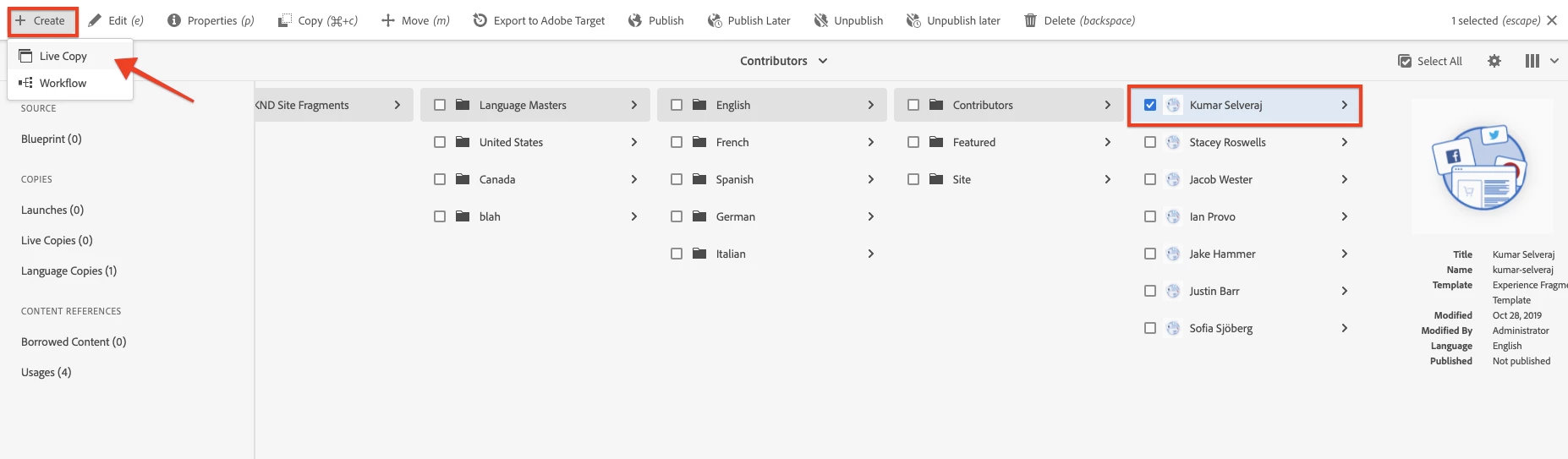
You should have the Live Copy option from within the Experience Fragment console:


One thing to keep in mind is that Experience Fragment UI does not copy any sub folder structure like in the Sites console. Those will have to be manually created. The Experience Fragment component of Core Components fully supports localization more details here: https://experienceleague.adobe.com/docs/experience-manager-core-components/using/components/experience-fragment.html?lang=en#localized-site-structure


2 replies

Daniel_Gordon
Adobe Employee
Daniel_GordonAdobe EmployeeAccepted solution
Adobe Employee
March 17, 2021

You should have the Live Copy option from within the Experience Fragment console:


One thing to keep in mind is that Experience Fragment UI does not copy any sub folder structure like in the Sites console. Those will have to be manually created. The Experience Fragment component of Core Components fully supports localization more details here: https://experienceleague.adobe.com/docs/experience-manager-core-components/using/components/experience-fragment.html?lang=en#localized-site-structure


Umesh_Thakur
Community Advisor
Community Advisor
March 18, 2021

You don't have option to select target for the live copy for experience fragment as it is for normal content pages. Only option you have is create live copy in the same folder then use Move option to the desired folder, the benefit will be you not need to care about the reference.It will update automatically.

Hope this will help.

Umesh Thakur