Experience Fragment Master Node Deleted on Republish Using Manage Publication option | Community
Skip to main content
Level 2
February 25, 2026
Solved

Experience Fragment Master Node Deleted on Republish Using Manage Publication option

  • February 25, 2026
  • 1 reply
  • 19 views

I’m working in AEM as a Cloud Service (AEMaaCS).
I'm encountering an unexpected issue when publishing the XF parent folder multiple times.
 

1. First Publish

  • I create a new Experience Fragment.
  • I select the parent folder and trigger publishing using my custom workflow.
  • Result:
    ✔️ Both the parent folder and the master XF node are published correctly.

2. Second Publish

  • I again select only the parent node and publish using the same workflow.
  • Result:
    ⚠️ Only the parent folder is published.
    ❌ The master XF node is deleted on the publish instance.
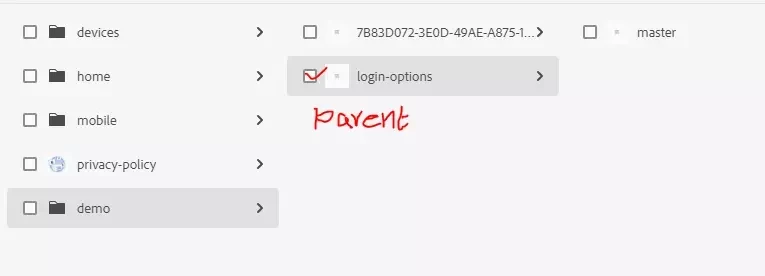


    Note: demo folder is created using program as a nt:folder, not the sling:Folder

Best answer by giuseppebaglio

hi ​@Kamaraj_AEM,

here my idea of what’s going on: The first publish succeeds because the XF and its parent are new — the distribution serializes the full subtree. On the second publish, only the selected path (nt:folder) is re-serialized, and the distribution applies a replace rather than merge to the publish node, removing any existing children not present in the new package. 

Based on this, it appears this issue has been reproduced and reported as a product behavior.

I would recommend trying to fix it like this:

  • Change your programmatic folder creation from "nt:folder" to "sling:Folder"
  • If you use the Publish Content Tree workflow step in your custom workflow, make sure the includeChildren parameter is set to true. By default it is false. In your workflow model configuration, add the process argument:
includeChildren=true

This forces the distribution package to include child nodes (including the master XF variant) regardless of folder type. (Source: here)

1 reply

giuseppebaglio
giuseppebaglioAccepted solution
Level 10
February 25, 2026

hi ​@Kamaraj_AEM,

here my idea of what’s going on: The first publish succeeds because the XF and its parent are new — the distribution serializes the full subtree. On the second publish, only the selected path (nt:folder) is re-serialized, and the distribution applies a replace rather than merge to the publish node, removing any existing children not present in the new package. 

Based on this, it appears this issue has been reproduced and reported as a product behavior.

I would recommend trying to fix it like this:

  • Change your programmatic folder creation from "nt:folder" to "sling:Folder"
  • If you use the Publish Content Tree workflow step in your custom workflow, make sure the includeChildren parameter is set to true. By default it is false. In your workflow model configuration, add the process argument:
includeChildren=true

This forces the distribution package to include child nodes (including the master XF variant) regardless of folder type. (Source: here)