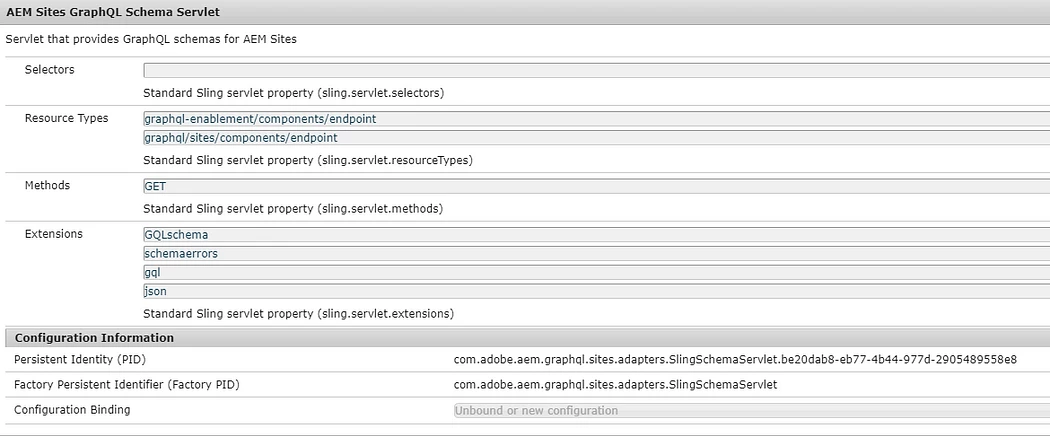
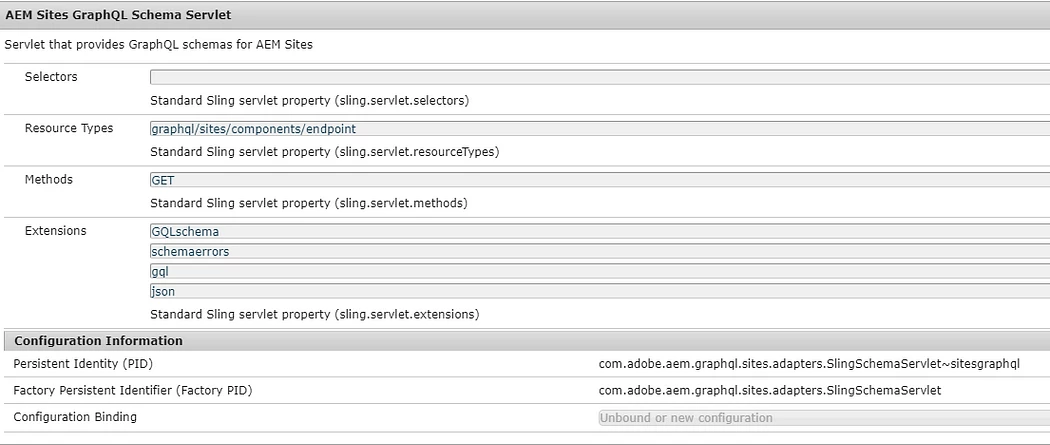
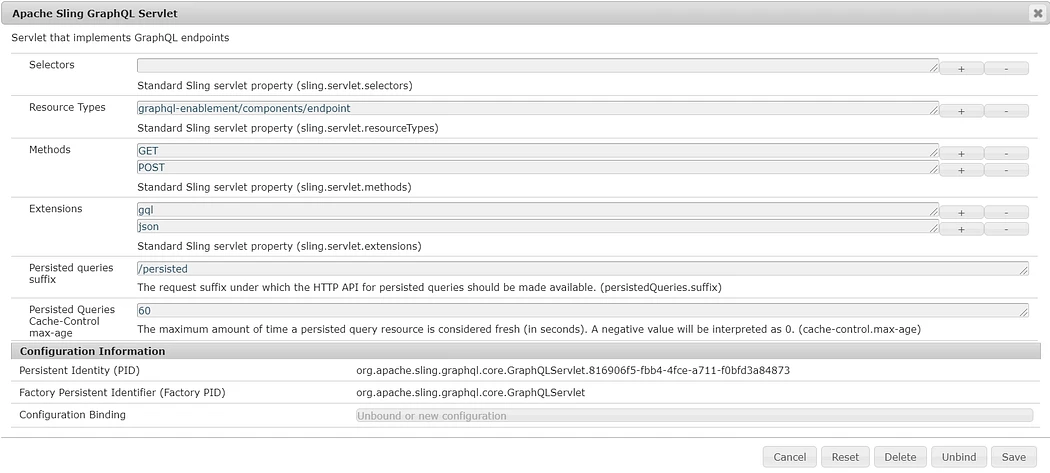
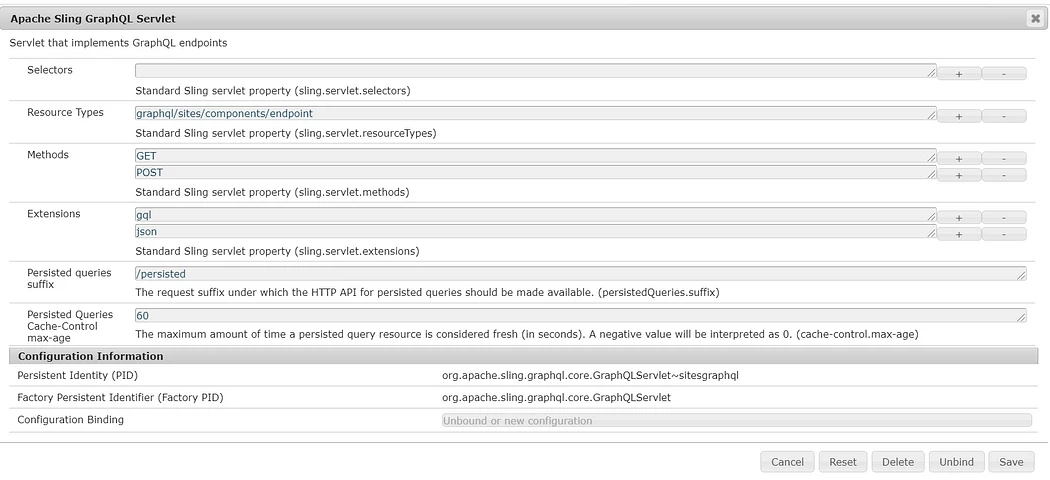
Solved
error while saving Persistant Query
<!DOCTYPE HTML PUBLIC "-//IETF//DTD HTML 2.0//EN">
<html>
<head><title>409 Conflict</title></head>
<body>
<h1>Conflict</h1>
<p>Cannot serve request to /graphql/persist.json/my-project/Persons in org.apache.sling.jcr.webdav.impl.servlets.SimpleWebDavServlet</p>
<h3>Request Progress:</h3>
<pre>
0 TIMER_START{Request Processing}
1 COMMENT timer_end format is {<elapsed microseconds>,<timer name>} <optional message>
5 LOG Method=PUT, PathInfo=null
6 TIMER_START{handleSecurity}
1324 TIMER_END{1316,handleSecurity} authenticator org.apache.sling.auth.core.impl.SlingAuthenticator@51c5993c returns true
1612 TIMER_START{ResourceResolution}
1682 TIMER_END{70,ResourceResolution} URI=/graphql/persist.json/my-project/Persons resolves to Resource=ServletResource, servlet=com.adobe.aem.graphql.impl.servlet.PersistedQueryServlet, path=/graphql/persist
1691 LOG Resource Path Info: SlingRequestPathInfo: path='/graphql/persist', selectorString='null', extension='json', suffix='/my-project/Persons'
1691 TIMER_START{ServletResolution}
1694 TIMER_START{resolveServlet(/graphql/persist)}
1698 LOG Will not look for a servlet at /graphql/persist.servlet as it is not in the list of allowed paths
1715 TIMER_END{20,resolveServlet(/graphql/persist)} Using servlet org.apache.sling.jcr.webdav.impl.servlets.SimpleWebDavServlet
1717 TIMER_END{25,ServletResolution} URI=/graphql/persist.json/my-project/Persons handled by Servlet=org.apache.sling.jcr.webdav.impl.servlets.SimpleWebDavServlet
1721 LOG Applying Requestfilters
1725 LOG Calling filter: com.adobe.granite.resourceresolverhelper.impl.ResourceResolverHelperImpl
1731 LOG Calling filter: org.apache.sling.security.impl.ContentDispositionFilter
1737 LOG Calling filter: com.adobe.granite.csrf.impl.CSRFFilter
2031 LOG Calling filter: org.apache.sling.i18n.impl.I18NFilter
2034 LOG Calling filter: com.adobe.granite.httpcache.impl.InnerCacheFilter
2040 LOG Calling filter: org.apache.sling.rewriter.impl.RewriterFilter
2043 LOG Calling filter: com.adobe.cq.history.impl.HistoryRequestFilter
2047 LOG Calling filter: com.day.cq.wcm.core.impl.WCMRequestFilter
2055 LOG Calling filter: com.adobe.acs.commons.redirects.filter.RedirectFilter
2065 LOG Calling filter: com.adobe.fd.core.security.internal.CurrentUserServiceImpl
2316 LOG Calling filter: com.adobe.cq.wcm.core.components.internal.servlets.CoreFormHandlingServlet
2320 LOG Calling filter: com.adobe.granite.optout.impl.OptOutFilter
2329 LOG Calling filter: com.day.cq.wcm.foundation.forms.impl.FormsHandlingServlet
2332 LOG Calling filter: com.adobe.cq.social.commons.cors.CORSAuthenticationFilter
2336 LOG Calling filter: com.adobe.livecycle.dsc.clientsdk.internal.ResourceResolverHolderFilter
2340 LOG Calling filter: org.apache.sling.engine.impl.debug.RequestProgressTrackerLogFilter
2350 LOG Calling filter: com.adobe.livecycle.content.appcontext.impl.AppContextFilter
2355 LOG Calling filter: com.trp.aem.iinvestor.piweb.core.filters.LoggingFilter
2361 LOG Calling filter: com.day.cq.wcm.mobile.core.impl.redirect.RedirectFilter
2365 LOG Calling filter: com.day.cq.wcm.core.impl.AuthoringUIModeServiceImpl
2489 LOG Calling filter: com.adobe.granite.rest.assets.impl.AssetContentDispositionFilter
2492 LOG Calling filter: com.adobe.granite.requests.logging.impl.RequestLoggerImpl
2496 LOG Calling filter: com.adobe.granite.rest.impl.servlet.ApiResourceFilter
2658 LOG Calling filter: com.day.cq.dam.core.impl.servlet.ActivityRecordHandler
2666 LOG Calling filter: com.day.cq.dam.core.impl.assetlinkshare.AdhocAssetShareAuthHandler
2671 LOG Calling filter: com.adobe.cq.social.ugcbase.security.impl.SaferSlingPostServlet
2674 LOG Calling filter: com.day.cq.wcm.core.impl.warp.TimeWarpFilter
2682 LOG Applying Componentfilters
2684 LOG Calling filter: com.day.cq.personalization.impl.TargetComponentFilter
2687 LOG Calling filter: com.day.cq.wcm.core.impl.page.PageLockFilter
2690 LOG Calling filter: com.day.cq.wcm.core.impl.WCMComponentFilter
2783 LOG Calling filter: com.day.cq.wcm.core.impl.WCMDebugFilter
2791 TIMER_START{org.apache.sling.jcr.webdav.impl.servlets.SimpleWebDavServlet#0}
3315 LOG Applying Error filters
3319 LOG Calling filter: org.apache.sling.i18n.impl.I18NFilter
3322 LOG Calling filter: org.apache.sling.rewriter.impl.RewriterFilter
3335 TIMER_START{handleError:status=409}
3698 TIMER_END{362,handleError:status=409} Using handler /libs/sling/servlet/errorhandler/default.jsp
5239 LOG Found processor for post processing ProcessorConfiguration: {contentTypes=[text/html], order=-1, active=true, valid=true, processErrorResponse=true, pipeline=(generator=Config(type=htmlparser, config=JcrPropertyMap [node=Node[NodeDelegate{tree=/apps/trp-commons/config/rewriter/default/generator-htmlparser: { jcr:primaryType = nt:unstructured, includeTags = [A, /A, IMG, AREA, FORM, BASE, LINK, SCRIPT, BODY, /BODY]}}], values={jcr:primaryType=nt:unstructured, includeTags=[Ljava.lang.String;@697de7b0}]), transformers=(Config(type=linkchecker, config={}), Config(type=mobile, config=JcrPropertyMap [node=Node[NodeDelegate{tree=/apps/trp-commons/config/rewriter/default/transformer-mobile: { jcr:primaryType = nt:unstructured, component-optional = true}}], values={jcr:primaryType=nt:unstructured, component-optional=true}]), Config(type=mobiledebug, config=JcrPropertyMap [node=Node[NodeDelegate{tree=/apps/trp-commons/config/rewriter/default/transformer-mobiledebug: { jcr:primaryType = nt:unstructured, component-optional = true}}], values={jcr:primaryType=nt:unstructured, component-optional=true}]), Config(type=contentsync, config=JcrPropertyMap [node=Node[NodeDelegate{tree=/apps/trp-commons/config/rewriter/default/transformer-contentsync: { jcr:primaryType = nt:unstructured, component-optional = true}}], values={jcr:primaryType=nt:unstructured, component-optional=true}]), Config(type=versioned-clientlibs, config={}), serializer=Config(type=htmlwriter, config={}))}
5374 TIMER_END{5373,Request Processing} Dumping SlingRequestProgressTracker Entries
</pre>
<hr>
<address>ApacheSling/2.7 (jetty/9.4.49.v20220914, OpenJDK 64-Bit Server VM 11.0.22, Linux 5.15.0-102-generic amd64)</address>
</body>
</html>
AEM Version: 6.5.17
Getting above error , when I do "save query" on graphiql editor.
Am I missing anything to install or configure?
Thanks,
Sri