Error in all package while running mvn clean install in aem sdk version | Community
Skip to main content
Level 2
May 5, 2023
Solved

Error in all package while running mvn clean install in aem sdk version

  • May 5, 2023
  • 2 replies
  • 1550 views

Failed to execute goal com.adobe.aem:aemanalyser-maven-plugin:0.9.2:analyse (default-analyse) on project aem-guides- myproject.analyse

Although my (analyser) version is 1.4.10 still it shows build failure.

@arunpatidar 

This post is no longer active and is closed to new replies. Need help? Start a new post to ask your question.
Best answer by MayurSatav

This error indicates that Maven was unable to download the required artifact. did you tried intelliJ options i mentioned ? if not then please try those. 

if still not worked then try to clean your local repository using the mvn dependency:purge-local-repository command and try again. Also you can try to add the Adobe Maven repository in your pom.xml file. You can find the repository information here: https://repo.adobe.com/nexus/content/groups/public/com/adobe/aem/aem-sdk-api/


2 replies

MayurSatav
Community Advisor and Adobe Champion
May 5, 2023

hi @nits13 ,


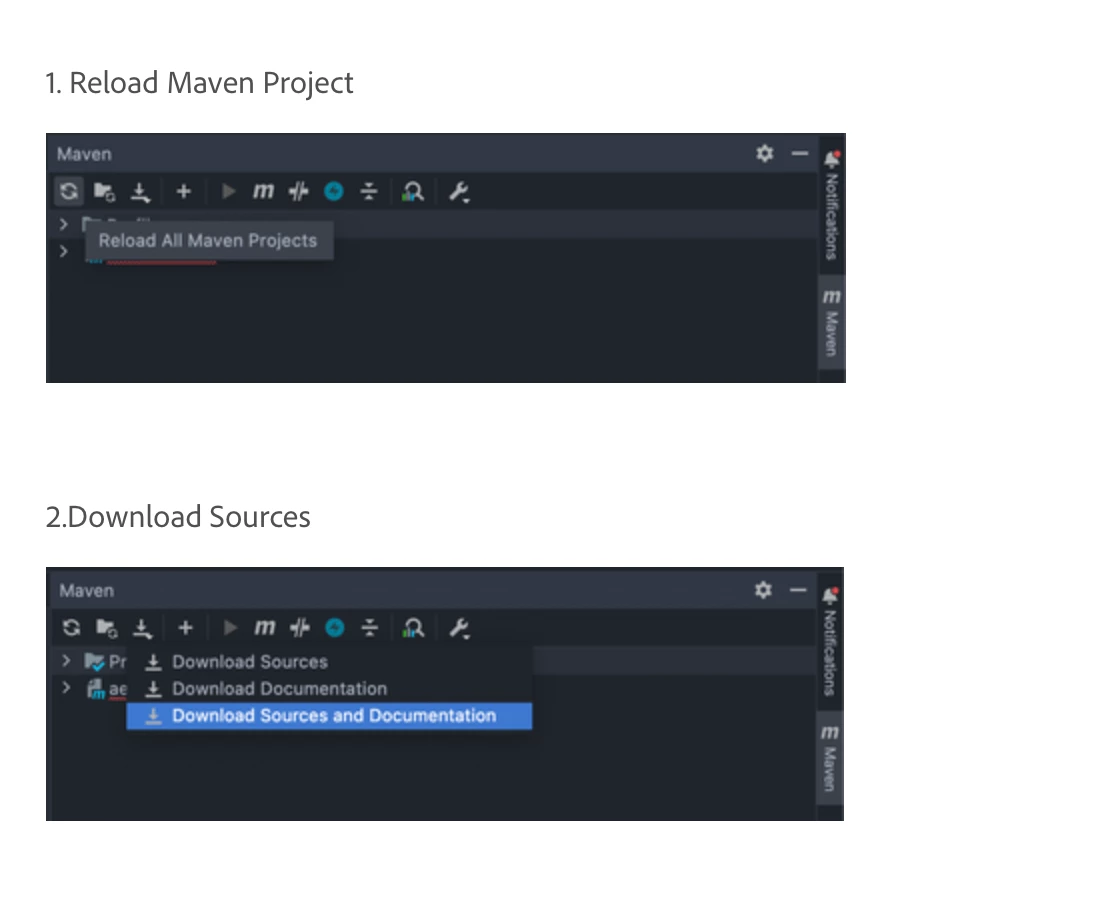
Can try cleaning the project and rebuilding it again. You can also check if there are any other issues with your project configuration or dependencies that might be causing the build failure. If you are using intelliJ idea then try below options


1. Reload Maven Project


2.Download Sources


Nits13Author
Level 2
May 5, 2023

Hi @mayursatav 

tried rebuilding the project, even tried it from scratch but the error persists.

MayurSatav
Community Advisor and Adobe Champion
MayurSatavCommunity Advisor and Adobe ChampionAccepted solution
Community Advisor and Adobe Champion
May 5, 2023

This error indicates that Maven was unable to download the required artifact. did you tried intelliJ options i mentioned ? if not then please try those. 

if still not worked then try to clean your local repository using the mvn dependency:purge-local-repository command and try again. Also you can try to add the Adobe Maven repository in your pom.xml file. You can find the repository information here: https://repo.adobe.com/nexus/content/groups/public/com/adobe/aem/aem-sdk-api/