Engagement Community - Banner Image Issue | Community
Skip to main content
AEM_Forum
Level 10
November 29, 2017
Solved

Engagement Community - Banner Image Issue

  • November 29, 2017
  • 3 replies
  • 904 views

Hi all,

I am trying to create an Engagement Community by following Getting Started with AEM Communities @ Getting Started with AEM Communities

I added a banner image, but am seeing that it is displayed twice as below.
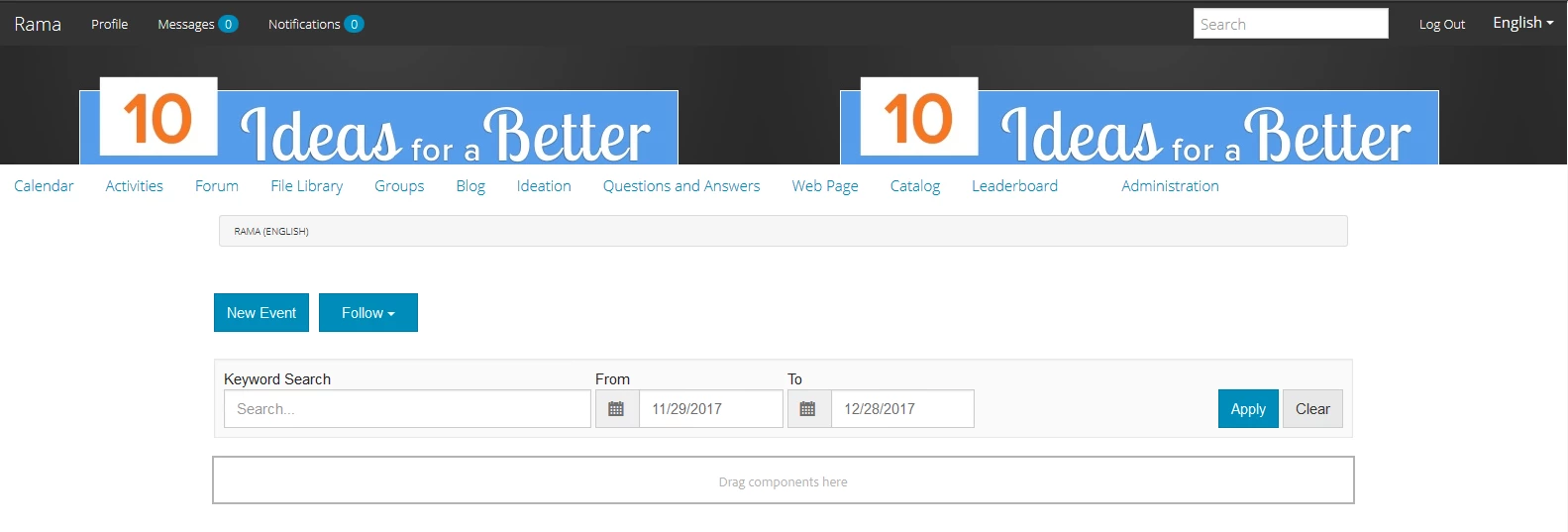
I tried a different image and that is displayed 6 times across the page in the same row.

Kindly suggest ASAP.

Thanks,

Rama.

This post is no longer active and is closed to new replies. Need help? Start a new post to ask your question.
Best answer by kautuk_sahni

Reply from the Community engineering:

Log a bug for this.

Meantime, you can make a change in: /libs/social/console/components/hbs/sitepage/clientlibs/page.css

For css class .scf-site-brand-img, customer can add - background-repeat: no-repeat;

Though we expect a banner image with below details

Upload a banner image to display across the site pages.   The banner is pinned to the left edge of the browser, between the community site header and menu (navigation links).  The banner height is cropped to 120 pixels.  There is no resizing of the banner to fit the width of the browser and 120 pixel height.

Excerpt from [1]

[1] https://helpx.adobe.com/experience-manager/6-3/communities/using/create-site.html

3 replies

kautuk_sahni
Community Manager
Community Manager
November 29, 2017

Do you see any error on browser console and on error.log? Also share the AEM version with FP in use!!

Kautuk Sahni
AEM_Forum
AEM_ForumAuthor
Level 10
November 29, 2017

No errors.

AEM 6.2 and AEM-6.2-Communities-Livefyre-Feature-Pack-3-1.10.167.

kautuk_sahni
Community Manager
kautuk_sahniCommunity ManagerAccepted solution
Community Manager
November 29, 2017

Reply from the Community engineering:

Log a bug for this.

Meantime, you can make a change in: /libs/social/console/components/hbs/sitepage/clientlibs/page.css

For css class .scf-site-brand-img, customer can add - background-repeat: no-repeat;

Though we expect a banner image with below details

Upload a banner image to display across the site pages.   The banner is pinned to the left edge of the browser, between the community site header and menu (navigation links).  The banner height is cropped to 120 pixels.  There is no resizing of the banner to fit the width of the browser and 120 pixel height.

Excerpt from [1]

[1] https://helpx.adobe.com/experience-manager/6-3/communities/using/create-site.html

Kautuk Sahni