Empty Component groups in iparsys | Community
Skip to main content
May 15, 2024

Empty Component groups in iparsys

  • May 15, 2024
  • 4 replies
  • 1206 views

Hi,

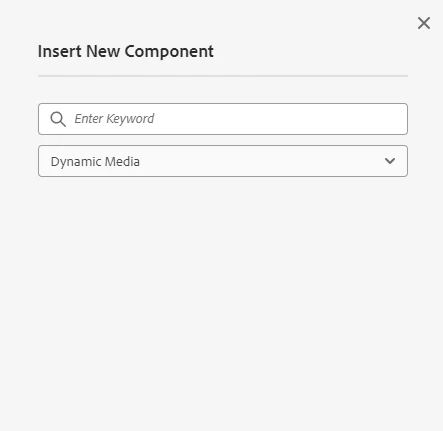
In Editable template we are using iParsys for header and footer(since there is legacy code), and layout container for body section, we have added 4 groups in layout container policy and 2 groups in iparsys policy, but in iparsys we are seeing all the other groups from layout container with no components to add.


This post is no longer active and is closed to new replies. Need help? Start a new post to ask your question.

4 replies

tushaar_srivastava
May 15, 2024

Hi @chalamcharla 

check for policy configuration.
Got to

Select the Policy


Here you can add your policy and enable components. 

Before doing this do check the component Group.

gkalyan
Community Advisor and Adobe Champion
May 16, 2024
This is likely due to the way policies are resolved in AEM.
 
When you define policies for components, AEM looks for policies in the following order:
/conf/<site>/settings/wcm/policies
/apps/<app>/policies
/libs/wcm/policies
If a policy is not found at a higher level, AEM falls back to the next level until it finds a matching policy.
 
In your case, it seems that the iParsys component is inheriting the policies defined for the layout container because there are no specific policies defined for iParsys at a higher level (/conf or /apps).
 
 
To resolve this issue, you can create separate policy nodes for the layout container and iParsys components at the /conf/<site>/settings/wcm/policies level, and configure the allowed groups accordingly.


HrishikeshKagne
Community Advisor
Community Advisor
May 16, 2024

Hi @chalamcharla ,

It seems like you're encountering an issue where the groups configured in the layout container policy are appearing in the iParsys policy, even though you only expect the iParsys to display its own groups. This could be due to how the iParsys component is configured and how the policies are applied.

Here are a few potential reasons and solutions for this issue:

  1. Component Inheritance: Check if the components in the iParsys are inheriting from the layout container. If the iParsys is inheriting from a parent component that includes all the groups, this could cause all the groups to appear in the iParsys even if they are not explicitly configured there.

    Solution: Ensure that the iParsys component is not inheriting from the layout container or any other component that includes unwanted groups. Adjust the component inheritance settings if necessary.

  2. Policy Application: Review how the policies are applied to the iParsys and layout container components. If the iParsys is inheriting policies from a higher level, it may be including groups from the layout container policy inadvertently.

    Solution: Double-check the policy inheritance and application settings to ensure that the iParsys and layout container components are using the correct policies independently.

  3. Component Configuration: Verify the configuration of the iParsys component itself. Ensure that it is configured to only display its own groups and not inherit or include groups from other components.

    Solution: Adjust the iParsys component configuration to explicitly specify which groups should be displayed, and ensure that it is not inheriting unwanted groups from other components.

  4. Template Structure: Check the structure of your Editable template and the placement of the iParsys and layout container components. Make sure that the iParsys and layout container are correctly nested and configured to work independently.

    Solution: Review the template structure and component hierarchy to ensure that the iParsys and layout container are configured and nested correctly.

By investigating these areas, you should be able to identify the cause of the issue and take appropriate steps to resolve it, ensuring that the iParsys displays only the groups that are intended for it.

Hrishikesh Kagane
kautuk_sahni
Community Manager
Community Manager
May 16, 2024

@chalamcharla Did you find the suggestions from users helpful? Please let us know if more information is required. Otherwise, please mark the answer as correct for posterity. If you have found out solution yourself, please share it with the community.

Kautuk Sahni
May 21, 2024

Hi, here we have iparsys for header and footer and the polices are independently applied to them:


and in iparsys policy there is only one group added:

but in iparsys it is showing more groups with empty references:  I mean since  Dynamic media is not part of actual policy it is showing empty group there


Iparsys is independent and their policies too.