
Empty attribute value stripped by Sightly | Community
Skip to main content
anjali_biddanda
Level 4
July 31, 2018
Solved

Empty attribute value stripped by Sightly

  • July 31, 2018
  • 4 replies
  • 7233 views

HI All,

We have a scenario where we want the empty alt attribute to be preserved as alt="" instead of stripping the empty string.

Screen readers skip the image when alt="" whereas if only alt is found, some screen readers like Jaws and NVDA do not skip the image.

What we want: <img src="xyz" alt="">

The issue we have now: <img src="xyz" alt>

This is with any attribute that has an empty literal string. Sightly strips them from the output. We're using AEM6.2 which uses Sightly version 1.2. I've tested on AEM6.4, which has Sightly 1.3 and we have the same issue. According to Sightly documentation htl-spec/SPECIFICATION.md at master · Adobe-Marketing-Cloud/htl-spec · GitHub Sightly Version 1.4 preserves empty string attributes.

I have read a similar post Re: AEM 5.6.1. Empty Alt tag removed from RTE and I think Transformer factory is an option.

I have tried empty string array "{['']}" that some people have said works for them.

Is there any simple way at all to achieve this? I'm bemused that this hasn't already been reported.

Thanks in advance for you help.

Regards,

Anjali
This post is no longer active and is closed to new replies. Need help? Start a new post to ask your question.
Best answer by arunpatidar

Hi Anjali,

Attribute without value is equivalent to attribute with empty literal string.

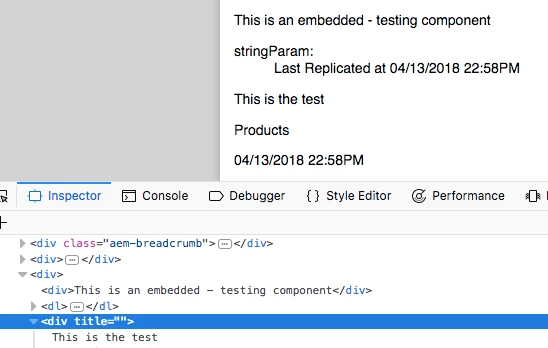
Chrome and Safari strips empty values and only shows attribute, Firefox keep both as it as.

Firefox screenshots :

Both behaviours are correct.

You can't add string with 0 length, though string with length 1 (space) " " works in chrome and safari.

e.g

<div title=" " >

Thanks

Arun

4 replies

arunpatidar
Community Advisor
arunpatidarCommunity AdvisorAccepted solution
Community Advisor
July 31, 2018

Hi Anjali,

Attribute without value is equivalent to attribute with empty literal string.

Chrome and Safari strips empty values and only shows attribute, Firefox keep both as it as.

Firefox screenshots :

Both behaviours are correct.

You can't add string with 0 length, though string with length 1 (space) " " works in chrome and safari.

e.g

<div title=" " >

Thanks

Arun

Arun Patidar
edubey
Level 10
July 31, 2018

The [''] trick doesn’t work anymore, and the spec seems to be wrong for that specific example.

In HTML5, both alt and alt=”” are parsed identically by the underlying parser.

In HTML4 that was different, and an alt=”” is required for the markup to be valid.

Due the way it's being parsed by reader is not your control, you can use below workaround, though not great but should be fine.

<sly data-sly-test.hasAlt="${imageState.alt}">

    <img alt="${imageState.alt}" title="${imageState.title}">

</sly>

<sly data-sly-test="${!hasAlt}">

    <img alt="" title="${imageState.title}">

</sly>

anjali_biddanda
Level 4
August 1, 2018

Thanks Arun. That's right! And I found this after I developed a transformer that looks at a path, picks IMG tags to transform and update the alt attribute, only to find out that it's the Chrome browser dev tool that removes the empty attribute value! Chrome version 55/56 and Safari does this too. Firefox renders the alt="". I should've looked at view source instead of the Inspect element. I found the following posts and I knew this accessibility issue is not for me to fix. Would've saved you time replying if i updated the ticket yesterday with my findings. But thanks so much for your response.

https://bugs.chromium.org/p/chromium/issues/detail?id=708192
https://groups.drupal.org/node/489508

August 18, 2022

There is a solution: `alt="${properties.alt || true}"`
Will render the authored value or `alt`
https://github.com/adobe/aem-core-wcm-components/issues/1268#issuecomment-1126000022

BrettBirschbach
Adobe Champion
Adobe Champion
July 3, 2024

Thank you @tim_white1 I believe your answer should be marked as the "correct" answer as it directly answers the original question. This was important to me for supporting form radio/select elements with an option with an empty value.  Radio button without `value` property sends a value of "on" whereas with `value=""` or just `value` in the element then the value comes through as empty string ("").