Embedding Youtube videos in AEM 6.5 using AEM core component - Embed | Community
Skip to main content
March 9, 2021
Solved

Embedding Youtube videos in AEM 6.5 using AEM core component - Embed

  • March 9, 2021
  • 1 reply
  • 6721 views

Hi All,


I am trying to embed youtube videos using Embed component. While selecting youtube from embeddable tab, I can see video id but width and height option is not visible. I want to set width and height from the dialogue as can be seen in Adobe documentation - https://experienceleague.adobe.com/docs/experience-manager-core-components/using/components/embed.ht...


As per the document, enable option should be activated from design dialog, but in my design dialog, I can see only option to enable mute and other options are not visible.
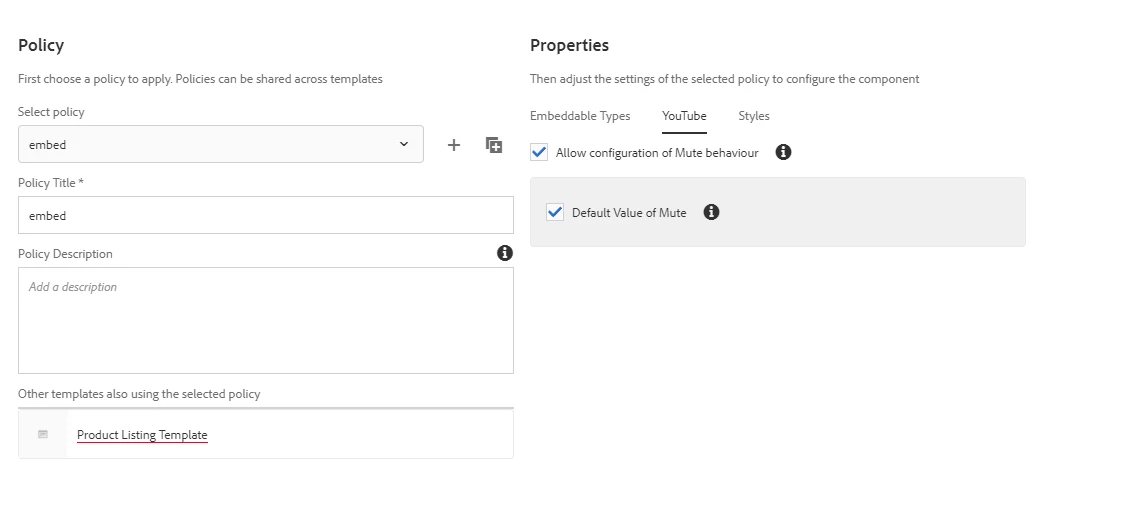
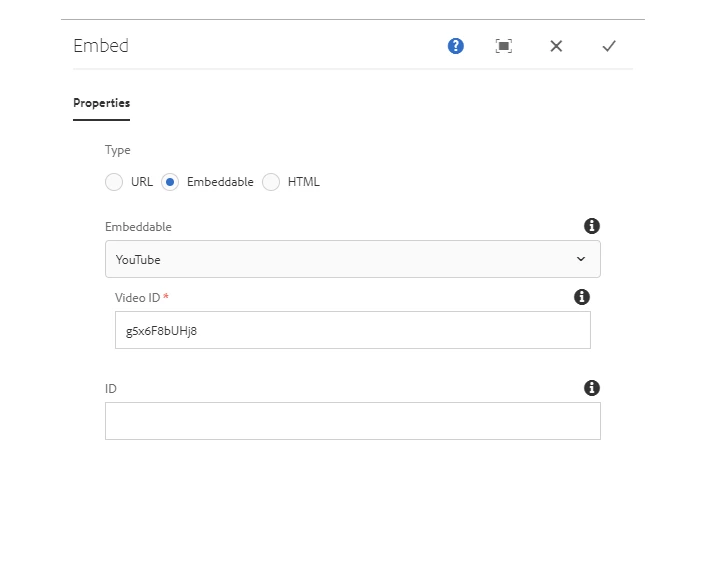


Can anyone tell me how to fix this issue?


Thanks in Advance.


Regards,

Amit

This post is no longer active and is closed to new replies. Need help? Start a new post to ask your question.
Best answer by SureshDhulipudi

Can you paste your dialog image here

Are you saying, you are not able to see three Radio options?  (URL , Embeddable, HTML) 

you have to select Embeddable Radio option to see the height and width details


dialog 

1 reply

SureshDhulipudi
Community Advisor
SureshDhulipudiCommunity AdvisorAccepted solution
Community Advisor
March 9, 2021

Can you paste your dialog image here

Are you saying, you are not able to see three Radio options?  (URL , Embeddable, HTML) 

you have to select Embeddable Radio option to see the height and width details


dialog 

March 9, 2021
Thanks for replying Suresh. I have updated the image of dialog. I am selecting the YouTube option from Embeddable tab and I am getting only video id and not width and height.