Editable Template policy is not getting updated with mode=merge or mode=update or mode=replace or without any mode | Community
Skip to main content
Level 2
November 24, 2022
Solved

Editable Template policy is not getting updated with mode=merge or mode=update or mode=replace or without any mode

  • November 24, 2022
  • 4 replies
  • 3143 views

My current version is AEM 6.5.12


I need to delete flex_grid from xxx template policies.
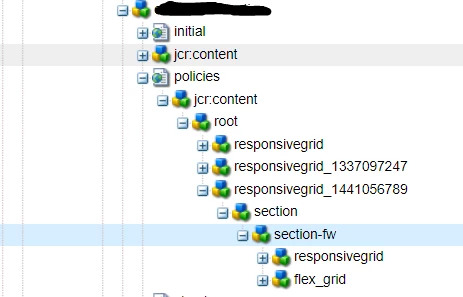
 

I have tried with all the options in filter.xml but my changes are not reflected in crx/de post deployment.

Note

1. After I remove flex_grid node from codebase and build the package then flex_grid node is removed in the build package.

2. If I delete section-fw manually and reinstall the package then flex_grid will be removed in crx/de.


Awaiting for your suggestions!! @arunpatidar 


Thanks in advance.

 

This post is no longer active and is closed to new replies. Need help? Start a new post to ask your question.
Best answer by arunpatidar

can you try removing the merge mode.


Make sure you are checking at right place. policies are stores inside /conf/<path>/settings/wcm/policies and templates uses inside template e.g.

/conf/<path>//settings/wcm/templates/my-template/policies/


can you try to add this two path in the filter.xml without any mode.


4 replies

Adobe Employee
November 24, 2022

hi @aayushagrawal, Mode should be replace as you are expecting to delete the node. Please refer to filevault modes.

Jackrabbit FileVault – Workspace Filter (apache.org)

bhoang
Level 4
November 24, 2022

I have the same issue. When using mode="merge" or mode="update" you need to manually remove the old template on the crx/de before deployment.

Adobe Employee
November 24, 2022

hi @bhoang , yes correct as none of these mode i.e. merge or update delete the content as mentioned by Jackrabbit filevault. Only mode which deletes the content is replace.

Level 2
November 24, 2022

replace is also not working for me. i.e I have mentioned in the subject that none of the mode is working for me. I am not able to delete flex_grid node. 

manjunathdj
November 24, 2022


filter elements

The filter elements are independent of each other and define include and exclude patters for subtrees. The root of a subtree is defined by the root attribute, which must be an absolute path.

The filter element can have an optional mode attribute which specified the import mode used when importing content.

Available Filter Modes

replace -

Existing content will be replaced completely by the imported content, i.e. is overridden or deleted.

merge -

Existing content is not modified, i.e. only new content is added and none is deleted or modified.

update -

Existing content is updated, new content is added and none is deleted

arunpatidar
Community Advisor
Community Advisor
November 24, 2022

Hi,

You need to delete  flex_grid node from codebase and build the package and deploy using replace filter.

make sure the version of install package is higher or snapshot.


Arun Patidar
Level 2
November 25, 2022

Thanks @arunpatidar for your input. Higher version of package was missing before however increasing the package version also didn't work. If I add anything in the policies it will be reflected but in case of removing anything from the policies doesn't reflect. 


Any other suggestion?


Regards,
Aayush

arunpatidar
Community Advisor
arunpatidarCommunity AdvisorAccepted solution
Community Advisor
November 25, 2022

can you try removing the merge mode.


Make sure you are checking at right place. policies are stores inside /conf/<path>/settings/wcm/policies and templates uses inside template e.g.

/conf/<path>//settings/wcm/templates/my-template/policies/


can you try to add this two path in the filter.xml without any mode.


Arun Patidar