Edit ,Configure options of Component are not showing | Community
Skip to main content
varuns46785756
Level 5
November 12, 2019

Edit ,Configure options of Component are not showing

  • November 12, 2019
  • 2 replies
  • 5131 views

Hi All,

I am using AEM6.4.2.0 and in edit mode of the page, edit and configure option are missing.

I found one discussion in forum with same issue Edit and configure component options are not showing when we search in chrome browser

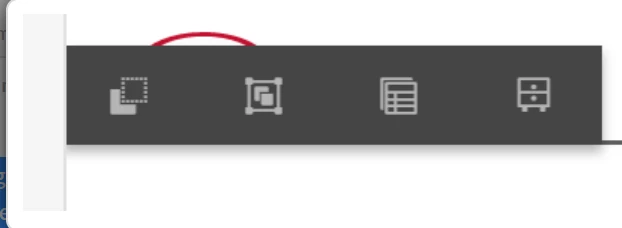
I have tried all the steps  as per the link but still not able to see "configure " option.Is there any hotfix to fix this issue.Only these options are coming:
Regards,

This post is no longer active and is closed to new replies. Need help? Start a new post to ask your question.

2 replies

ArpitVarshney
Community Advisor
Community Advisor
November 12, 2019

Hi varuns46785756

The issue that you're talking about is only happening when we make a search in chrome browser. Also, if we click outside and click on the editable area then we can see the configure option.

Do you also facing the same issue?If yes, please raise a daycare ticket if you want to resolve this.

Otherwise, If the configure option is not coming in general. Please verify whether your component contains _cq_editConfig.xml or not?

Please find sample XML for your reference:

<?xml version="1.0" encoding="UTF-8"?>

<jcr:root xmlns:cq="http://www.day.com/jcr/cq/1.0" xmlns:jcr="http://www.jcp.org/jcr/1.0"

    cq:actions="[edit,-,delete,insert,copymove]"

    cq:disableTargeting="{Boolean}true"

    cq:layout="editbar"

    jcr:primaryType="cq:EditConfig">

    <cq:listeners

        jcr:primaryType="cq:EditListenersConfig"

        afteredit="REFRESH_PARENT"/>

</jcr:root>

Regards,

Arpit Varshney

varuns46785756
Level 5
November 13, 2019

Thanks Arpit,

In my case configure option was not coming in general, actually "v2" folder was missing in my AEM from this this path: "/apps/core/wcm/components/page/v2". I have added v2 and now its working.

Regards,