Level 2
Oct 10, 2019 1:41 PM UTC

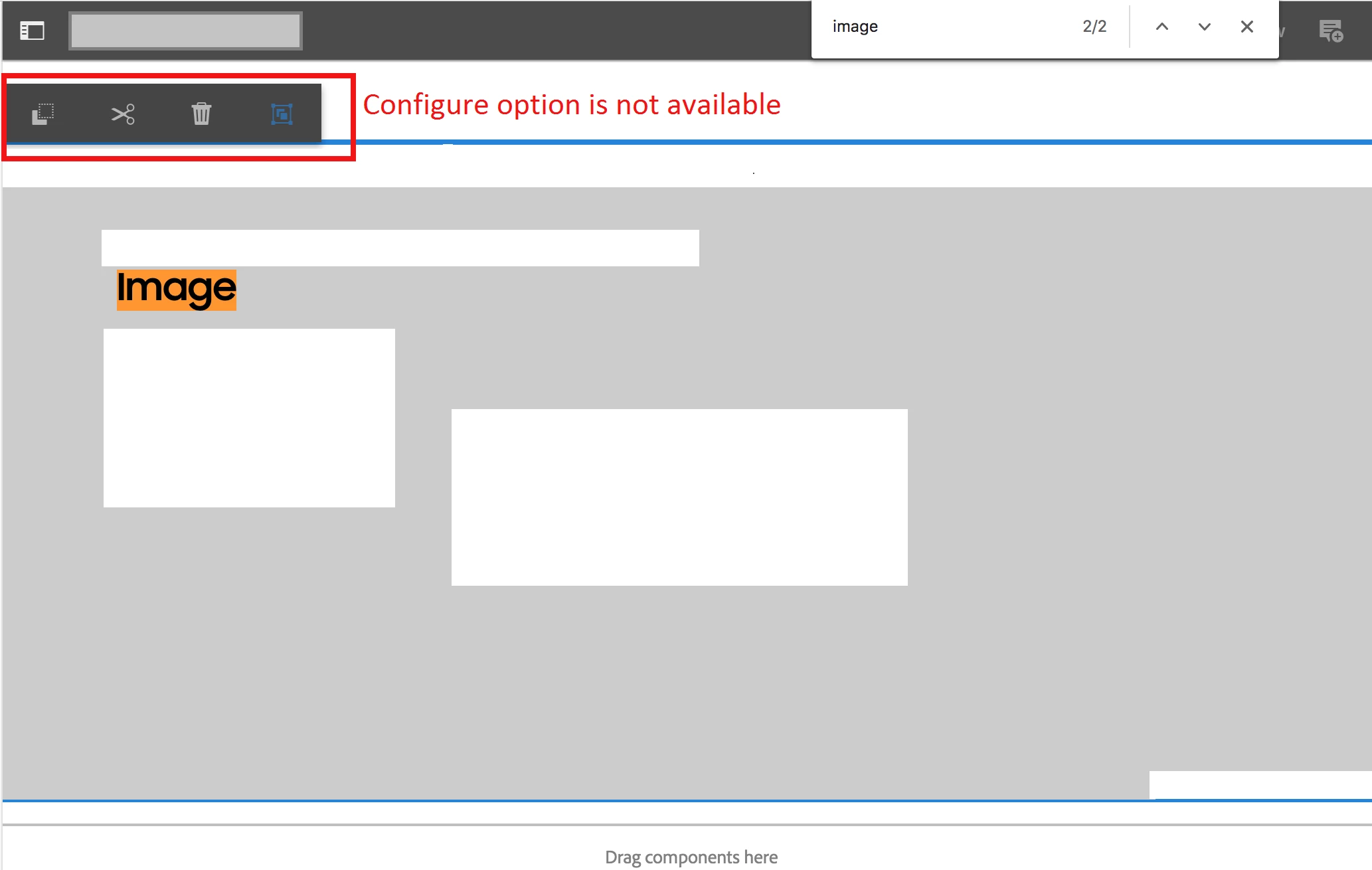
Edit and configure component options are not showing when we search in chrome browser

Hi All,

I am facing issue in authoring the component.  When I search a word in the page in edit mode and click on the component doesn't showing the configure option to author the dialog.  So I couldn't open the dialog to author in AEM 6.1.

Template type: Editable template

Browser : issue happening in Chrome only

AEM version: AEM 6.4.4

Please refer the below screenshot.  Any suggestions would be helpful.
Thanks,

Velmurugan

This post is no longer active and is closed to new replies. Need help? Start a new post to ask your question.

15 replies

Ankur_Khare
Community Advisor
Community Advisor
Oct 10, 2019 2:35 PM UTC

Could u pls check console errors.

Translate
Ankur
ArpitVarshney
Community Advisor
Community Advisor
Oct 10, 2019 3:13 PM UTC

Hi velmuruganv38

Even it is a bug in AEM 6.4.6 as well. Better to log a daycare ticket.

Regards,

Arpit Varshney

Translate
Adobe Employee
Oct 10, 2019 3:25 PM UTC

Does it also happen in private mode (incognito) ?

Translate
Adobe Employee
Oct 10, 2019 3:30 PM UTC

I can confirm this is not a BUG. Cannot reproduce the issue on any AEM instances (6.3-6.5)

Your best option is to check the developer console for any js errors.

Translate
Level 2
Oct 11, 2019 10:13 AM UTC

hamidk92094312​ Yes it's happening in private mode also.

ka786​ & jbrar  I don't see any console errors.

Also noticed if we click outside of editable area and click on the component, i'm able to see config options.

Translate
ArpitVarshney
Community Advisor
Community Advisor
Oct 11, 2019 5:37 PM UTC

Hi velmuruganv38  jbrar

The same behaviour is occurring in AEM 6.4.6 as well but only once.

Below are the steps in touchui:

1. Open any page and do ctrl+f and search for a word and click enter.

2. Click on dialog editable area and you can't see the edit & configure options.

3. Click outside.

4. Again Click on the editable area again and it is visible now.

It happened only once when a search is made after page load. The issue didn't happen after step 4 even though you make any search.

Regards,

Arpit Varshney

Translate
Nov 20, 2020 10:17 AM UTC

@kautuk_sahni Did not understand your answer. What is the fix for this issue ?

Translate
Level 5
Dec 7, 2020 9:57 PM UTC

@kashyapta - Is there any fix for this issue?

Translate
Level 2
Oct 14, 2019 6:17 AM UTC

arpitv27529355 Yeah correct, it's happening only once.  Are you using Editable template?

jbrar​ Do you have any idea on this?

Translate
ArpitVarshney
Community Advisor
Community Advisor
Oct 14, 2019 6:19 AM UTC

velmuruganv38 Yes, I have checked on pages created using editable template.

Translate
varuns46785756
Level 5
Nov 10, 2019 1:09 AM UTC

Hi All,

I am facing the same issue and I am using AEM 6.4.2.0. I have tried all the steps but still not able to see "configure" option.Is there any hotfix to fix this issue.Only these options are coming:

Regards,

Translate
anelem1760873
Level 4
Jul 20, 2020 1:35 PM UTC

Am also facing the same issue, is there any fix for this????

Translate
Aug 17, 2022 10:45 PM UTC

I can even reproduce this issue with AEM 6.5.11. But only when i have two different sites deployed which is pointing to two different core.wcm.components. For ex: Site A uses Core 2.4.0 & Site B uses Core 2.17.10

Translate
Nov 23, 2022 4:44 AM UTC

I am also facing same issue with AEM 6.5.13. Do we have any fix for this issue.

Translate