
Dynamic Media Image Assets - Illegal Image Size | Community
Skip to main content
Rohan_Garg
Community Advisor
Community Advisor
November 25, 2022
Solved

Dynamic Media Image Assets - Illegal Image Size

  • November 25, 2022
  • 2 replies
  • 2692 views

Hi All,

I have an image asset (part of hero component) which is rendered on published site as Scene 7 URL.

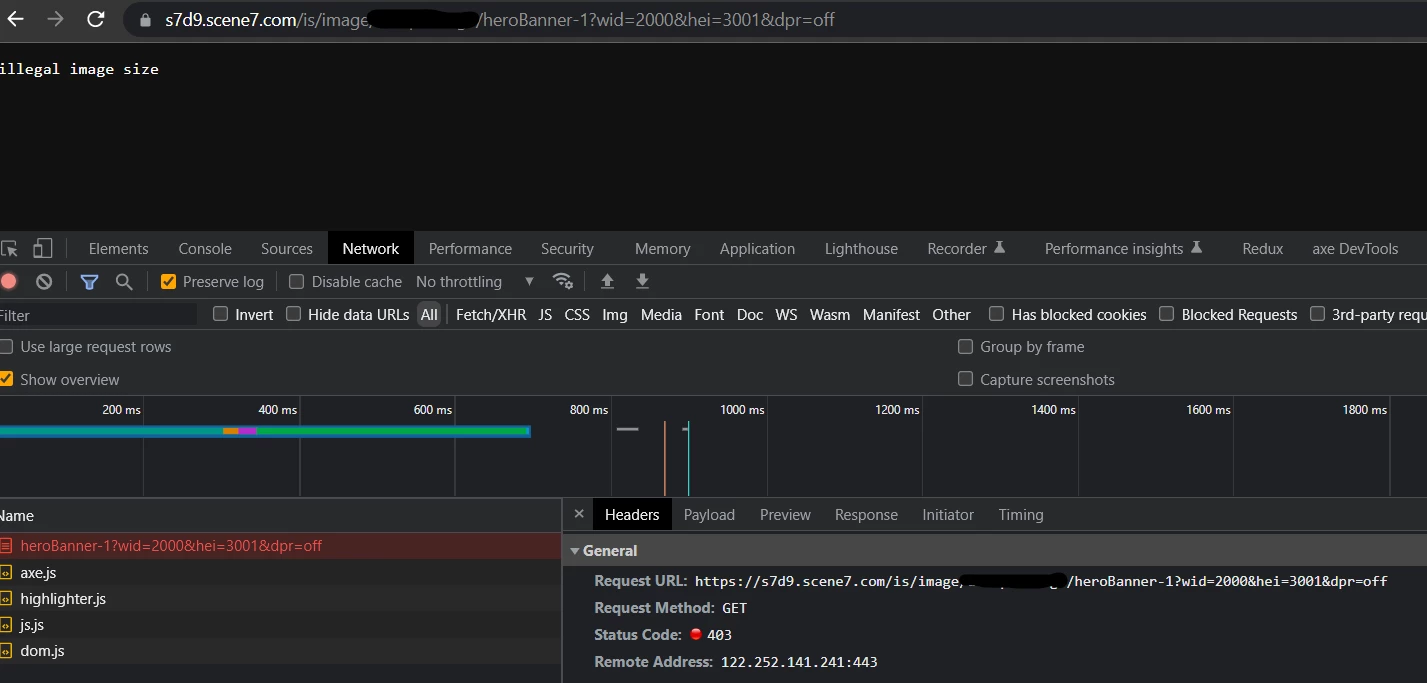
The hero banner image when processed via smart crop is not visible to all users.

For users with higher resolution and sizes (height-3000px beyond) the image is not rendering and displays 403 HTTP Code in console.


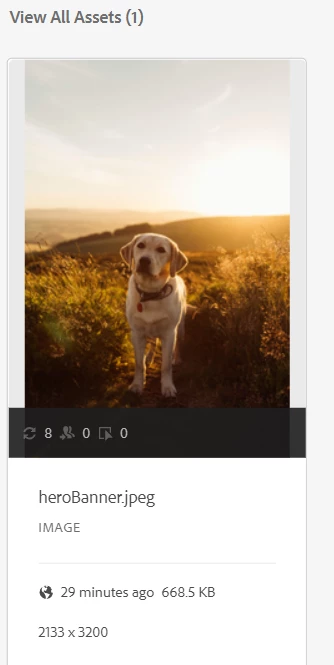
The original DAM asset is a JPEG image with width 2133 px and height 3200 px.


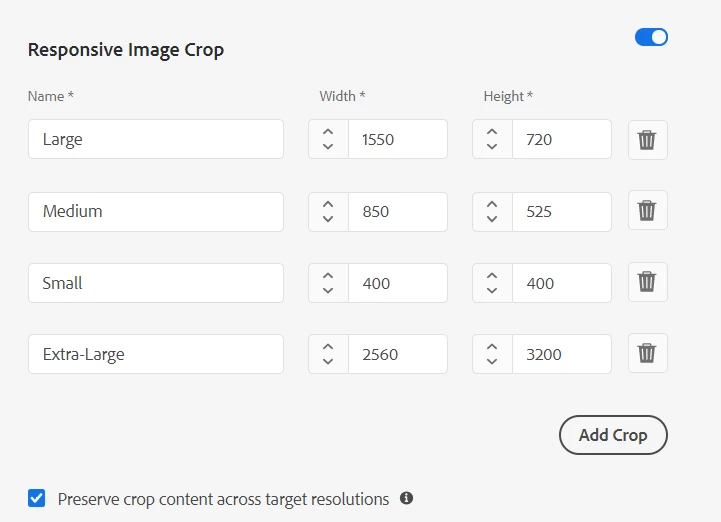
We have even created a new crop profile "Extra-Large" to accomodate 3000px+ height images.


The URL is of form https://s7d9.scene7.com/is/image/brandName/heroBanner-1?wid=2000&hei=3001&dpr=off

If the hei parameter value <= 3000, we are getting 200 OK response, else the response is illegal image size.


Can you please help with the same ?

@arunpatidar@mohit_kbansal@vikram1285, @markusbullaadobe@kautuk_sahni 


Thanks in advance,

Rohan Garg
This post is no longer active and is closed to new replies. Need help? Start a new post to ask your question.
Best answer by Rohan_Garg

The Adobe Support Team has responded with the below update -

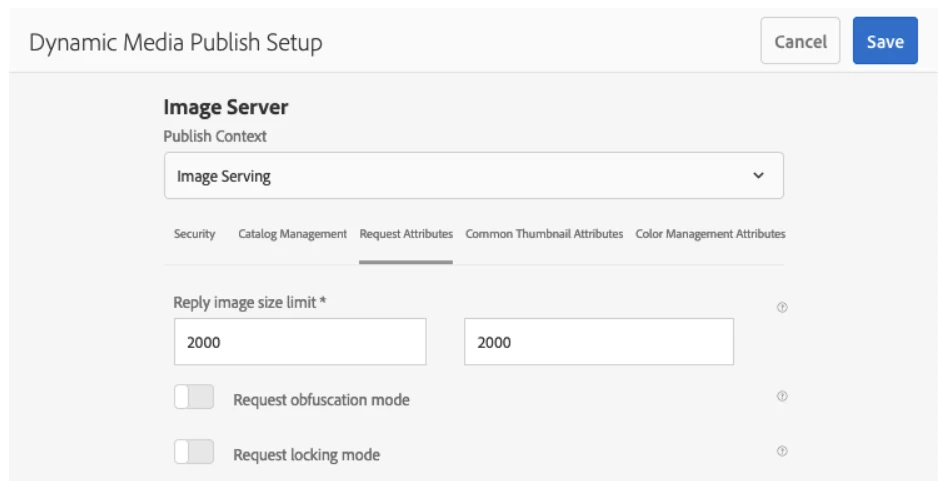
The "Reply Image Size" was set to 9 MP whereas it should have been updated to allow up to 25 MP.
We have made the correction in the account and it now returns the image when called.


On further checking this I found the below info - 

Each DM account has a configuration setting called "Reply Image Size Limit."

It specifies the maximum reply image width and height that can be returned to the client.

The server returns the "illegal image size" message if a request would cause a reply image whose width or height is larger than this setting.

https://experienceleague.adobe.com/docs/experience-manager-65/assets/dynamic/dm-publish-settings.html?lang=en


To adjust the MaxPix, log in to DM cloud(Scene7 Publishing System), and choose Setup > Application Setup > Publish Setup > Image Server > Reply Image Size Limit.

Increase this setting to a value you think is sufficient, and save it. The current limit is 5000 x 5000 pixels.

The Dynamic Media servers currently don't serve up images that are larger than 25 million pixels.

2 replies

Community Advisor
November 25, 2022

Hi @rohan_garg 

Did you check if "Extra-Large" profile is published to dynamic media server? Even though it is published automatically, in case its not published may cause this issue.

Rohan_Garg
Community Advisor
Community Advisor
November 25, 2022

Hi @salamswapnil , thanks for the quick reply.

Yes, the profile is published to dynamic media server. We are getting requests with below format in network trace -

https://s7d9.scene7.com/is/image/brandName/heroBanner-1:extra-large?wid=2000&hei=3001&dpr=off


Rohan_Garg
Community Advisor
Rohan_GargCommunity AdvisorAuthorAccepted solution
Community Advisor
November 25, 2022

The Adobe Support Team has responded with the below update -

The "Reply Image Size" was set to 9 MP whereas it should have been updated to allow up to 25 MP.
We have made the correction in the account and it now returns the image when called.


On further checking this I found the below info - 

Each DM account has a configuration setting called "Reply Image Size Limit."

It specifies the maximum reply image width and height that can be returned to the client.

The server returns the "illegal image size" message if a request would cause a reply image whose width or height is larger than this setting.

https://experienceleague.adobe.com/docs/experience-manager-65/assets/dynamic/dm-publish-settings.html?lang=en


To adjust the MaxPix, log in to DM cloud(Scene7 Publishing System), and choose Setup > Application Setup > Publish Setup > Image Server > Reply Image Size Limit.

Increase this setting to a value you think is sufficient, and save it. The current limit is 5000 x 5000 pixels.

The Dynamic Media servers currently don't serve up images that are larger than 25 million pixels.