Dropdown field not appearing in aialog overlay | Community
Skip to main content
Level 2
July 29, 2025
Solved

Dropdown field not appearing in aialog overlay

  • July 29, 2025
  • 1 reply
  • 360 views


Hi everyone,

I’m trying to extend the core Title component core/wcm/components/title/v3/title by adding a dropdown field to its dialog using Sling Resource Merger.

Here is what I have done:

1. Created a proxy component at /apps/myproject/components/title

2. Set sling:resourceSuperType = "core/wcm/components/title/v3/title"

3. Created an overlay dialog at:
/apps/myproject/components/title/_cq_dialog/.content.xml

And I tried adding this dropdown:

<jcr:root xmlns:sling="http://sling.apache.org/jcr/sling/1.0" xmlns:jcr="http://www.jcp.org/jcr/1.0" jcr:primaryType="nt:unstructured" sling:resourceSuperType="core/wcm/components/title/v3/title"> <content jcr:primaryType="nt:unstructured"> <items jcr:primaryType="nt:unstructured"> <headingType jcr:primaryType="nt:unstructured" sling:resourceType="granite/ui/components/coral/foundation/form/select" fieldLabel="Heading Type" name="./headingType"> <items jcr:primaryType="nt:unstructured"> <h1 jcr:primaryType="nt:unstructured" text="H1" value="h1"/> <h2 jcr:primaryType="nt:unstructured" text="H2" value="h2"/> <h3 jcr:primaryType="nt:unstructured" text="H3" value="h3"/> </items> </headingType> </items> </content> </jcr:root>
 

But this dropdown not showing in the dialog at all.

Thanks in advance!
Best answer by SantoshSai

Hi @sanaqu,

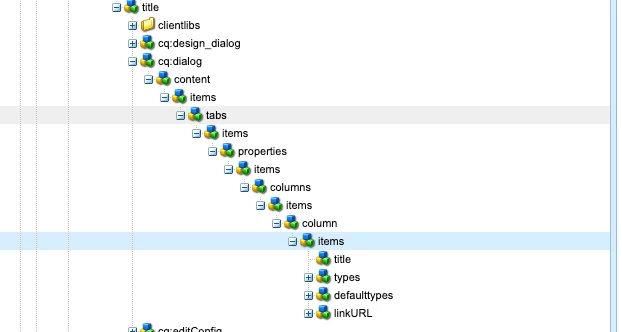
Please verify the structure of the dialog node where it is nested - Since Sling Resource Merger merges based on matching structure, your dropdown field must be placed in the same path - otherwise, it won’t get picked up.

Example from the above screenshot: Be specific to provide th necessary structured xml.

<jcr:root xmlns:jcr="http://www.jcp.org/jcr/1.0" xmlns:sling="http://sling.apache.org/jcr/sling/1.0" jcr:primaryType="nt:unstructured" sling:resourceSuperType="core/wcm/components/title/v3/title"> <content jcr:primaryType="nt:unstructured"> <items jcr:primaryType="nt:unstructured"> <tabs jcr:primaryType="nt:unstructured"> <items jcr:primaryType="nt:unstructured"> <properties jcr:primaryType="nt:unstructured"> <items jcr:primaryType="nt:unstructured"> <columns jcr:primaryType="nt:unstructured"> <items jcr:PrimaryType="nt:unstructured"> <column jcr:primaryType="nt:unstructured"> <items jcr:primaryType="nt:unstructured"> <!-- New Dropdown Field --> <headingType jcr:primaryType="nt:unstructured" sling:resourceType="granite/ui/components/coral/foundation/form/select" fieldLabel="Heading Type" name="./headingType"> <items jcr:primaryType="nt:unstructured"> <h1 jcr:primaryType="nt:unstructured" text="H1" value="h1"/> <h2 jcr:primaryType="nt:unstructured" text="H2" value="h2"/> <h3 jcr:primaryType="nt:unstructured" text="H3" value="h3"/> </items> </headingType> </items> </column> </items> </columns> </items> </properties> </items> </tabs> </items> </content> </jcr:root>

1 reply

SantoshSai
Community Advisor
SantoshSaiCommunity AdvisorAccepted solution
Community Advisor
July 29, 2025

Hi @sanaqu,

Please verify the structure of the dialog node where it is nested - Since Sling Resource Merger merges based on matching structure, your dropdown field must be placed in the same path - otherwise, it won’t get picked up.

Example from the above screenshot: Be specific to provide th necessary structured xml.

<jcr:root xmlns:jcr="http://www.jcp.org/jcr/1.0" xmlns:sling="http://sling.apache.org/jcr/sling/1.0" jcr:primaryType="nt:unstructured" sling:resourceSuperType="core/wcm/components/title/v3/title"> <content jcr:primaryType="nt:unstructured"> <items jcr:primaryType="nt:unstructured"> <tabs jcr:primaryType="nt:unstructured"> <items jcr:primaryType="nt:unstructured"> <properties jcr:primaryType="nt:unstructured"> <items jcr:primaryType="nt:unstructured"> <columns jcr:primaryType="nt:unstructured"> <items jcr:PrimaryType="nt:unstructured"> <column jcr:primaryType="nt:unstructured"> <items jcr:primaryType="nt:unstructured"> <!-- New Dropdown Field --> <headingType jcr:primaryType="nt:unstructured" sling:resourceType="granite/ui/components/coral/foundation/form/select" fieldLabel="Heading Type" name="./headingType"> <items jcr:primaryType="nt:unstructured"> <h1 jcr:primaryType="nt:unstructured" text="H1" value="h1"/> <h2 jcr:primaryType="nt:unstructured" text="H2" value="h2"/> <h3 jcr:primaryType="nt:unstructured" text="H3" value="h3"/> </items> </headingType> </items> </column> </items> </columns> </items> </properties> </items> </tabs> </items> </content> </jcr:root>
Santosh Sai
SanaQuAuthor
Level 2
July 29, 2025

Thank you, that helped.