Dialog Labels not translated manually In AEM as cloud | Community
Skip to main content
Level 1
May 29, 2026
Question

Dialog Labels not translated manually In AEM as cloud

  • May 29, 2026
  • 3 replies
  • 60 views

I have one dialog like cta. it contain one text filed. I want update filed Label name based on local using i18n. In English it is working fine. but in fr not translated dialog  filed Label name still it is showing English text.



In EN Language:
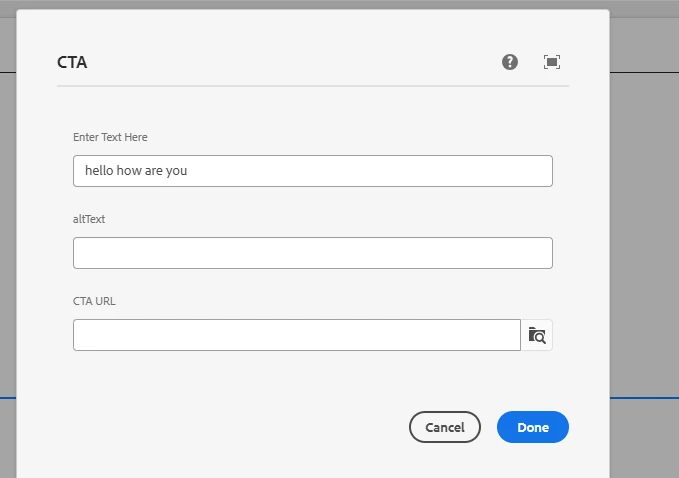

In FR Language:
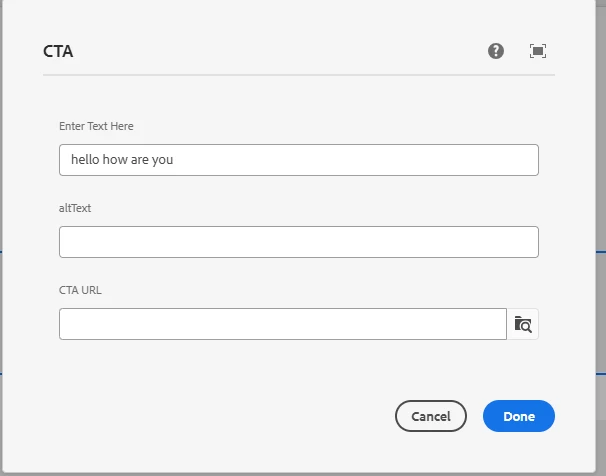
How to fix this issue in AEM as clould 

    3 replies

    VeenaVikraman
    Community Advisor
    Community Advisor
    May 29, 2026

    Hi ​@nagarajukoniki1 

    Thanks for sharing the additional screenshot.

    I can see that you have both English and French i18n dictionaries configured under /apps/.../i18n, so the next thing to verify is the dictionary entries themselves.

    For example, if your dialog field is configured as:

    fieldLabel="Enter Text Here"
    i18n="{Boolean}true"

    then the French dictionary should contain a translation for the exact key used in the fieldLabel property, such as:

    Enter Text Here -> Entrez le texte ici
    altText -> Texte alternatif
    CTA URL -> URL CTA

    From the screenshots, I can see the dialog configuration and the presence of the i18n dictionaries, but I cannot see the actual dictionary entries.

    Could you please share a screenshot of the properties of the fr/hello dictionary entry (or the corresponding dictionary content)? This will help verify whether the dictionary keys match the values used in the dialog fieldLabel properties.

    Thanks

    Veena

    avesh_narang
    Level 4
    May 30, 2026

    Hi ​@nagarajukoniki1 ,


    To assist you with this, could you kindly provide the list of i18 values that are set up to accomplish this functionality?


    Thanks 

    Level 4
    May 31, 2026

    Hi ​@nagarajukoniki1,


    The issue is that your French i18n dictionary is missing entries that exactly match your fieldLabel values.


    Steps to fix:

        1.    Go to CRXDE: /apps/.../i18n/fr
        2.    For each dialog field, create a node with:
        •    Node type: sling:MessageEntry
        •    sling:key = exact fieldLabel value (e.g. Enter Text Here)
        •    sling:message = French translation (e.g. Entrez le texte ici)
        3.    Do the same for altText and CTA URL
        4.    Clear the i18n cache via /system/console/bundles or touch/save the dictionary node
        5.    Reload in FR locale and reopen the dialog


    Key thing to verify: The sling:key must be an exact match, same capitalization and spacing, as what’s in your fieldLabel property.


    If you share the contents of your fr/hello dictionary node in CRXDE, I can confirm whether the keys are aligned correctly.


    Hope this helps!
