Default new policy is getting applied to the image component policy | Community
Skip to main content
July 21, 2023
Solved

Default new policy is getting applied to the image component policy

  • July 21, 2023
  • 3 replies
  • 930 views

There is a problem with the component policy. The policy for the image component is not being applied correctly.
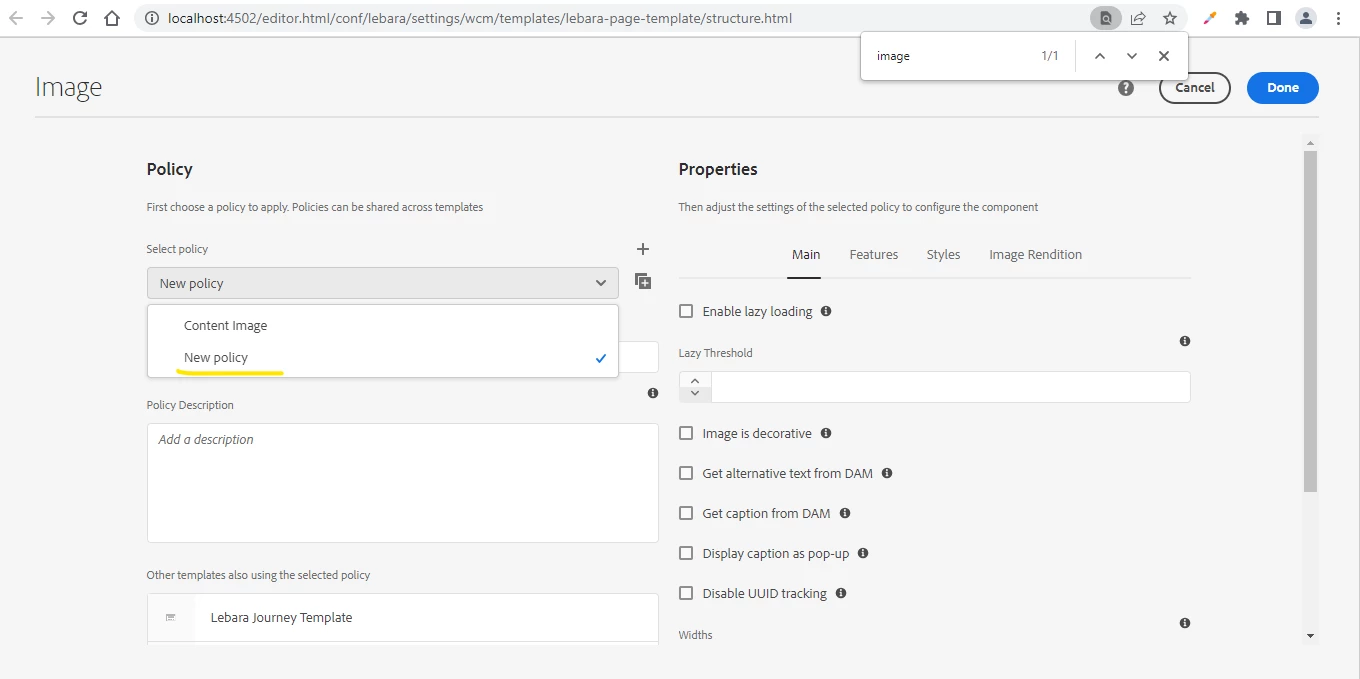


.


This post is no longer active and is closed to new replies. Need help? Start a new post to ask your question.
Best answer by Mahedi_Sabuj

Hi @varunkanchi, You need to connect your wcm/policies with the template policies. 

You can check the following example:
/conf/aem-demo/settings/wcm/templates/[template]/policies/.content.xml

<aem-demo jcr:primaryType="nt:unstructured"> <components jcr:primaryType="nt:unstructured"> <image jcr:primaryType="nt:unstructured" <!-- Your Policy here --> cq:policy="aem-demo/components/content/image/v1/image/policy" sling:resourceType="wcm/core/components/policies/mapping"/> </components> </aem-demo>


3 replies

Mahedi_Sabuj
Community Advisor
Mahedi_SabujCommunity AdvisorAccepted solution
Community Advisor
July 21, 2023

Hi @varunkanchi, You need to connect your wcm/policies with the template policies. 

You can check the following example:
/conf/aem-demo/settings/wcm/templates/[template]/policies/.content.xml

<aem-demo jcr:primaryType="nt:unstructured"> <components jcr:primaryType="nt:unstructured"> <image jcr:primaryType="nt:unstructured" <!-- Your Policy here --> cq:policy="aem-demo/components/content/image/v1/image/policy" sling:resourceType="wcm/core/components/policies/mapping"/> </components> </aem-demo>


Mahedi Sabuj
kaikubad
Community Advisor
Community Advisor
July 24, 2023

From your screenshot I can see that you have created a image policy named Content Image. All you need to do is just map it with the image component.

Follow the path and pattern in this screenshot where I am defining the policy.

and after it I will map it to different types of templates

This is the mapping on home page template
