Default CSS Classes or Style Variations are Not Applied for my Custom Component which does not use any ResourceSuperType of core Components | Community
Skip to main content
Level 2
November 27, 2024
Solved

Default CSS Classes or Style Variations are Not Applied for my Custom Component which does not use any ResourceSuperType of core Components

  • November 27, 2024
  • 3 replies
  • 1035 views

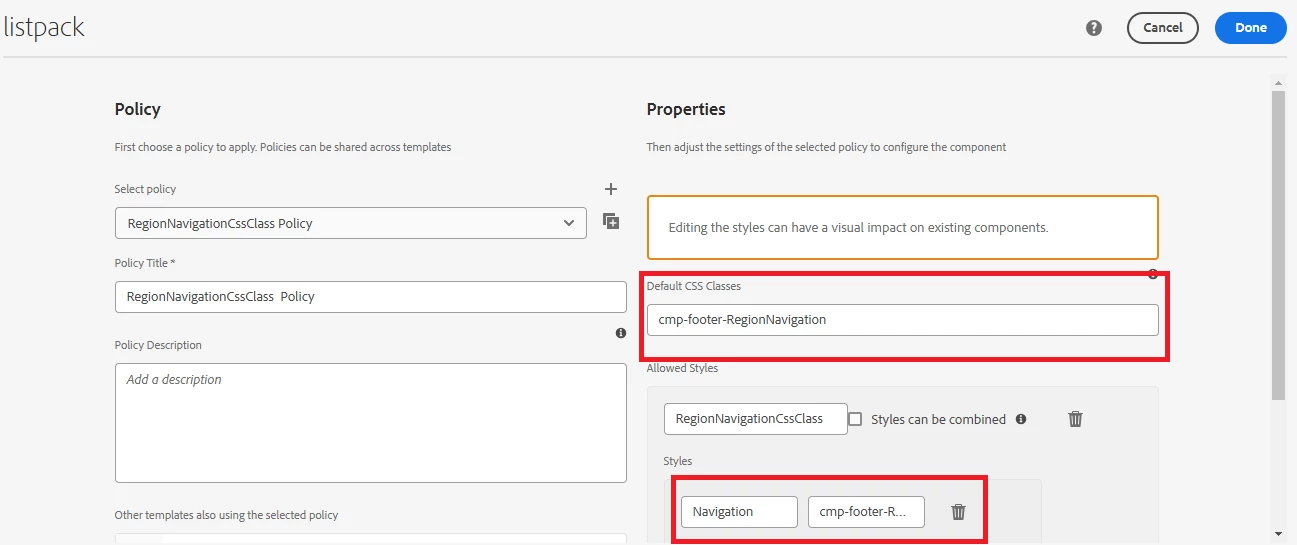
I created a custom component without specifying a resourceSuperType from the core components. The component includes a cq:dialog for the dialog box and a cq:design_dialog for the component policy.


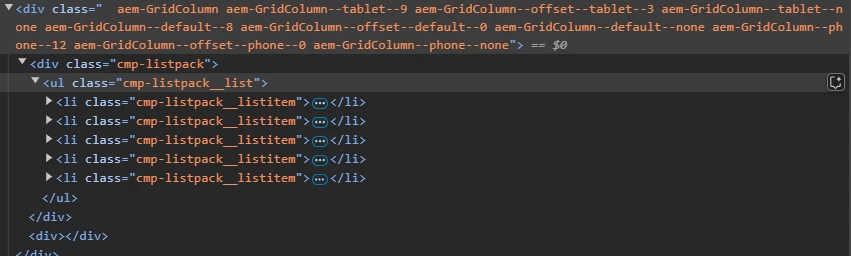
First, I tried adding default CSS classes in the component's policy, but they did not appear in the HTML DOM. Then, I added a style variation class, but it also did not show up in the DOM.


This post is no longer active and is closed to new replies. Need help? Start a new post to ask your question.

3 replies

PRATHYUSHA_VP
Community Advisor
Community Advisor
November 27, 2024

Hi @rahulsi13 


Below are the few things you can re-check -


1. Check the clientlib category is added and loading at page level in network tab

2. Policies might not be applied in the instance you're checking or some issue with the policy creation


Hope this helps


Thanks


PRATHYUSHA_VP
Community Advisor
PRATHYUSHA_VPCommunity AdvisorAccepted solution
Community Advisor
November 27, 2024
arunpatidar
Community Advisor
Community Advisor
November 27, 2024

Hi @rahulsi13 

Please check component policy.

the component policy is not applied correctly otherwise you could see default style and style picker/dropdown when edit the component.

Arun Patidar
Nikhil-Kumar
Community Advisor
Community Advisor
November 27, 2024

@rahulsi13  - Please check if you are using the correct template where policies are defined. Also the Style System props are seen at the root of the component. But as per the screenshot i think you are looking for it further down.