Debugger using Intelij for angular frontend project | Community
Skip to main content
Level 2
June 26, 2024
Solved

Debugger using Intelij for angular frontend project

  • June 26, 2024
  • 2 replies
  • 968 views

Hi, I am working on a project in which the front end is Angular. I am trying to set up a debugger to check the values in the sling model on runtime. But my debugger is not stopping at the breakpoints. however, I am connected to the socket. below is my configuration. 
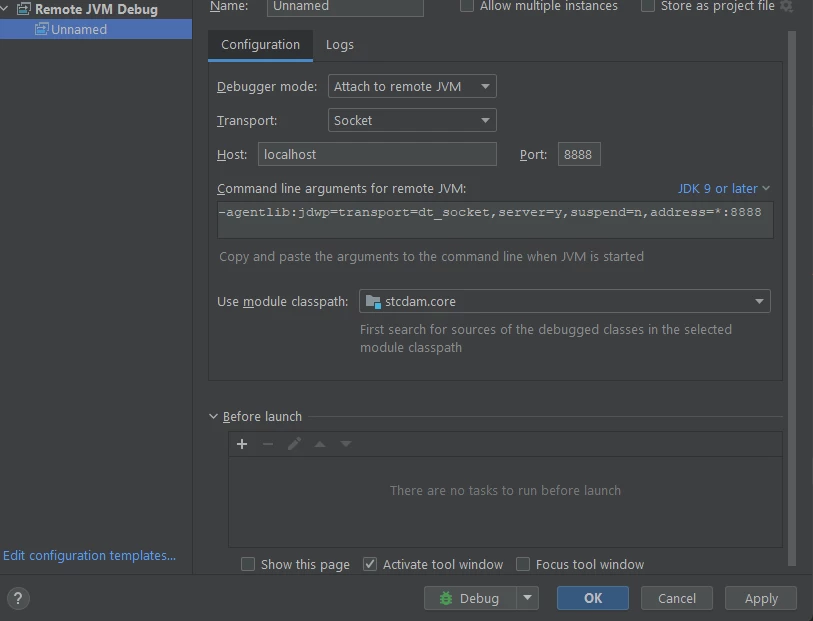


This post is no longer active and is closed to new replies. Need help? Start a new post to ask your question.
Best answer by h_kataria

If you have started your AEM using the standard debugging options i.e.

-Djava.awt.headless=true -agentlib:jdwp=transport=dt_socket,address=30303,server=y,suspend=n

then change the JDK9 or later option to JDK 5-8 and it should work


Adjust the port as per your configuration.


2 replies

EstebanBustamante
Community Advisor and Adobe Champion
June 26, 2024

Hi, 

Please check this article: https://aemgeeks.com/aem-debugging/how-to-start-aem-in-debug-mode/ 

Things to double-check:


  • Ensure your AEM instance is running in debug mode.

  • The port which is part of your debug start script matches the port in your IDE
  • Verify that the code deployed is the same as the code you are debugging. Sometimes, it is useful to redeploy the code to ensure it is up to date; otherwise, it may not work.


Hope this helps

Esteban Bustamante
Level 2
June 26, 2024

I have done all the above and still cannot stop the debugger at breakpoints. 

EstebanBustamante
Community Advisor and Adobe Champion
June 26, 2024

Try to remove all code from your instance, manually delete the code references via CRX/de, delete the packages installed in the package manager, and then redeploy your code. After completing these steps, make sure that your code functions correctly in the instance, that the bundle is active, and so on. Next, try enabling debug mode in IntelliJ.

Esteban Bustamante
h_kataria
Community Advisor
h_katariaCommunity AdvisorAccepted solution
Community Advisor
June 26, 2024

If you have started your AEM using the standard debugging options i.e.

-Djava.awt.headless=true -agentlib:jdwp=transport=dt_socket,address=30303,server=y,suspend=n

then change the JDK9 or later option to JDK 5-8 and it should work


Adjust the port as per your configuration.


Level 2
June 27, 2024

I fixed the issue not sure if that is the reason or not. I was running my instance on Powershell. But when I started the instance on cmd with run as admin. It worked. 

Thanks for the reply