Custom Workflow to Publish page to Preview | Community
Skip to main content
Level 2
March 12, 2026
Solved

Custom Workflow to Publish page to Preview

  • March 12, 2026
  • 2 replies
  • 55 views

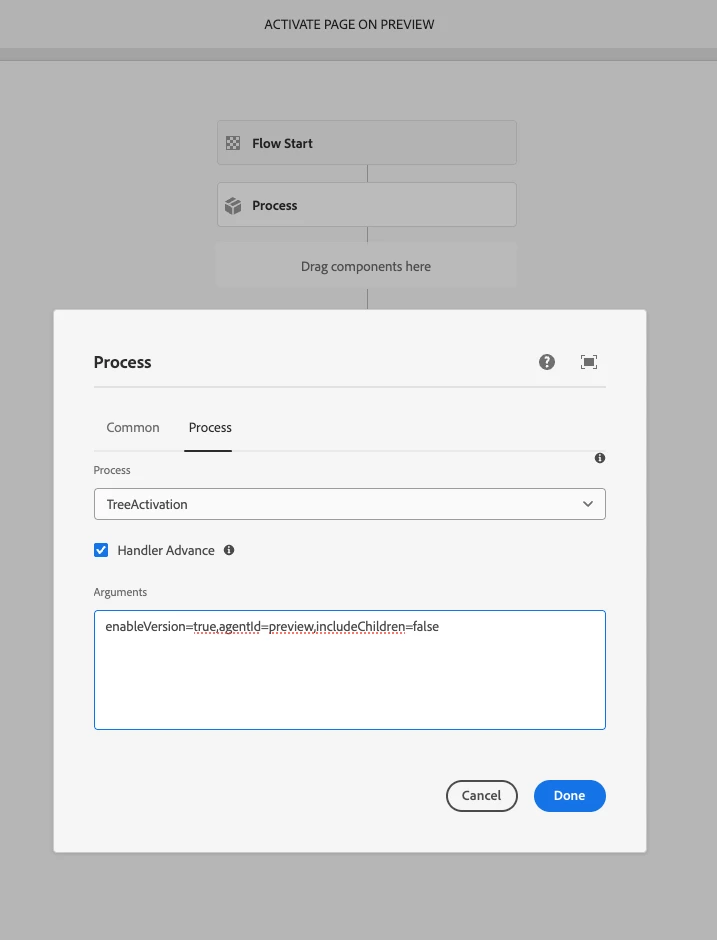
Hello, I have a custom workflow created that will publish a page to the Preview instance. This workflow is using the TreeActivation process with the Handler Advance checked and the following arguments: enableVersion=true,agentId=preview,includeChildren=false

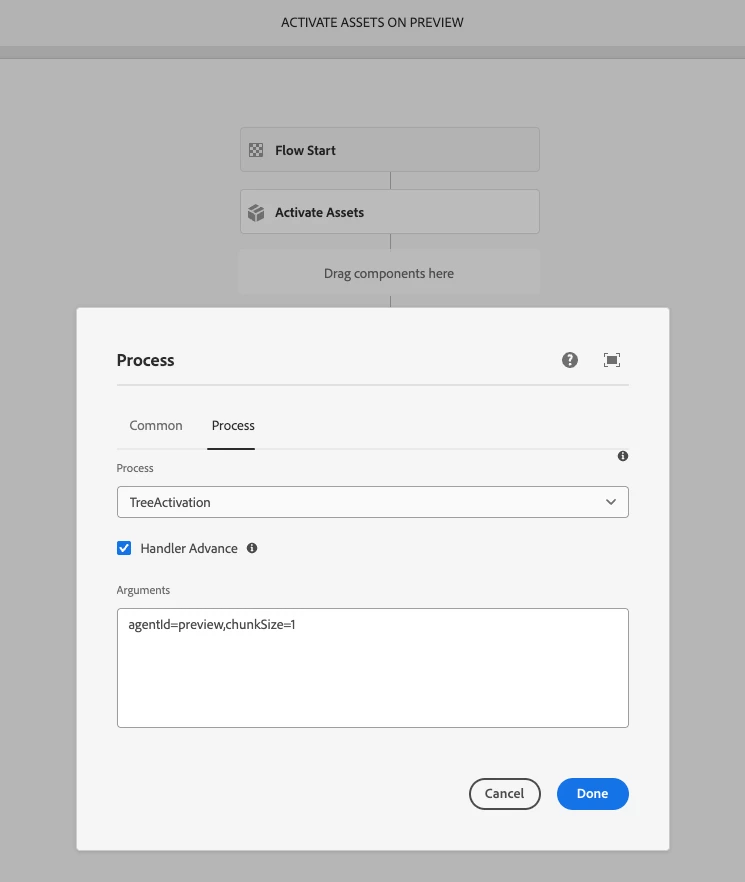
This normally functions fine for content updates. But any asset updates are not picked up and pushed to the Preview instance. It displays a broken image. 
 

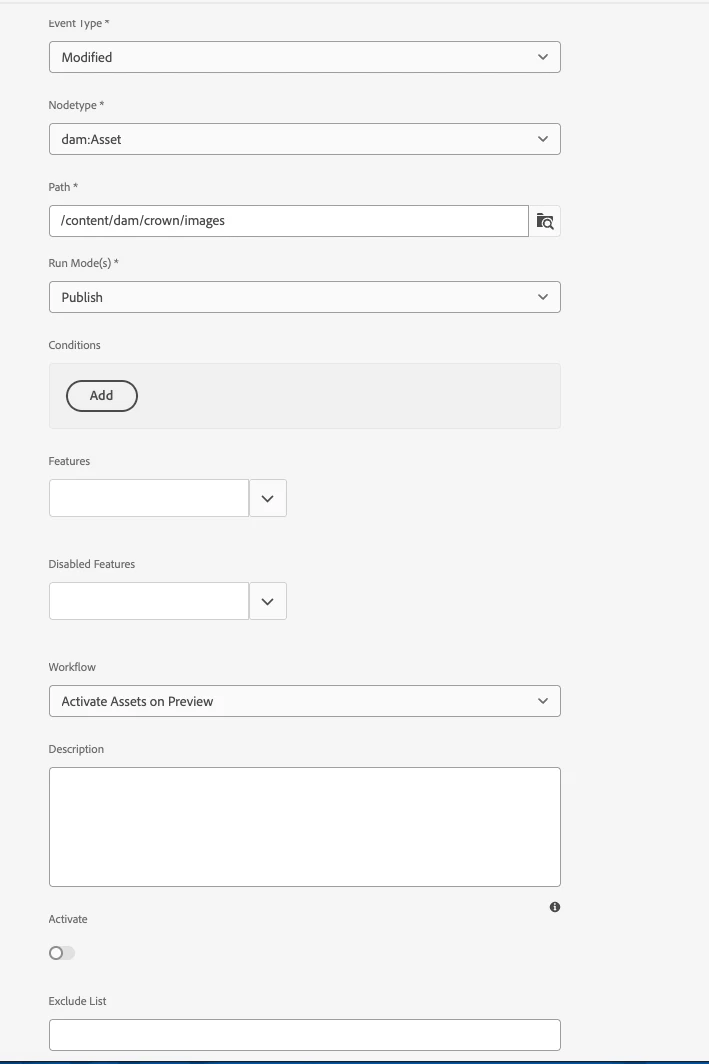
I attempted to create a Workflow Launcher but it is running multiple times on the asset before it finishes processing. 
I have a screen capture of the workflow launcher and the workflow models attached. As well as a log file that displays something about the jcr:content/metadata. 

11.03.2026 15:31:19.071 [cm-p------e--------aem-author-668fd857c6-rrzjs] *ERROR* [sling-threadpool-8685bd4f-0ae6-48c7-b09f-bcbb858297cc-(apache-sling-job-thread-pool)-6-DM Publish queue(dam/scene7/asset/activation)] com.day.cq.dam.scene7.impl.utils.Scene7AssetPublishUtils Repository exception during Scene7 asset activation
javax.jcr.InvalidItemStateException: OakState0001: Unresolved conflicts in /content/dam/crown/images/home-page/2022/new-image-here.jpg/jcr:content/metadata
  at org.apache.jackrabbit.oak.api.CommitFailedException.asRepositoryException(CommitFailedException.java:238) [org.apache.jackrabbit.oak-api:1.88.0.T20251029163355-5d5086d]
  at org.apache.jackrabbit.oak.api.CommitFailedException.asRepositoryException(CommitFailedException.java:213) [org.apache.jackrabbit.oak-api:1.88.0.T20251029163355-5d5086d]
  at org.apache.jackrabbit.oak.jcr.delegate.SessionDelegate.newRepositoryException(SessionDelegate.java:745) [org.apache.jackrabbit.oak-jcr:1.88.0.T20251029163355-5d5086d]
  at org.apache.jackrabbit.oak.jcr.delegate.SessionDelegate.save(SessionDelegate.java:559) [org.apache.jackrabbit.oak-jcr:1.88.0.T20251029163355-5d5086d]
  at org.apache.jackrabbit.oak.jcr.session.SessionImpl$9.performVoid(SessionImpl.java:460) [org.apache.jackrabbit.oak-jcr:1.88.0.T20251029163355-5d5086d]
  at org.apache.jackrabbit.oak.jcr.delegate.SessionDelegate.performVoid(SessionDelegate.java:306) [org.apache.jackrabbit.oak-jcr:1.88.0.T20251029163355-5d5086d]
  at org.apache.jackrabbit.oak.jcr.session.SessionImpl.save(SessionImpl.java:457) [org.apache.jackrabbit.oak-jcr:1.88.0.T20251029163355-5d5086d]
  at com.day.cq.dam.scene7.impl.utils.Scene7AssetPublishUtils.setMetadataPublishState(Scene7AssetPublishUtils.java:516) [com.day.cq.dam.cq-scene7-core:5.13.526]
  at com.day.cq.dam.scene7.impl.utils.Scene7AssetPublishUtils.persistPublishStateInJcr(Scene7AssetPublishUtils.java:225) [com.day.cq.dam.cq-scene7-core:5.13.526]
  at com.day.cq.dam.scene7.impl.utils.Scene7AssetPublishUtils.activateDamS7Assets(Scene7AssetPublishUtils.java:84) [com.day.cq.dam.cq-scene7-core:5.13.526]
  at com.day.cq.dam.scene7.impl.listener.Scene7ActivationJobConsumer.process(Scene7ActivationJobConsumer.java:165) [com.day.cq.dam.cq-scene7-core:5.13.526]
  at org.apache.sling.event.impl.jobs.JobConsumerManager$JobConsumerWrapper.process(JobConsumerManager.java:556) [org.apache.sling.event:4.4.0]
  at org.apache.sling.event.impl.jobs.queues.JobQueueImpl.startJob(JobQueueImpl.java:379) [org.apache.sling.event:4.4.0]
  at org.apache.sling.event.impl.jobs.queues.JobQueueImpl.access$100(JobQueueImpl.java:60) [org.apache.sling.event:4.4.0]
  at org.apache.sling.event.impl.jobs.queues.JobQueueImpl$1.run(JobQueueImpl.java:306) [org.apache.sling.event:4.4.0]
  at java.base/java.util.concurrent.ThreadPoolExecutor.runWorker(ThreadPoolExecutor.java:1144)
  at java.base/java.util.concurrent.ThreadPoolExecutor$Worker.run(ThreadPoolExecutor.java:642)
  at java.base/java.lang.Thread.run(Thread.java:1583)
Caused by: org.apache.jackrabbit.oak.api.CommitFailedException: OakState0001: Unresolved conflicts in /content/dam/crown/images/home-page/2022/new-image-here.jpg/jcr:content/metadata


Any help would be appreciated. I have very limited access to the admin section of AEM.
 

Best answer by AmitVishwakarma

Hi ​@carbfrze_crown 

Root causes

  • Your page preview workflow using TreeActivation with agentId=preview publishes only the page, not its DAM assets. That's why preview shows broken images: the page is on Preview, the assets are not.
  • Your DAM asset launcher on dam:Asset (Event: Modified) fires several times while the asset is still being processed (DAM Update Asset + Dynamic Media/Scene7). That creates multiple overlapping jobs updating /jcr:content/metadata, and Scene7's own job then fails with the OakState0001: Unresolved conflicts error you see (concurrent saves on the same metadata node).

Do not use a standalone dam:Asset launcher for preview publishing.

Instead, hook the asset preview publish into the end of the DAM Update Asset workflow, so it runs once per asset, after processing is finished.

1. Keep your existing page preview workflow

Your page workflow is fine conceptually:

  • Model: "Activate Page on Preview"
  • Step: Process Step -> Publish Content Tree (TreeActivation)
  • Arguments: enableVersion=true,agentId=preview,includeChildren=false

2. Remove/disable the current asset launcher

In Tools -> Workflow -> Launchers:

Disable the launcher:

  • Event type: Modified
  • Node type: dam:Asset
  • Path: /content/dam/crown/images
  • Workflow: "Activate Assets on Preview"

This is the piece that is firing repeatedly and contributing to OakState0001.

3. Add "publish to Preview" as the last step of DAM Update Asset

Ask an admin (since you said you have limited access) to:

  • Open Tools -> Workflow -> Models and locate the DAM Update Asset model used in your environment.
  • Copy it (if required by your ops standards) and edit the copy.
  • At the very end of that workflow, add a new Process Step, for example:
    • Title: Activate asset on Preview
    • Process: Publish Content Tree (TreeActivation)
    • Handler Advance: checked
    • Arguments: agentId=preview,includeChildren=false
      • (agentId=preview is the only thing you absolutely need; others can stay default.)

Make this modified DAM Update Asset model the one actually used by your DAM asset launcher (or as the default DAM Update Asset model in Cloud Service config).

2 replies

VishalKa5
Level 6
March 13, 2026

Hi ​@carbfrze_crown ,


In Adobe Experience Manager (AEM) Cloud Service, this usually happens because page activation does not automatically publish referenced assets to the Preview instance.

Key Points

  1. TreeActivation limitation

    • Your workflow (TreeActivation with agentId=preview) publishes the page only, not the referenced DAM assets.

  2. Assets must be activated separately

    • Images in /content/dam need their own activation step to be replicated to the Preview agent.

  3. Workflow Launcher behavior

    • Launchers on dam:Asset with event Modified can trigger multiple times because asset processing updates metadata several times.

  4. Recommended launcher configuration

    • Use Event Type: Created or Modified with a condition filter (for example check cq:lastModified or dam:status) to avoid repeated triggers.

  5. Broken image reason

    • The page is available on Preview, but the asset is not replicated yet, so the image appears broken.

  6. Log error explanation

    • OakState0001: Unresolved conflicts usually occurs when multiple workflows or asset processing steps try to update metadata at the same time.

Suggested Approach

  • Keep your page preview workflow for pages.

  • Create a separate asset workflow or launcher to activate assets to the Preview agent after asset processing is complete.

Conclusion:
The issue occurs because assets are not automatically published when the page workflow runs. Assets must be replicated separately to the Preview instance, and the workflow launcher should be configured carefully to avoid multiple executions.

AmitVishwakarma
Community Advisor
AmitVishwakarmaCommunity AdvisorAccepted solution
Community Advisor
March 13, 2026

Hi ​@carbfrze_crown 

Root causes

  • Your page preview workflow using TreeActivation with agentId=preview publishes only the page, not its DAM assets. That's why preview shows broken images: the page is on Preview, the assets are not.
  • Your DAM asset launcher on dam:Asset (Event: Modified) fires several times while the asset is still being processed (DAM Update Asset + Dynamic Media/Scene7). That creates multiple overlapping jobs updating /jcr:content/metadata, and Scene7's own job then fails with the OakState0001: Unresolved conflicts error you see (concurrent saves on the same metadata node).

Do not use a standalone dam:Asset launcher for preview publishing.

Instead, hook the asset preview publish into the end of the DAM Update Asset workflow, so it runs once per asset, after processing is finished.

1. Keep your existing page preview workflow

Your page workflow is fine conceptually:

  • Model: "Activate Page on Preview"
  • Step: Process Step -> Publish Content Tree (TreeActivation)
  • Arguments: enableVersion=true,agentId=preview,includeChildren=false

2. Remove/disable the current asset launcher

In Tools -> Workflow -> Launchers:

Disable the launcher:

  • Event type: Modified
  • Node type: dam:Asset
  • Path: /content/dam/crown/images
  • Workflow: "Activate Assets on Preview"

This is the piece that is firing repeatedly and contributing to OakState0001.

3. Add "publish to Preview" as the last step of DAM Update Asset

Ask an admin (since you said you have limited access) to:

  • Open Tools -> Workflow -> Models and locate the DAM Update Asset model used in your environment.
  • Copy it (if required by your ops standards) and edit the copy.
  • At the very end of that workflow, add a new Process Step, for example:
    • Title: Activate asset on Preview
    • Process: Publish Content Tree (TreeActivation)
    • Handler Advance: checked
    • Arguments: agentId=preview,includeChildren=false
      • (agentId=preview is the only thing you absolutely need; others can stay default.)

Make this modified DAM Update Asset model the one actually used by your DAM asset launcher (or as the default DAM Update Asset model in Cloud Service config).

Amit Vishwakarma - Adobe Commerce Champion 2025 | 16x Adobe certified | 4x Adobe SME
Level 2
March 13, 2026

This worked perfectly! Thanks for the response!