Custom script for AEM inbox notification | Community
Skip to main content
Level 2
January 8, 2025
Solved

Custom script for AEM inbox notification

  • January 8, 2025
  • 2 replies
  • 460 views

Hi Everyone,

    I have one requirement, whenever user login or lands aem start page in aem 6.5 environment after that aem inbox notification automatically should expand. I have written a custom script but I don't know where to place this since these are all granite and coral related functionalities.


Script:

document.addEventListener('DOMContentLoaded', function() {
if (window.location.pathname === '/aem/start.html') {
var aemInboxNotification = document.querySelector('.granite-shell-badge');
if (aemInboxNotification) {
aemInboxNotification.click();
}
}
})


Can anyone help me on this? Thanks in advance!
 

Best answer by PRATHYUSHA_VP

Hi @jooca 


You can check n/w tab which clientlibs are loading as part of the home screen.


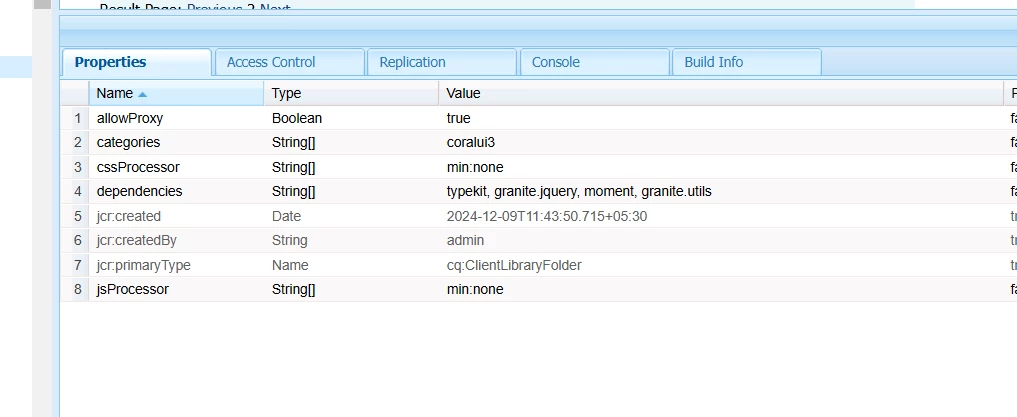
coralui3 categories will load by default on the AEM screen from foundation granite clientlibs

You can create your own custom clientlib files (Ex : /apps/project/custom-clientlibs ) in your project and use same category 


Hope this helps


Thanks

2 replies

PRATHYUSHA_VP
Community Advisor
PRATHYUSHA_VPCommunity AdvisorAccepted solution
Community Advisor
January 8, 2025

Hi @jooca 


You can check n/w tab which clientlibs are loading as part of the home screen.


coralui3 categories will load by default on the AEM screen from foundation granite clientlibs

You can create your own custom clientlib files (Ex : /apps/project/custom-clientlibs ) in your project and use same category 


Hope this helps


Thanks

AmitVishwakarma
Community Advisor
Community Advisor
January 17, 2025

Hi @jooca 

To trigger the auto-expand of AEM Inbox Notification on the start page, you can place your custom script in a ClientLib under the CQ author or publish environment.

Steps:

  1. Create a ClientLib in /apps/<your_project>/clientlibs/ (e.g., clientlibs/inbox-notification).
  2. Add the JavaScript file (e.g., inboxNotification.js) with your script inside clientlibs/inbox-notification/js/.
  3. Include the ClientLib in your start.html or AEM page template by adding the following in the head section: