Custom Metadata is not appearing in AEM Cloud environment | Community
Skip to main content
Mario248
Level 7
March 16, 2023

Custom Metadata is not appearing in AEM Cloud environment

  • March 16, 2023
  • 2 replies
  • 1857 views

My custom Metadata is not appearing in the AEM Cloud environment. I have created custom metadata schemas and want to install them through the cloud manager pipeline. I kept all the changes in below location

 
ui.content/src/main/content/jcr_root/conf/global/settings/dam/adminui-extension/metadataschema
 
It is properly deployed in my local AEM SDK and I could see all my metadata schemas  but when I installed the same code in AEM cloud, I didn't see the metadata schema at all. I tried to see what is installed but I don't see any nodes inside /conf (even being administrator). 
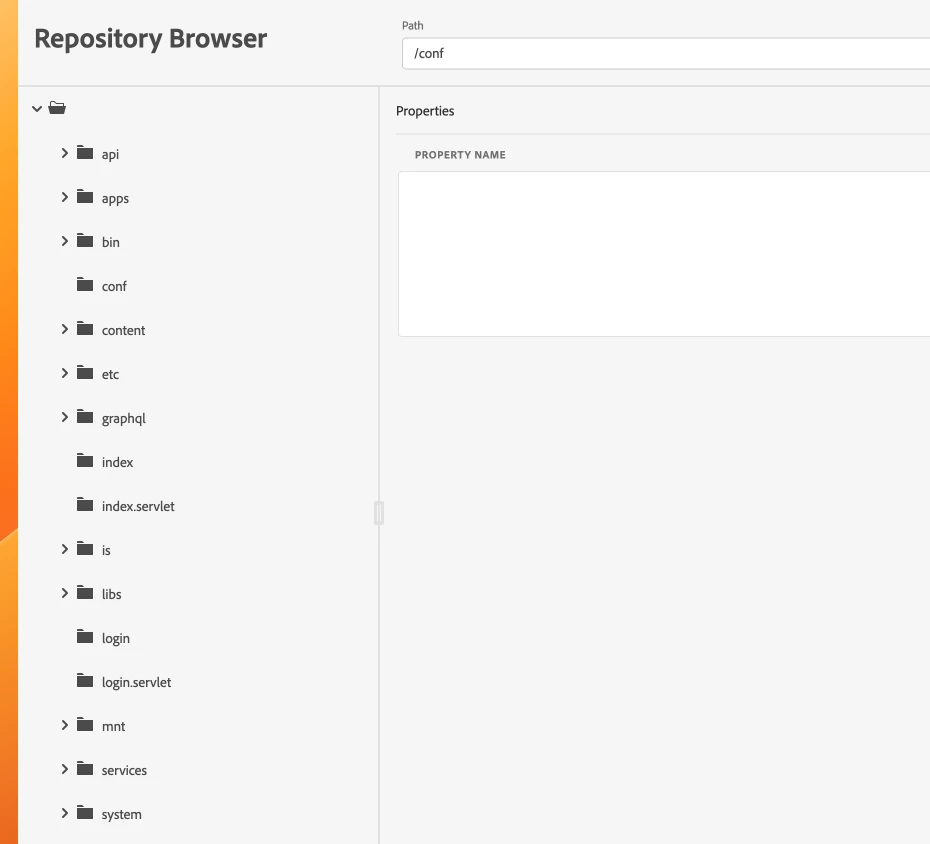


Can anyone tell where it is working in the local AEM SDK and why it is not working in the AEM cloud? Do I need to do anything special to make it work in the AEM cloud ?


This post is no longer active and is closed to new replies. Need help? Start a new post to ask your question.

2 replies

Level 3
March 16, 2023

Hi @mario248 

To troubleshoot the issue of custom metadata not appearing in AEM Cloud, you need to check permissions, replication, and indexing. First, ensure that the user has the necessary permissions to view and access the custom metadata schema properties, and that they have been added to the appropriate groups. Second, check if the custom metadata schema has been properly replicated to all AEM Cloud environments and that the replication status is successful. Lastly, check if the custom metadata schema has been properly indexed by AEM, and that the indexing status is successful.


Mario248
Mario248Author
Level 7
March 17, 2023

1 - ensure that the user has the necessary permissions to view and access the custom metadata schema properties - yes, I am part of administrator group hence I have full access but still I can not see custom metadata schema


2 - Check if the custom metadata schema has been properly replicated to all AEM Cloud environments - How to check this as crxde is not enabled in stage and prod. I used to repository browser but /conf is not having any nodes. 


3 - Check replication status is successful - Why do I need to check replication status as metadata schema I am checking in author instance.


4. check if the custom metadata schema has been properly indexed by AEM - Interesting, I have not checked this before. Can you tell how to check the status of index and if not indexed how to do index?

Rohit_Utreja
Community Advisor
Community Advisor
March 17, 2023

@mario248 

Have you tried deploying the code in dev (non-prod) instance?
You have the access to crx/de in non-prod instances. Hence, if you deploy code in non-prod instance, you will be able to see these in the crx/de.


I hope it helps.