Custom JS validation in multifield component | Community
Skip to main content
Level 4
January 3, 2024

Custom JS validation in multifield component

  • January 3, 2024
  • 2 replies
  • 562 views

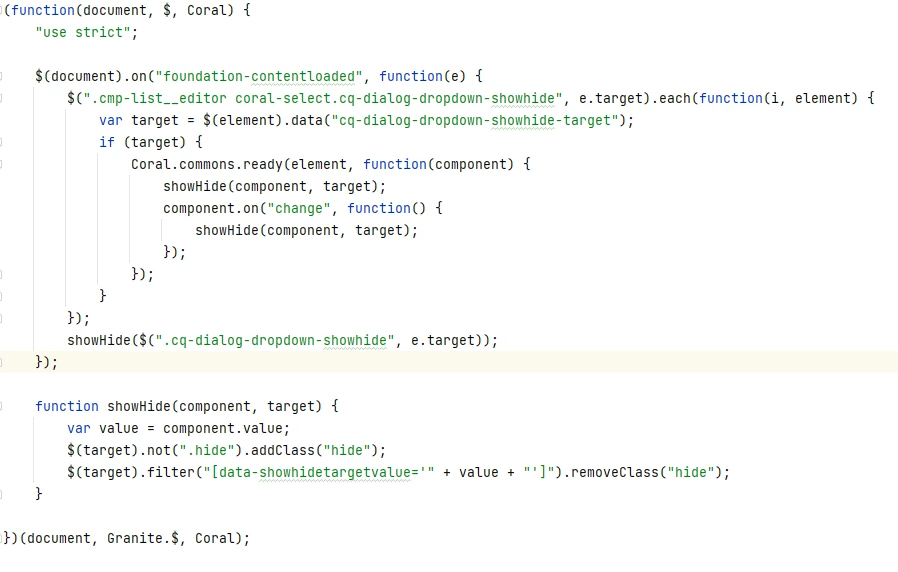
I have created a multifield component named Image list. Every card of image list has a dropdown. Based on the value selected in the dropdown, certain dialog values appear. I've achieved this using below JS code. 

The issue is selection of dropdown value in one card is getting reflected in all other cards as well.


JS code is - 
Dropdown looks like this - 

How can I achieve the functionality that on changing the value in dropdown, other cards should not be affected?

The catch here is that the dropdown is in a multifield component. So, if the value is being changed in one card, it is somehow reflected in other cards as well.

This post is no longer active and is closed to new replies. Need help? Start a new post to ask your question.

2 replies

VikasChaudhary_
Level 3
January 3, 2024

Hi @goyalkritika ,


Can you share the dialog definition as well?

kautuk_sahni
Community Manager
Community Manager
January 18, 2024

@goyalkritika Did you find the suggestions from users helpful? Please let us know if more information is required. Otherwise, please mark the answer as correct for posterity. If you have found out solution yourself, please share it with the community.

Kautuk Sahni