Custom form component with slider and buttons |AEMasCS | Community
Skip to main content
Level 4
September 11, 2024
Solved

Custom form component with slider and buttons |AEMasCS

  • September 11, 2024
  • 3 replies
  • 982 views

Hi Team,

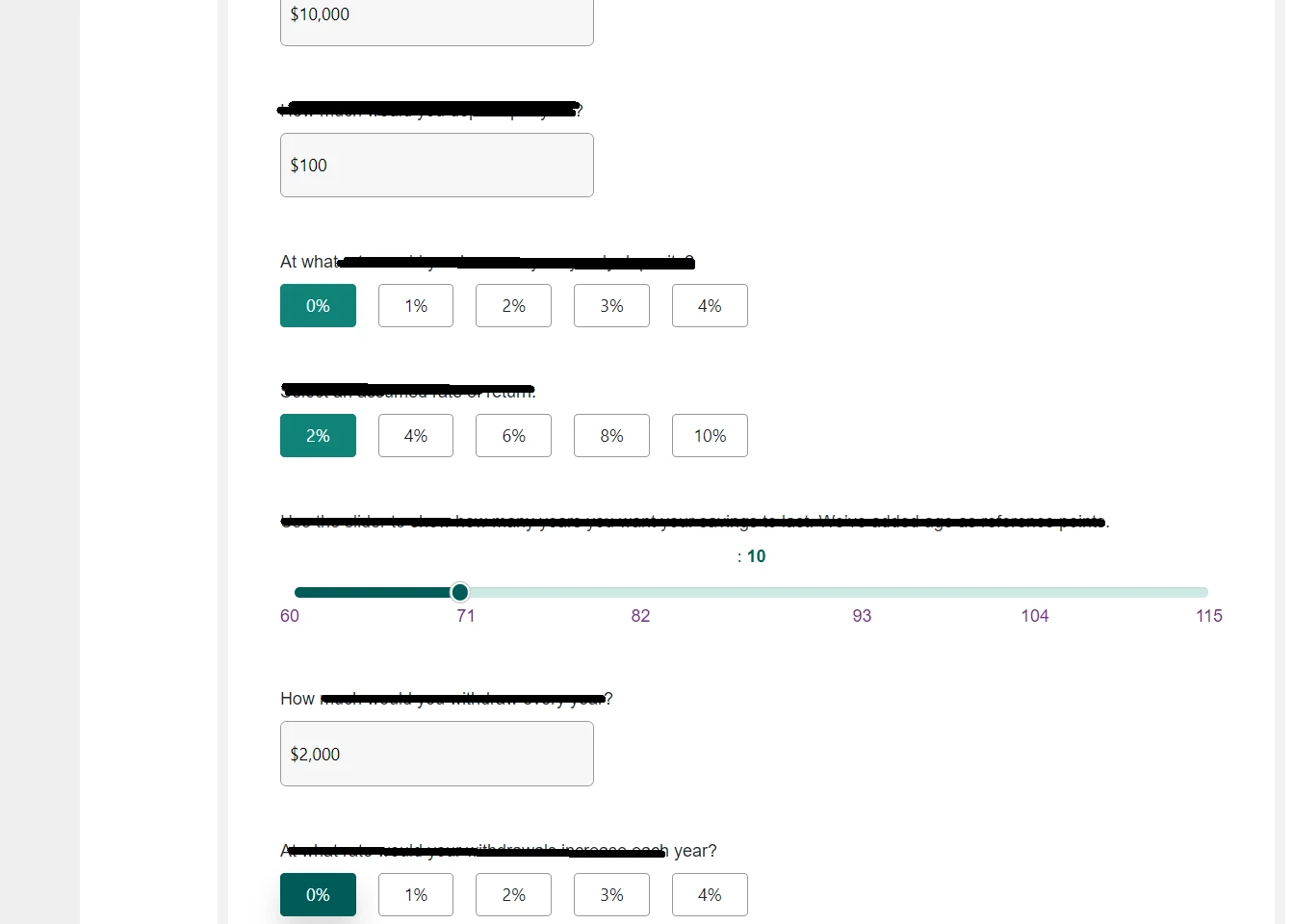
We have a requirement to develop a form component similar to the above structure and look and feel for the end user to submit, as of now these fields values will be static but later business might come up different options/Questions. The form submission will return response from backend system. How to develop this component ?
Can we directly use Static html, CSS and JavaScript or should we pass field values through dialog  properties. and use Stylings  ? 

Thanks,
Geo

This post is no longer active and is closed to new replies. Need help? Start a new post to ask your question.
Best answer by BrianKasingli

For me, I would re-use the AEM Core Form Components, and add style systems to match the styling as what you are showing us. 
for example, 
I can see 7 form elements on your page.

1. Form Text, seems standard, you can just overlay this component, and add some CSS to it to match your needs Form Text (aemcomponents.dev)

2.Form Text, seems standard, you can just overlay this component, and add some CSS to it to match your needs Form Text (aemcomponents.dev)
3 & 4. Form Options, you can just overlay this component, and style system to customize the CSS, Form Options (aemcomponents.dev) 

5. Form Slider, this should be a brand new component you should be creating, How To Create Range Sliders (w3schools.com)


For the form submission you can do it two ways. to just post to the form without javascript (making sure you have all form fields on the rendered page) or with javascript, sending the formData to the POST body.

3 replies

BrianKasingli
Community Advisor and Adobe Champion
BrianKasingliCommunity Advisor and Adobe ChampionAccepted solution
Community Advisor and Adobe Champion
September 11, 2024

For me, I would re-use the AEM Core Form Components, and add style systems to match the styling as what you are showing us. 
for example, 
I can see 7 form elements on your page.

1. Form Text, seems standard, you can just overlay this component, and add some CSS to it to match your needs Form Text (aemcomponents.dev)

2.Form Text, seems standard, you can just overlay this component, and add some CSS to it to match your needs Form Text (aemcomponents.dev)
3 & 4. Form Options, you can just overlay this component, and style system to customize the CSS, Form Options (aemcomponents.dev) 

5. Form Slider, this should be a brand new component you should be creating, How To Create Range Sliders (w3schools.com)


For the form submission you can do it two ways. to just post to the form without javascript (making sure you have all form fields on the rendered page) or with javascript, sending the formData to the POST body.

georhe6Author
Level 4
October 24, 2024

Hi @briankasingli ,
Thanks for the response ,But could you please explain how capturing the data , here we need to send the post request to the backend system and get the response.
Should we write custom action type on the form container .


kautuk_sahni
Community Manager
Community Manager
September 13, 2024

@georhe6 Did you find the suggestion helpful? Please let us know if you require more information. Otherwise, please mark the answer as correct for posterity. If you've discovered a solution yourself, we would appreciate it if you could share it with the community. Thank you!

Kautuk Sahni
RiteshY18
Community Advisor
Community Advisor
September 13, 2024

@georhe6 it is depend on what is the case here 


if ask to have an author experience where the author can add/remove fields or update style  the solution suggested by @briankasingli is good 

but if the ask does not have any author experience then the option without dialog can also work