Custom acttion for a component in template editor | Community
Skip to main content
Level 2
February 16, 2026
Question

Custom acttion for a component in template editor

  • February 16, 2026
  • 1 reply
  • 0 views

I have recently tried to add a custom action to add a custom action to open the experience fragment in a new tab for a legacy experience fragment component.

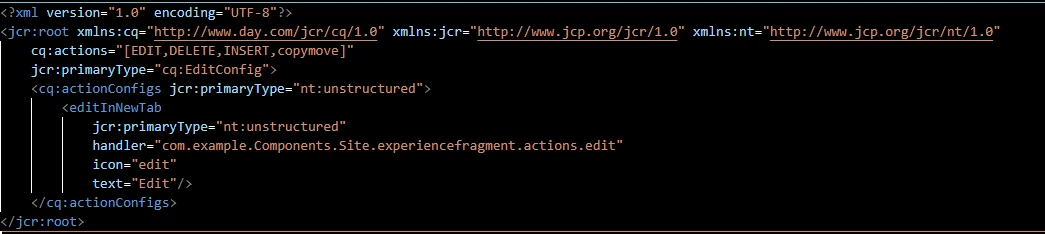
I used the cq:actionConfigs to add the new custom action like how its done for the core component.

The new action button appears in the page editor but not in the template editor.

I know we can add actions using Granite.author.edit.ToolbarActions, but before doing that I was wondering if I am doing anything wrong while adding the actionConfigs node?
 

1 reply

giuseppebaglio
Level 10
February 16, 2026

hi ​@rohitwanchoo94

I'm not entirely sure if I've caught your ask, but this tutorial does a great job of explaining how to extend and customize the AEM component action toolbar: 

https://www.initialyze.com/insights/extend-and-customize-adobe-experience-manager-component-action-toolbar

Level 2
February 16, 2026

Hi ​@giuseppebaglio 

Thanks for this link, it definitely is what I wanted.

However, I also was checking if someone was aware here why do we need to add the custom action via JS, when AEM provides with the cq:actionConfigs to implement a action when its only required for one component, say creating an edit link action for experience fragments, like how its also done for Experience Fragment AEM core component here: https://github.com/adobe/aem-core-wcm-components/blob/main/content/src/content/jcr_root/apps/core/wcm/components/experiencefragment/v2/experiencefragment/_cq_editConfig.xml

My problem is, this approach only works if you drop the component in a page, not in a template.

giuseppebaglio
Level 10
February 16, 2026

Okay, I think I understand better now.
You’ve defined the handler as:

handler="com.example.Components.Site.experiencefragment.actions.edit"

When you click the icon, what issue are you encountering? Are you seeing any errors in the browser’s developer console?