creating custom css | Community
Skip to main content
Karl515
Level 5
January 23, 2019
Solved

creating custom css

  • January 23, 2019
  • 2 replies
  • 2964 views

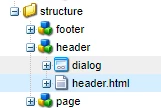
Ok so I have create these components

how can I add css into it? WKND tut did it by installing a package. what if I want to do it manually like crx or IDE? how can I achieve this?

the thing is, I can't trace from .html file since there no link found

how does aem do it? connecting this html to gateway or client-libs?

This post is no longer active and is closed to new replies. Need help? Start a new post to ask your question.
Best answer by Gaurav-Behl

you would need to create a project first, then template/components/clientlibs as mentioned in WKND tutorial.

follow WKND and create your own project from scratch, starting with chapter -1. In chapter-3, you would see how to add clientlibs to your project. You would've to create your own clientlibs either directly in /crx/de or in any IDE, create a package and then upload it to local AEM.

Setup your local workspace with Eclipse or any IDE sync it with AEM server

Download and configure

HTH

2 replies

Gaurav-Behl
Gaurav-BehlAccepted solution
Level 10
January 23, 2019

you would need to create a project first, then template/components/clientlibs as mentioned in WKND tutorial.

follow WKND and create your own project from scratch, starting with chapter -1. In chapter-3, you would see how to add clientlibs to your project. You would've to create your own clientlibs either directly in /crx/de or in any IDE, create a package and then upload it to local AEM.

Setup your local workspace with Eclipse or any IDE sync it with AEM server

Download and configure

HTH

Lokesh_Shivalingaiah
Level 10
January 23, 2019

You have to create clientlibs either within the component folder or under /apps [Refer /apps/weretail/clientlibs] and then include these clientlibs in your component html.

You can refer this -- Using Client-Side Libraries