Creating an AEM 6.3 HTL Restful Web Service - Some Info | Community
Skip to main content
AEM_Forum
Level 10
December 7, 2017
Solved

Creating an AEM 6.3 HTL Restful Web Service - Some Info

  • December 7, 2017
  • 3 replies
  • 1469 views

Hi All,

I am following Creating an Adobe Experience Manager 6.3 HTL Component that displays data from a Restful Web Service at https://helpx.adobe.com/experience-manager/using/restful_aem63.html.

1. I downloaded httpclient-4.0.1 and httpcore-4.3.2.

To create an OSGi bundle fragment that contains client HTTP packages, I am following the steps in that article and at the following step.

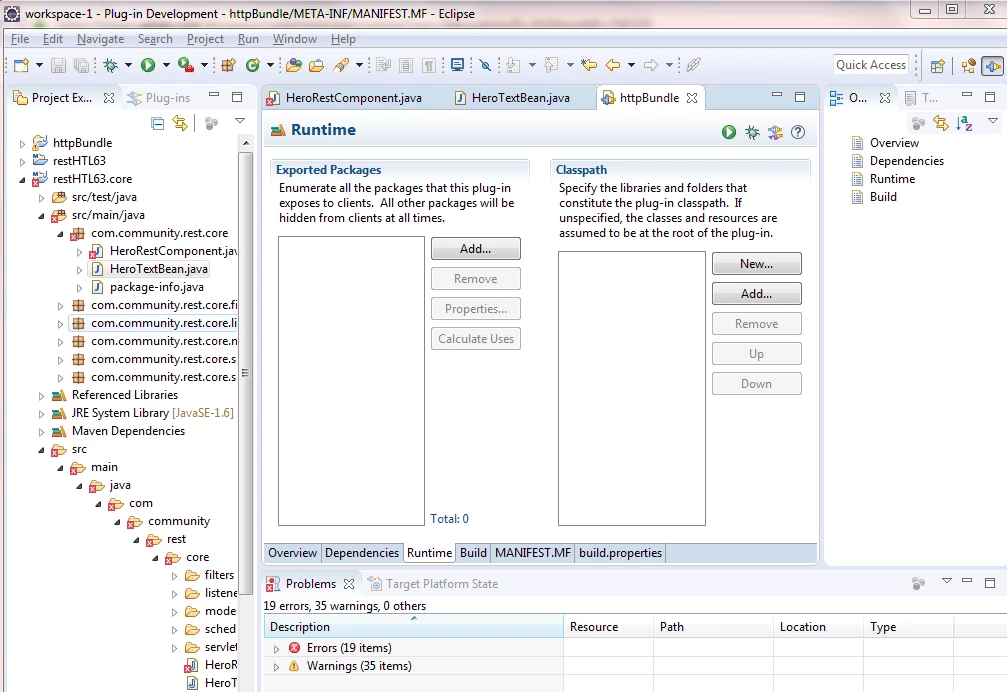
11. Make sure that the Exported Packages list is populated.

My eclipse does not populate anything as in the below screen shot.

2. The next two steps, 12 and 13 are not clear.

Please suggest.

Thanks,

Rama.
This post is no longer active and is closed to new replies. Need help? Start a new post to ask your question.
Best answer by smacdonald2008

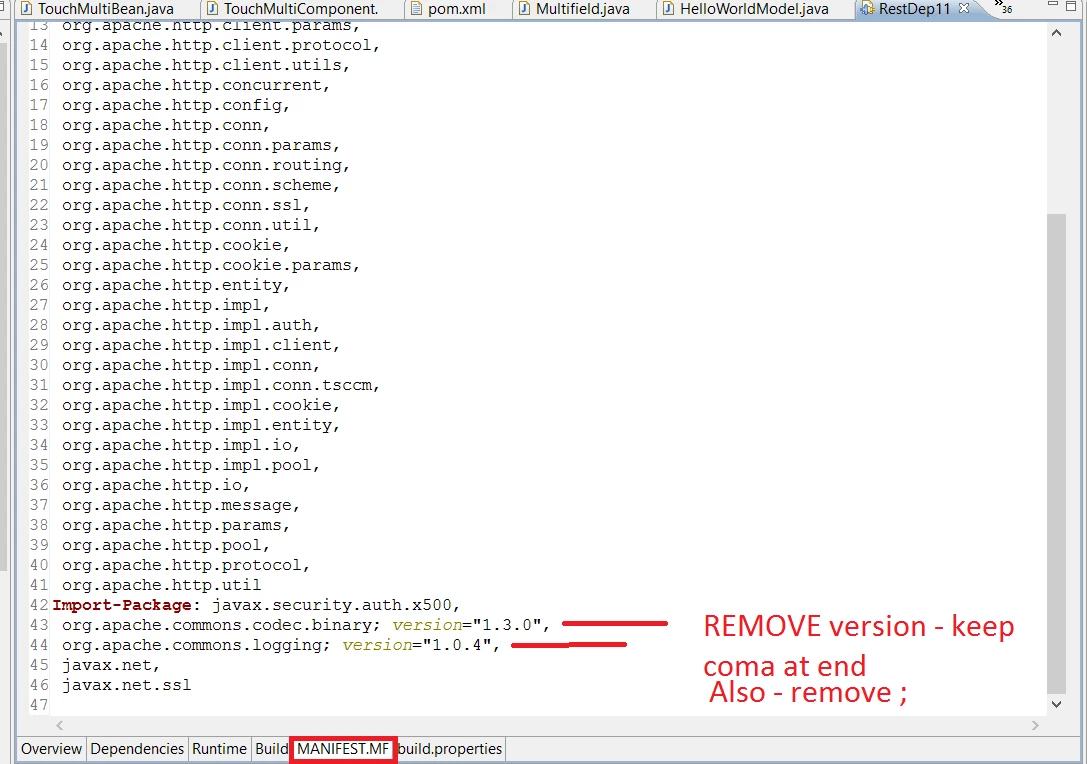
See this...

So ensure Import-Package looks like:

Import-Package: javax.security.auth.x500,

org.apache.commons.codec.binary,

org.apache.commons.logging,

javax.net,

javax.net.ssl

Follow the rest of the instructions to make a OSGi bundle with these JARs in it. They are needed to make the Restfulful Java call work.

We have a video that shows you everything - step by step -- watch here -- Scott's Digital Community: Creating an AEM HTML Template Language Component that displays data from a Restful Web Servic…

3 replies

smacdonald2008
Level 10
December 7, 2017

Click the Manifest MF in the tab - this will show you the MF file,

smacdonald2008
smacdonald2008Accepted solution
Level 10
December 7, 2017

See this...

So ensure Import-Package looks like:

Import-Package: javax.security.auth.x500,

org.apache.commons.codec.binary,

org.apache.commons.logging,

javax.net,

javax.net.ssl

Follow the rest of the instructions to make a OSGi bundle with these JARs in it. They are needed to make the Restfulful Java call work.

We have a video that shows you everything - step by step -- watch here -- Scott's Digital Community: Creating an AEM HTML Template Language Component that displays data from a Restful Web Servic…

smacdonald2008
Level 10
December 7, 2017

As described in the article --

1. Start Eclipse (The Indigo version works best). The steps below have been tested on Eclipse Java EE IDE for Web Developers version Indigo Service Release 1.