Create Language Copy Wizard Doesn't Work Correctly
Hi Community,
I use AEM 6.4 and I got puzzled with the language copy wizard.
Preconditions:
- a site root created (/content/<brand>);
- a child node is a base language page (say, en_us);
- a translation cloud configuration created under path /conf/<brand>/settings/cloudconfigs/translation/translationcfg/default_translation;
- jcr:content node of the website root has cq:conf property with a link to the confg.
So, as a user, I'd like to see the cloud configuration in the 2nd tab of language copy wizard and its path in path picker (#1 on the screen cap). I also would like to have access to configuration page through the link (#2 on the screen cap).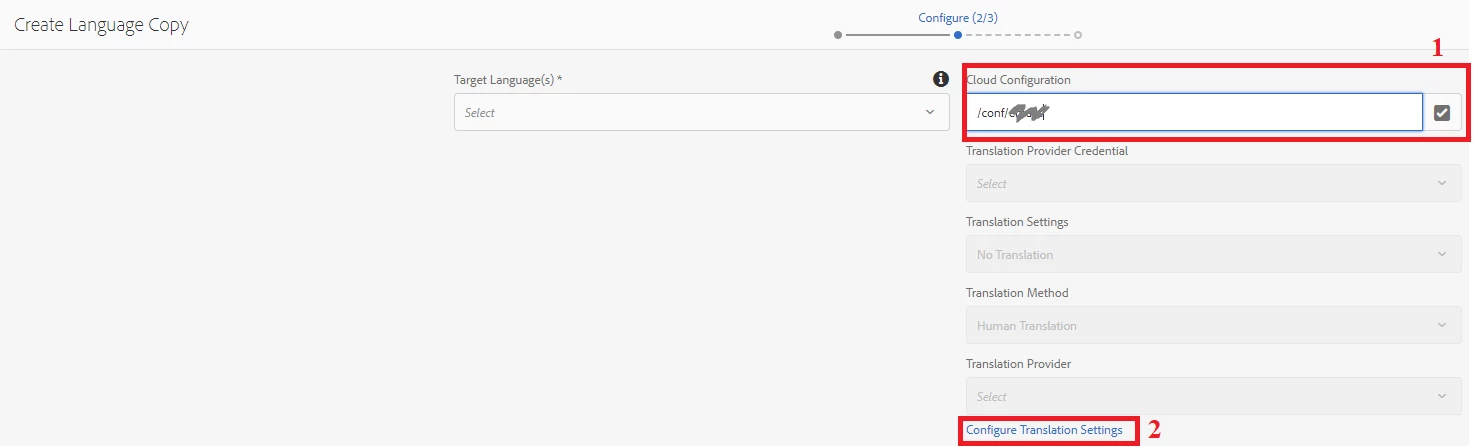
However, the wizard doesn't show the path and the link works not as I expect (it goes to original /libs cloud translation configuration).
Nevertheless, if I manually choose the configuration from the path picker, then everything works as expected (as you can see on the screen cap).
So I took some time debugging how it works and I found that the desired behavior will be displayed only if either url path has suffix or parameter 'item' with current page as a value. (If you need more details, please see ConfigPathBrowserImpl#getCurrentPage() )
Could you please help me on that? Is it a bug?
Thanks in advance
Best regards,
Sergei