CQ/component dialog: pre-populate form fields based on dropdown list selection | Community
Skip to main content
jayv25585659
Level 8
July 17, 2023
Solved

CQ/component dialog: pre-populate form fields based on dropdown list selection

  • July 17, 2023
  • 1 reply
  • 629 views

This is for a component dialog (and not a rendered page). An content author will be configuring this.

-------------------------

might be best explain with an example:


I have a dropdown list for product items (example: the list contains all the model numbers Bose QuietComfort series).


If I select QC25 from the list, the 2 fields below the dropdown will auto-populate with data regards QC25.


example:

field1 => wireless  capability | value = Yes

field2 => description | value = "insert some text here"


something like this:
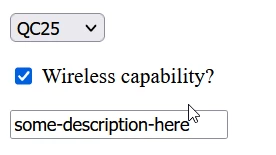
 

Any ideas on how this can be done?

This post is no longer active and is closed to new replies. Need help? Start a new post to ask your question.
Best answer by Nishant-Singh

Hi @jayv25585659  

Your Use case is to develop cascading dropdown list.

You can refer below Blog to get the reference how you can implement this.

https://jimfrenette.com/aem/components/dialog-coral-ui-select-cascade/


1 reply

Nishant-Singh
Adobe Employee
Nishant-SinghAdobe EmployeeAccepted solution
Adobe Employee
July 17, 2023

Hi @jayv25585659  

Your Use case is to develop cascading dropdown list.

You can refer below Blog to get the reference how you can implement this.

https://jimfrenette.com/aem/components/dialog-coral-ui-select-cascade/