Copy/Paste Experience Fragments | Community
Skip to main content
Level 3
February 17, 2022
Solved

Copy/Paste Experience Fragments

  • February 17, 2022
  • 3 replies
  • 1489 views

Hi All, 

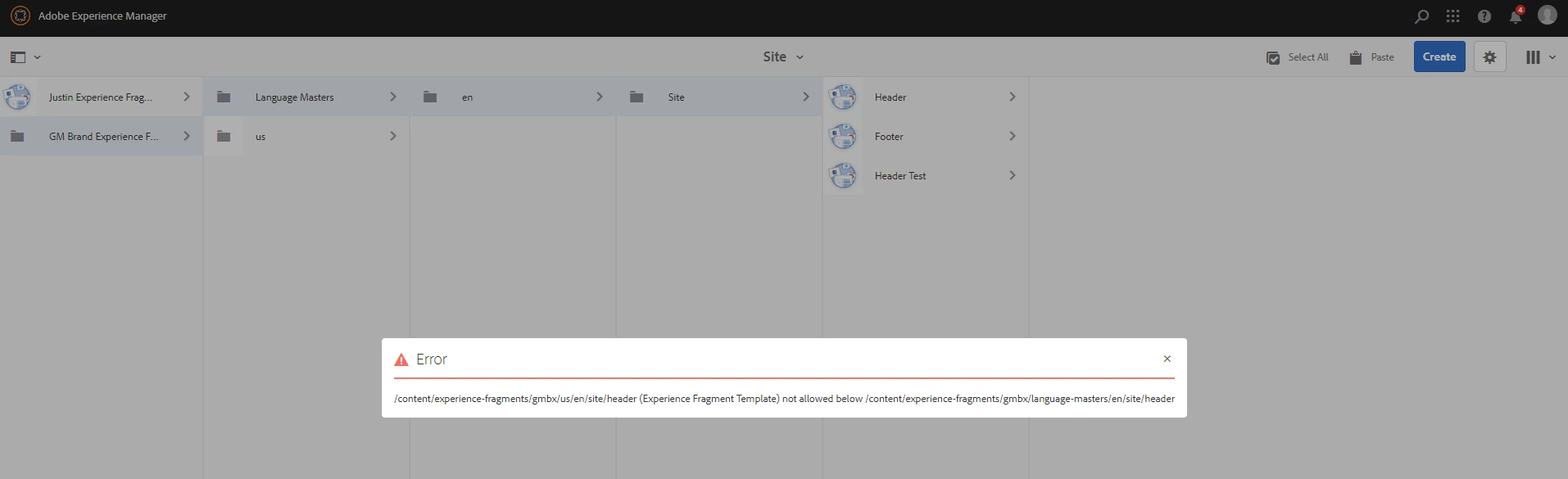
I am having a hard time figuring out if it is possible to copy and paste a Experience Fragment Template into another folder. When I try to do so, I will get this error. In the example below I was trying to copy and paste a Header(Experience Fragment) from "us" to the site folder in "Language Masters". 


This post is no longer active and is closed to new replies. Need help? Start a new post to ask your question.
Best answer by Anish-Sinha

Hi @justinbr17 ,
You can definitely do a copy paste the experience fragments from on folder to another. Looking at the screenshot, looks like there might be some permission issue. If not and this is happening on your local with admin credentials, try to restart your instance and check if this fixes. 

3 replies

Anish-Sinha
Adobe Employee
Anish-SinhaAdobe EmployeeAccepted solution
Adobe Employee
February 17, 2022

Hi @justinbr17 ,
You can definitely do a copy paste the experience fragments from on folder to another. Looking at the screenshot, looks like there might be some permission issue. If not and this is happening on your local with admin credentials, try to restart your instance and check if this fixes. 

Nitin_laad
Community Advisor
Community Advisor
February 17, 2022
lukasz-m
Community Advisor
Community Advisor
February 17, 2022

Hi @justinbr17, you have to configure Allowed Templates section in properties of your target folder by adding path to the template(s) that you are using to create your XF.

Here is also link to documentation: https://experienceleague.adobe.com/docs/experience-manager-65/authoring/authoring/experience-fragments.html?lang=en#creating-and-configuring-a-folder-for-your-experience-fragments