New
Content fragments created using custom CFM show size as 0B
| Request for Feature Enhancement (RFE) Summary: | Content fragments created using custom CFM show size as 0B |
| Use-case: | Authors create CFs and they see the size of the CF is 0B as opposed to having some numeric value since the CF is not empty |
| Current/Experienced Behavior: | Create a Content fragment model in Tools->Assets->Content Fragment Models. Go to Navigation->Assets, click create, select content fragment from the drop-down. Select the content fragment model you created. Enter data into CF and click save. Change the view in Assets folder to List view, the size column for this content fragment shows 0B. When you create a content fragment which uses an OOB AEM CFM, the size is calculated correctly |
| Improved/Expected Behavior: | The size of the content fragment refering any CFM (custom or OOB) should show the actual size. |
| Environment Details (AEM version/service pack, any other specifics if applicable): | AEM 6.5.21.0 |
| Customer-name/Organization name: | Fidelity Investments Canada |
| Screenshot (if applicable): | 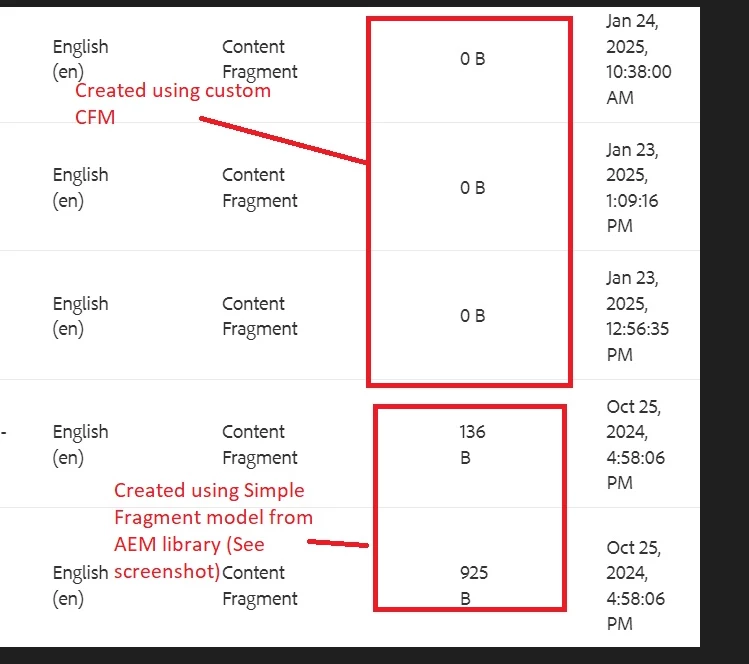
|
| Code package (if applicable): |