Content Fragment Model GraphQL Properties | Community
Skip to main content
Level 2
October 29, 2021
Solved

Content Fragment Model GraphQL Properties

  • October 29, 2021
  • 2 replies
  • 1110 views

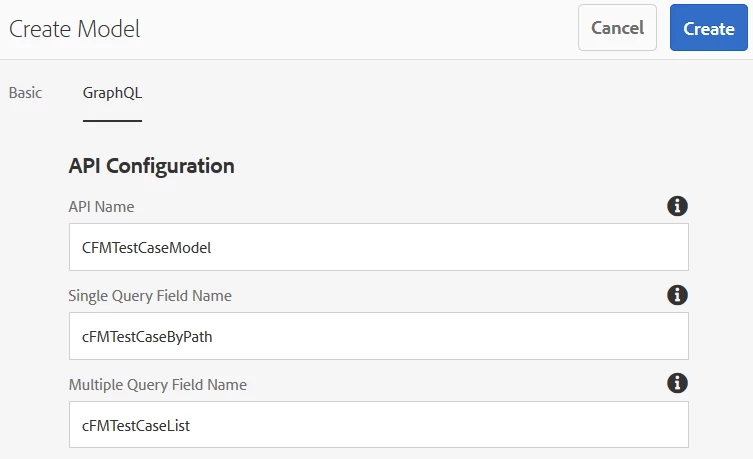
I have been reviewing the new GraphQL integration in sp10. The content fragment model's Properties has a new tab.

GraphQL

  • API Configuration
    • API Name
    • Single Query Field Name
    • Multiple Query Field Name
  • Cache Configuration
    • Browser Cache duration...
    • CDN Cache duration...

I checked the Adobe Content Fragment Model doc and revisited some of the AEM tutorial docs, but none discuss this tab. What can I do with it and where can I find more documentation? 
This post is no longer active and is closed to new replies. Need help? Start a new post to ask your question.
Best answer by KurtHo1

I get it now. Here's what it is in case anyone else is looking and has the same experience.


API Name - Model Name
Single Query Field Name - Adobe's ByPath query option
Multiple Query Field Name - Adobe's List query option


When I upgraded to SP10, all existing cfm API Configuration fields were left blank so I had no idea what they were doing and couldn't find additional information about it. When @kishore_kumar_ asked for a screenshot, I created a new model. The fields were auto-populated and follow the naming convention in the GraphiQL Docs section. This GraphQL Tab gives me the ability to use my own naming convention for Query Type names if needed.

2 replies

Kishore_Kumar_
Level 9
November 3, 2021

Hi @kurtho1 ,


Could you please attach a screenshot, I could not see these properties in CF Model.

KurtHo1AuthorAccepted solution
Level 2
November 3, 2021

I get it now. Here's what it is in case anyone else is looking and has the same experience.


API Name - Model Name
Single Query Field Name - Adobe's ByPath query option
Multiple Query Field Name - Adobe's List query option


When I upgraded to SP10, all existing cfm API Configuration fields were left blank so I had no idea what they were doing and couldn't find additional information about it. When @kishore_kumar_ asked for a screenshot, I created a new model. The fields were auto-populated and follow the naming convention in the GraphiQL Docs section. This GraphQL Tab gives me the ability to use my own naming convention for Query Type names if needed.