mohanb
Level 4
Sep 22, 2016 5:59 PM UTC
Solved

configuring RTE plugin for content fragment editor

Hi 

Has anyone configuration RTE plugin for content fragment editor? I am looking for node structure where default RTE config is stored for content fragment editor and whether it can be customized as per user needs

sureshr19072451
sureshr19072451Accepted solution
Level 3
Feb 19, 2019 3:30 PM UTC

You could try manually overlaying the StyleTextEditor.js file under /apps  -

Don't forget to define the categories and dependencies as done for clientLibraryFolders under /libs.

For ex:

Thanks.

16 replies

sureshr19072451
Level 3
Jan 21, 2019 3:41 AM UTC

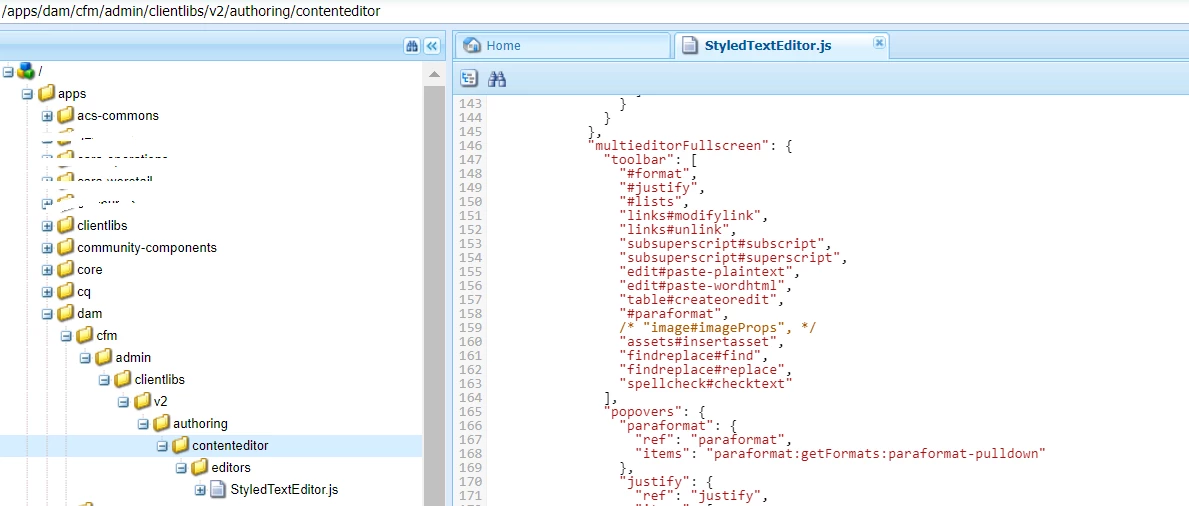
One quickest way to add subscript & superscript to CF Content Editor by editing /libs/dam/cfm/admin/clientlibs/v2/authoring/contenteditor/editors/StyledTextEditor.js

Here's my updates that adds these two plugins for both normal and full screen mode editors -

1.  "inline": {

              "toolbar": [

                "#format",

                "#justify",

                "#lists",

                "links#modifylink",

                "links#unlink",

                "subsuperscript#subscript",

                "subsuperscript#superscript" 

              ],

2.  "multieditorFullscreen": {

              "toolbar": [

                "#format",

                "#justify",

                "#lists",

                "links#modifylink",

                "links#unlink",

               "subsuperscript#subscript",

                "subsuperscript#superscript",

                "edit#paste-plaintext",

                "edit#paste-wordhtml",

                "table#createoredit",

                "#paraformat",

                /* "image#imageProps", */

                "assets#insertasset",

                "findreplace#find",

                "findreplace#replace",

                "spellcheck#checktext"

              ],

Full Screen Mode -

Someone from Adobe or Customizations Master Sreekanth to comment on this or take this little further so that many devs can get advantage of this information.

Translate
sureshr19072451
sureshr19072451Accepted solution
Level 3
Feb 19, 2019 3:30 PM UTC

You could try manually overlaying the StyleTextEditor.js file under /apps  -

Don't forget to define the categories and dependencies as done for clientLibraryFolders under /libs.

For ex:

Thanks.

Translate
Level 2
Aug 23, 2022 1:12 PM UTC

How can we custom the js for rte not appending .html to links

Translate
giurged74926129
Oct 29, 2019 9:41 AM UTC

I tried to enabled image#imageProps but doesn't work.

I don't know why the files under admin are like disable or something like this.

I want to add a property in rich text for the image (align: left, right).

Translate
Level 2
Dec 4, 2019 8:13 PM UTC

Is there a reason Images were disabled in AEM 6.4.4?

Translate
Level 2
Jul 19, 2021 4:25 PM UTC

I think there might be a bug in /libs/dam/cfm/admin/clientlibs/v2/authoring/contenteditor/editors/StyledTextEditor.js that is preventing the normal node-based configuration that relies on loading data-config-path during the ._start() method, because it sets $editable.data('config') with the default rte plugins during the .start() method before delegating to the ._start() method.


/libs/clientlibs/granite/richtext/js/rte/ConfigUtils.js defines a loadConfigAndStartEditing() method that follows this flow:

var config = {}; var configObj = $editable.data('config'); if (configObj) { config = ... } else { var configPath = $editable.data('config-path'); config = ... }


If $editable.data('config') is already set, it skips the $editable.data('config-path') loading logic, which is where the node-based configuration would come from.


This method is called during the StyledTextEditor._start() method, which is executed by StyledTextEditor.start() only after setting $editable.data('config') with the defaultCFMRTEConfig.

ns.StyledTextEditor.prototype.start = function() { this.$formViewContainer.removeClass("hidden"); this.$editable = this.$formViewContainer.find(this.options.selectorForEditable); this.$editable.data("config", $.extend(true, {}, defaultCFMRTEConfig)); var self = this; if (this.options.customStart) { this.$editable.on("rte-start", function() { if (self.$editable.data("useFixedInlineToolbar")) { self._start(); } }); } else { if (this.$editable.data("useFixedInlineToolbar")) { this._start(); } } };


Translate
