condition compare in sightly | Community
Skip to main content
Level 3
July 29, 2020
Solved

condition compare in sightly

  • July 29, 2020
  • 5 replies
  • 3321 views

Dear All,


I have one dialog , where I have defined skuid , installation label and installation link , as shown below.
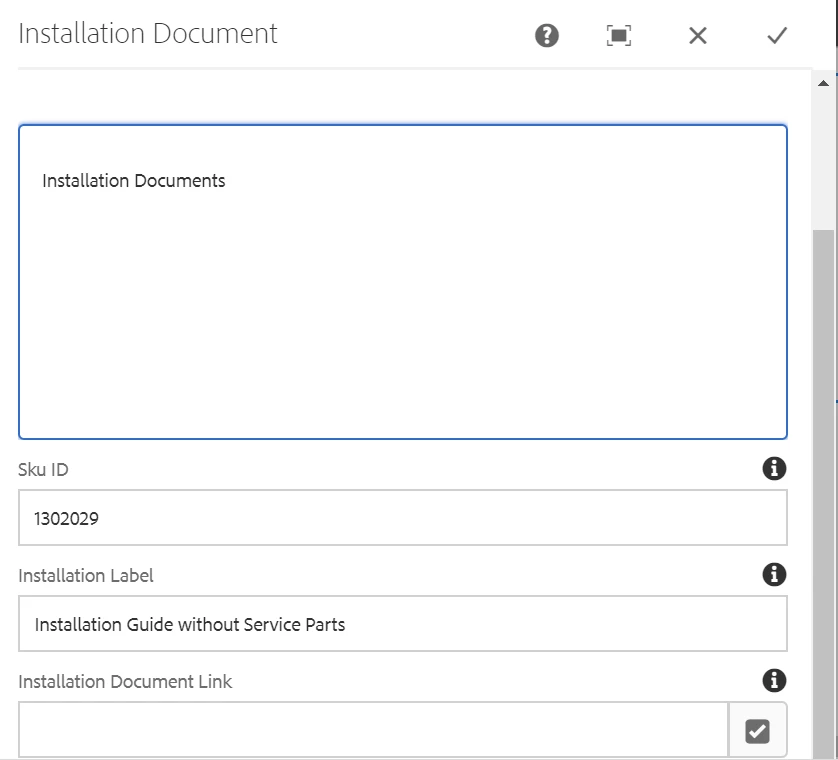


Now , my requirement is that if Sku ID is blank ("null") then it will display the installation document link in sightly


if Sku ID is not blank ("not null") then it will display the Sku ID link in sightly.


For above , I have written below in the sightly. But it is not working fine , as shown below.


**************SIGHTLY CODE **********************

<div class="installation-documents" data-sly-use.installationdocuments="com.sunita.core.components.models.InstallationDocumentModel">

<h2 class="installation_header">${installationdocuments.header}</h2>

<div>${installationdocuments.description @2941342 = 'html'}</div>

<!-- <div><h3>${installationdocuments.skuid}</h3></div> -->


<sly data-sly-test="${installationdocuments.skuid == '' || installationdocuments.skuid == null}">
<h2> Sku-ID null</h2>
<ul>
<a class="new-tab" href="http://localhost:4502/assetdetails.html${installationdocuments.installationLink}" target="_blank">
${installationdocuments.installationLabel}
</a>
</ul>
</sly>

<sly data-sly-test="${installationdocuments.skuid != '' || installationdocuments.skuid != null}">
<h2> Sku-ID not null</h2>
<ul>
<a class="new-tab" href="http://localhost:4502/assetdetails.html/content/dam/referencesite/bathroomproducts/${installationdocuments.skuid}.pdf" target="_blank">
${installationdocuments.installationLabel}
</a>
</ul>
</sly>
</div>

 

This post is no longer active and is closed to new replies. Need help? Start a new post to ask your question.
Best answer by Nupur_Jain

Hi @dipu2 


Try below:


<sly data-sly-test.skuid="${installationdocuments.skuid}">
<h2> Sku-ID not null</h2>
<ul>
<a class="new-tab" href="http://localhost:4502/assetdetails.html/content/dam/referencesite/bathroomproducts/${installationdocuments.skuid}.pdf" target="_blank">
${installationdocuments.installationLabel}
</a>
</ul>
</sly>

<sly data-sly-test="${!skuid}">
<h2> Sku-ID null</h2>
<ul>
<a class="new-tab" href="http://localhost:4502/assetdetails.html${installationdocuments.installationLink}" target="_blank">
${installationdocuments.installationLabel}
</a>
</ul>
</sly>


In above changes, I am checking sku id not null first and variable in expression in data-sly-test take both null as empty as false. So, there is no need to check empty and null seperately.


Hope it helps!

Thanks!

Nupur

5 replies

dipu2Author
Level 3
July 29, 2020

Adding to above , in my sightly output both null and not null is coming , as shown above.

Nupur_Jain
Adobe Employee
Nupur_JainAdobe EmployeeAccepted solution
Adobe Employee
July 29, 2020

Hi @dipu2 


Try below:


<sly data-sly-test.skuid="${installationdocuments.skuid}">
<h2> Sku-ID not null</h2>
<ul>
<a class="new-tab" href="http://localhost:4502/assetdetails.html/content/dam/referencesite/bathroomproducts/${installationdocuments.skuid}.pdf" target="_blank">
${installationdocuments.installationLabel}
</a>
</ul>
</sly>

<sly data-sly-test="${!skuid}">
<h2> Sku-ID null</h2>
<ul>
<a class="new-tab" href="http://localhost:4502/assetdetails.html${installationdocuments.installationLink}" target="_blank">
${installationdocuments.installationLabel}
</a>
</ul>
</sly>


In above changes, I am checking sku id not null first and variable in expression in data-sly-test take both null as empty as false. So, there is no need to check empty and null seperately.


Hope it helps!

Thanks!

Nupur

BrianKasingli
Community Advisor and Adobe Champion
July 29, 2020

Adding on to @nupur_jain,

Can you please provide the Sling Model implementation. You might have written you Sling Model improperly. 

dipu2Author
Level 3
July 30, 2020

HI Brian,


I do not think there is any issue in my slingmodel , as it is very much blank.


Below is my slingmodel.


protected static final Logger LOGGER = LoggerFactory.getLogger(InstallationDocumentImpl.class);

private Session session;

@3214626
private QueryBuilder builder;

// Inject a Sling ResourceResolverFactory
@3214626
private ResourceResolverFactory resolverFactory;

@ValueMapValue
@2434638("resource")
private String header;

@ValueMapValue
@2434638("resource")
private String description;


@ValueMapValue
@2434638("resource")
private String skuid;

@ValueMapValue
@2434638("resource")
private String installationLabel;

@ValueMapValue
@2434638("resource")
private String installationLink;

@ScriptVariable
private Page currentPage;

// Inject the installationdocmtlink node under the current node

/*
* @586265
*
* @7392697 public Resource installationdocmtlink;
*/

public static String getResourceType() {
return RESOURCE_TYPE;
}

@9944223
public String getExportedType() {
return RESOURCE_TYPE;
}

@9944223
public String getHeader() {
// LOGGER.info("Before return header *******" + header);
return header;
}

@9944223
public String getDescription() {
// LOGGER.info("Before return description *******" + description);
return description;
}


@9944223
public String getSkuid() {
LOGGER.info("Before return skuid *******" + skuid);
return skuid;
}

@9944223
public String getInstallationLabel() {
LOGGER.info("Before return installationLabel *******" + installationLabel);
return installationLabel;
}

@PostConstruct
private void initModel() throws Exception {
LOGGER.info("after return installationLink *******" + installationLink);

}

@9944223
public String getInstallationLink() {
LOGGER.info("Before return installationLink *******" + installationLink);
return installationLink;
}

}

dipu2Author
Level 3
July 30, 2020

Thanks Nupur .

It is working now.

I have one small question here. 

Currently I have hard coded the href , as shown below

<a class="new-tab" href="http://localhost:4502/assetdetails.html/content/dam/referencesite/bathroomproducts/${installationdocuments.skuid}.pdf" target="_blank">


Is there any way to not hard coded ??http://localhost:4502/assetdetails.html/content/dam/referencesite/bathroomproducts and show the url 


Also when I am trying to use below in my HTML by using the path link , 


<a class="new-tab" href="${installationdocuments.installationLink @2941342 = 'uri'}" target="_blank">
${installationdocuments.installationLabel}


My PDF file is downloading , but not opening as URL...in new tab.


My cq dialog is like above .


dipu2Author
Level 3
July 30, 2020

My cq:dialog for pathlink is as below.