Component's dialog tabs are broken in AEM 6.3, CoralUi3 | Community
Skip to main content
Level 2
August 8, 2018
Solved

Component's dialog tabs are broken in AEM 6.3, CoralUi3

  • August 8, 2018
  • 32 replies
  • 14160 views

I was migrating the sling:resourceType granite/coralUi3 properties by follwing this helpex article : Migration Guide to CoralUI 3-based — Granite UI 1.0 documentation 

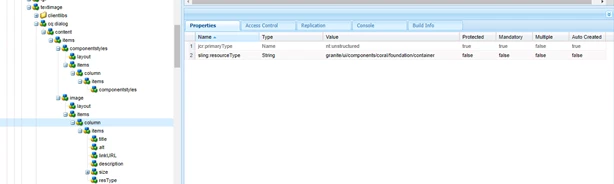
Where i was trying to modify the textImage component. This article says that in AEM 6.3 layouts have been removed. so i modified my component as:

I removed the "layout" from starting. But my dialog tabs appears to be broken:
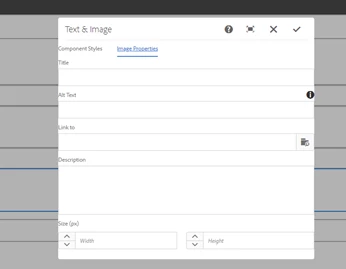
I changed all the sling:resourceType properties inside second tab according to that helpex document and after that this dialogs is showing distorted.  Also the margin in the two tabs also not looking good.

Is there problem going on with coralUi3 or something i missed here? Any suggestions would be appreciated.

This post is no longer active and is closed to new replies. Need help? Start a new post to ask your question.
Best answer by smacdonald2008

Here is the link with the package that works.

https://helpx.adobe.com/experience-manager/using/aem64_htl_movie_component.html

Also - here is a video that shows Granite/COral component dialog looks good with tabs.

32 replies

smacdonald2008
Level 10
August 8, 2018

No issue at all with granite coral/granite types - go through this doc -- Building Experience Manager Components using Granite/Coral Resource Types

All of the Touch UI dialogs work perfectly.

smacdonald2008
Level 10
August 8, 2018
Level 2
August 8, 2018

Thank you for your reply Scott!

Yes everything works fine with the coral/granite types, i checked this document and installed the package for the component "Lab2018". I was looking for a component inside it, where we have more than one tabs in the component's dialog but it was not there, so

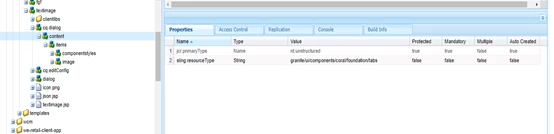
1. I tried to modify this component named "/apps/Lab2018/components/content/firstcomponent" where the layout is "granite/ui/components/foundation/layouts/tabs" which is fine and inside it we have one section (sling:resourceType : granite/ui/components/foundation/section) named "Hero Text Properties" (second image attached)

2. In my case as i want two tabs in the dialog so i created one more section exactly having same properties as that of "Hero Text properties". I was expecting the structure to be appearing in two tabs, as i have two sections in the layout now. But it did not happen. (Third image attached)

3. It is appearing in a cascaded manner (one section at the top and next just at the bottom of it). First image attched!

I was looking for a scenario with more than one tab in component's dialog specifically the new coral/granite types in 6.3/6.4 versions. Could you please help, how can i address this? It works fine with previous coralui2/granite types, but not here.

smacdonald2008
Level 10
August 8, 2018

We will be releasing the Movie COmpoennt article for AEM 6.4. This component example uses coral/granite tabs that work fine too - see this illustration.

smacdonald2008
Level 10
August 8, 2018

I will post the link here when its updated to AEM 6.4 in a day or so.

Level 2
August 8, 2018

Thanks Scott!

That will be a great help! I will wait to hear from your side.

smacdonald2008
Level 10
August 8, 2018

It will be up in a day or so. I am working on it now.

smacdonald2008
smacdonald2008Accepted solution
Level 10
August 9, 2018

Here is the link with the package that works.

https://helpx.adobe.com/experience-manager/using/aem64_htl_movie_component.html

Also - here is a video that shows Granite/COral component dialog looks good with tabs.

Ratna_Kumar
Level 10
August 9, 2018

Hi Ashish,

Yes this works. I just now tested the new article which shows coral/granite resource types. See below.

Thanks,

Ratna Kumar.

smacdonald2008
Level 10
August 9, 2018

Thanks Ranta for testing community content - this is awesome!