Component name is breaking when adding to a page | Adobe Higher Education
Skip to main content
akhilraj
Level 5
July 27, 2022
Respondido

Component name is breaking when adding to a page

  • July 27, 2022
  • 2 respostas
  • 1239 Visualizações

Hi,


When we are adding a component, it's name is breaking in the node structure and due to which some functionality is not working.


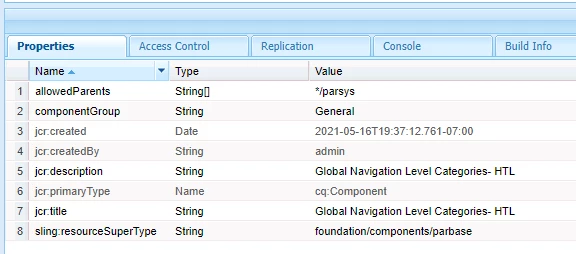
Component :


When we add it to a  page, it should look like below,


Expected:


Actual:  global_nav_categorie          - last word s is missing.


Any idea where we can check it?


Este tópico foi fechado para respostas.
Melhor resposta por Sachin_Arora_

I could see the same behavior in my local. Components that are dragged and dropped, the length of node name is restricted to 20 characters(excluding _ in end and random number). But that should ideally not impact any functionality because the name of node for a component is random and its functionality works based on Sling resolution. For example if you drag and drop the same component again, its name would be global_nav_categorie_RANDOM_NUMBER. 


If somewhere you are referring this node name, then you should use cq:template and refer the exact same name i.e. global_nav_categorie or refer same name in structure/initial of editable template. It should work fine.

Also if there is no restriction, I think you can change the name of the component and limit its name to max 20 characters. 

2 Respostas

Mohit_KBansal
Adobe Employee
Adobe Employee
July 27, 2022

Can you check and confirm, if you dont have another component with name "global_nav_categorie" (without s)?


I noticed that your component global_nav_categories is part of group General, so check if you may have created another component with the same name (without s) and make it part of your project group.

akhilraj
Level 5
July 27, 2022

Hi @mohit_kbansal ,

We don't have anything with "global_nav_categorie".

It will come to content/jcr:content  with mentioned name once we add the component to page

Mohit_KBansal
Adobe Employee
Adobe Employee
July 27, 2022

@akhilraj So the resourcePath is pointing to your component when you place it on content/jcr:content?

Sachin_Arora_
Community Advisor
Community Advisor
July 27, 2022

I could see the same behavior in my local. Components that are dragged and dropped, the length of node name is restricted to 20 characters(excluding _ in end and random number). But that should ideally not impact any functionality because the name of node for a component is random and its functionality works based on Sling resolution. For example if you drag and drop the same component again, its name would be global_nav_categorie_RANDOM_NUMBER. 


If somewhere you are referring this node name, then you should use cq:template and refer the exact same name i.e. global_nav_categorie or refer same name in structure/initial of editable template. It should work fine.

Also if there is no restriction, I think you can change the name of the component and limit its name to max 20 characters.