Component lists not apearing in Touch UI after upgrading to Service Pack | Community
Skip to main content
February 4, 2022
Solved

Component lists not apearing in Touch UI after upgrading to Service Pack

  • February 4, 2022
  • 1 reply
  • 1242 views

Hi All,

Hope you are doing well..


I just installed AEM 6.5 on my MacBook Pro for testing purposes and to play around with this app. The first time I installed from scratch (6.5.0), everything was working fine but when I updated it to SP11 the component list disappeared. I didn't touch anything at config level etc.. it just happened when upgrading. Somehow the components are there but it's not showing up, instead, they are kind of greyed out.
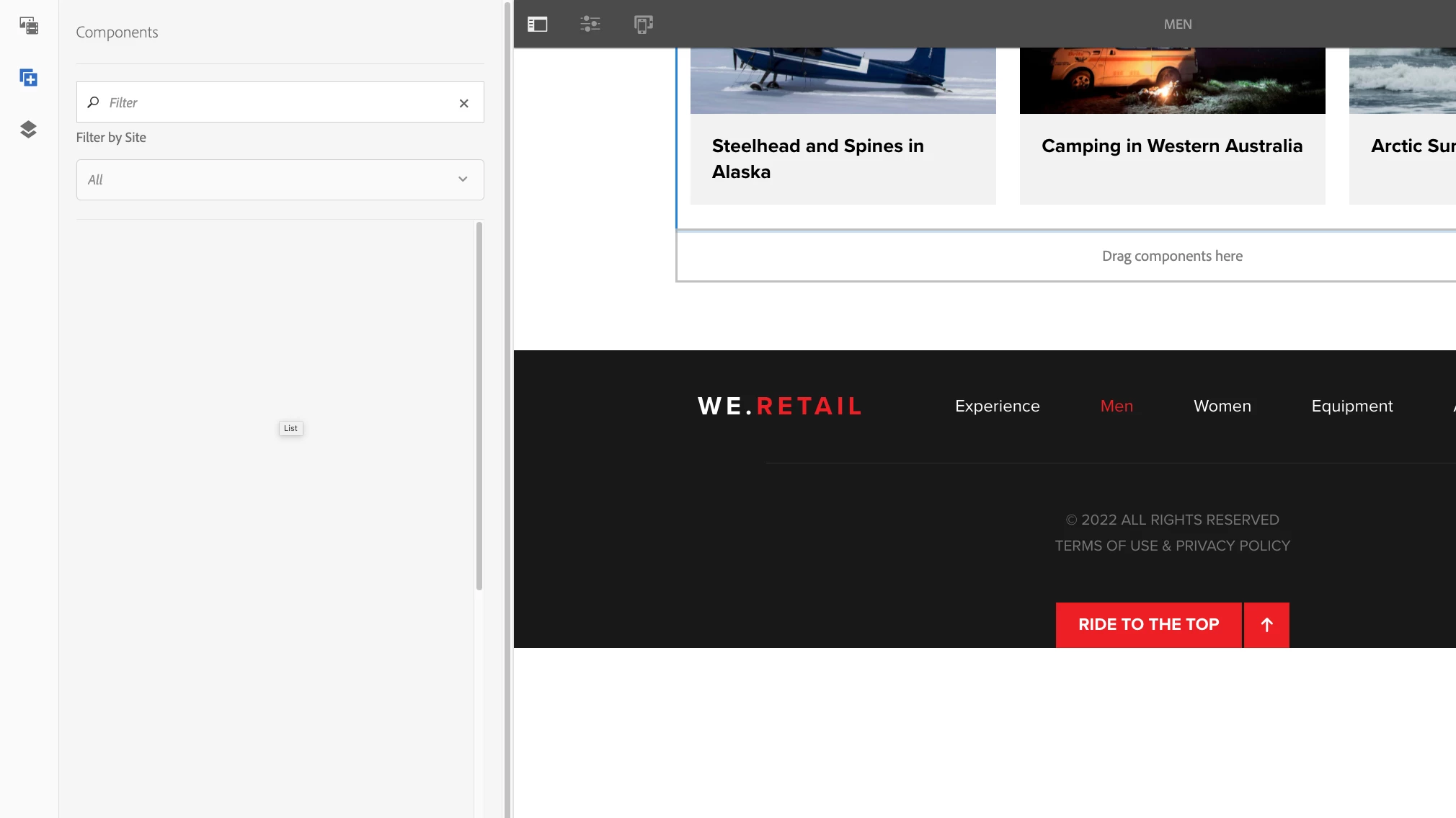


I tried to find more information but there is nothing related to this. I tried also invalidate client libs using "http://localhost:4502/libs/granite/ui/content/dumplibs.rebuild.html?invalidate=true" and didn't work.  Error.log doesn't show any error so I don't know what else to do. Have someone experience the same issue? If so, could you please help me?.


Regards

This post is no longer active and is closed to new replies. Need help? Start a new post to ask your question.
Best answer by Anish-Sinha

Hi @erneochoa ,
The components are enabled by adding them into the policy of the template.  Ideally this shouldn't happen, I have never seen this issue with an upgrade to service pack, but to fix this, you can just re-enable the components on the we retail template. Check this post. I have explained how to enable the component:

https://experienceleaguecommunities.adobe.com/t5/adobe-experience-manager/allowed-components-no-longer-showing-in-layour-container/m-p/439492#M125507


1 reply

Anish-Sinha
Adobe Employee
Anish-SinhaAdobe EmployeeAccepted solution
Adobe Employee
February 4, 2022

Hi @erneochoa ,
The components are enabled by adding them into the policy of the template.  Ideally this shouldn't happen, I have never seen this issue with an upgrade to service pack, but to fix this, you can just re-enable the components on the we retail template. Check this post. I have explained how to enable the component:

https://experienceleaguecommunities.adobe.com/t5/adobe-experience-manager/allowed-components-no-longer-showing-in-layour-container/m-p/439492#M125507


ErneOchoaAuthor
February 4, 2022

Hi @anish-sinha,


All the Policy options are enabled in the template editor but the issue persist. 


somehow it's allowing me to add the component by clicking on "Drag the component" but the Component list still not showing up.


what I don't understand is why after upgrading to a SP from a clean installation of AEM is having this kind of issues.

ErneOchoaAuthor
February 4, 2022

Hi @anish-sinha,


Forget about it....


I found out the issue. it was Browser cache. I opened AEM in different browser and all the components were loading fine. I know it may sound dumb but it was real.


If someone experiences the same, please do the following just in case


1.- Clear / recompile clientlibs http://localhost:4502/libs/granite/ui/content/dumplibs.rebuild.html

2.- Recompile JSP by going to http://localhost:4502/system/console/fsclassloader

3.- Clear Browser cache or open in a new incognito window


Thanks.