component dialog - how do I wrap/group fields inside a box? | Community
Skip to main content
jayv25585659
Level 8
May 18, 2023
Solved

component dialog - how do I wrap/group fields inside a box?

  • May 18, 2023
  • 3 replies
  • 2416 views

just to quickly explain the situation


I have a component dialog with lots of textfields.


granite/ui/components/coral/foundation/form/textfield


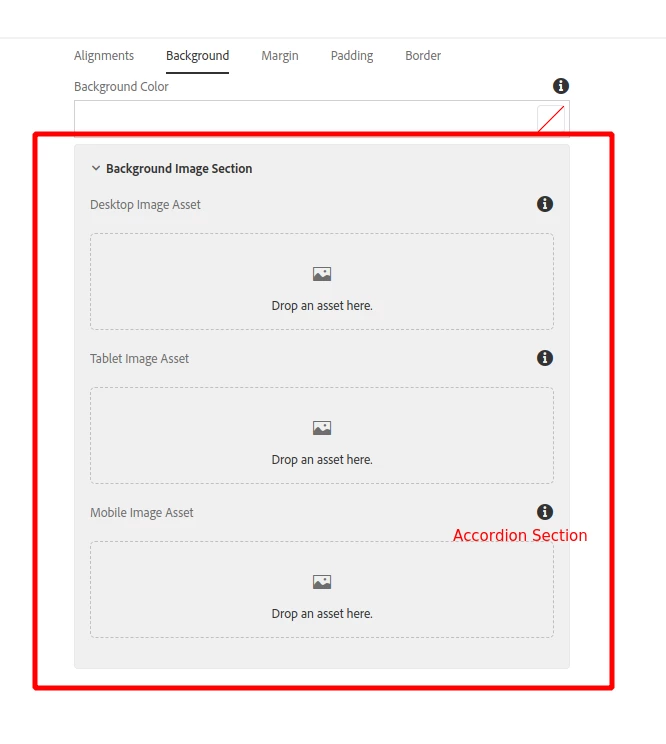
Because of usability issues, I want to group the related ones by enclosing them in sort sort of box like in the screenshot below.


I've already tried 

granite/ui/components/coral/foundation/form/fieldset

but the behavior is different.

Any ideas on how can I do it? Thank you.


-------------

This is a screenshot for a sample form from w3schools.
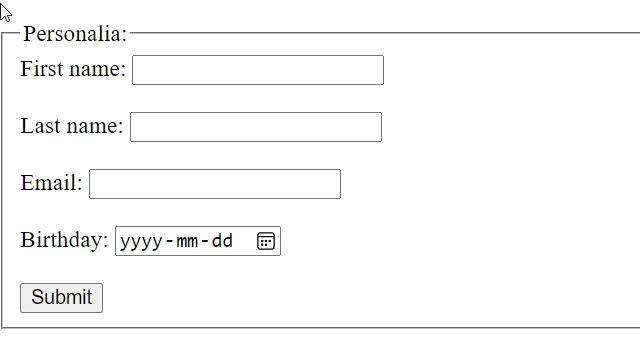
How can I do it?

This post is no longer active and is closed to new replies. Need help? Start a new post to ask your question.
Best answer by Sady_Rifat

Hello @jayv25585659 ,

For groups you can use accordion. https://developer.adobe.com/experience-manager/reference-materials/6-5/granite-ui/api/jcr_root/libs/granite/ui/components/coral/foundation/accordion/index.html 

<section jcr:primaryType="nt:unstructured" sling:resourceType="granite/ui/components/coral/foundation/accordion" maximized="{Boolean}true"> <items jcr:primaryType="nt:unstructured"> <itemContainer jcr:primaryType="nt:unstructured" jcr:title="Personalia" sling:resourceType="granite/ui/components/coral/foundation/container" maximized="{Boolean}true"> <items jcr:primaryType="nt:unstructured"> <!-- YOUR ITEMS --> </items> </itemContainer> </items> </section>


3 replies

Sady_Rifat
Community Advisor
Sady_RifatCommunity AdvisorAccepted solution
Community Advisor
May 18, 2023

Hello @jayv25585659 ,

For groups you can use accordion. https://developer.adobe.com/experience-manager/reference-materials/6-5/granite-ui/api/jcr_root/libs/granite/ui/components/coral/foundation/accordion/index.html 

<section jcr:primaryType="nt:unstructured" sling:resourceType="granite/ui/components/coral/foundation/accordion" maximized="{Boolean}true"> <items jcr:primaryType="nt:unstructured"> <itemContainer jcr:primaryType="nt:unstructured" jcr:title="Personalia" sling:resourceType="granite/ui/components/coral/foundation/container" maximized="{Boolean}true"> <items jcr:primaryType="nt:unstructured"> <!-- YOUR ITEMS --> </items> </itemContainer> </items> </section>


EstebanBustamante
Community Advisor and Adobe Champion
May 18, 2023

I agree with @sady_rifat , another option could be to use collapsable type from granite https://developer.adobe.com/experience-manager/reference-materials/6-5/granite-ui/api/jcr_root/libs/granite/ui/components/foundation/layouts/collapsible/index.html?highlight=collapsable.


Beyond those, i think you dont have other options ootb, you could create your own view if really needed.

Esteban Bustamante
aanchal-sikka
Community Advisor
Community Advisor
May 21, 2023
 
 
You might want to explore /libs/core/wcm/components/download/v2/download/cq:dialog/content/items/tabs/items/properties/items/columns/items/column/items/titleGroup
 
It uses "granite/ui/components/coral/foundation/well" as sling:resourceType. 
The wells can be used to group multiple fields on dialog. Example: "Title" and "Get title from DAM Asset" in below screenshot.


Aanchal Sikka
Level 2
April 3, 2024

Hi @aanchal-sikka ,

Can you share the content.xml for the above shown example and also please can you share how to add a fieldLabel to a well?

Thanks