Communities Avatar URLs on Author | Community
Skip to main content
Level 2
November 6, 2017
Solved

Communities Avatar URLs on Author

  • November 6, 2017
  • 6 replies
  • 3615 views

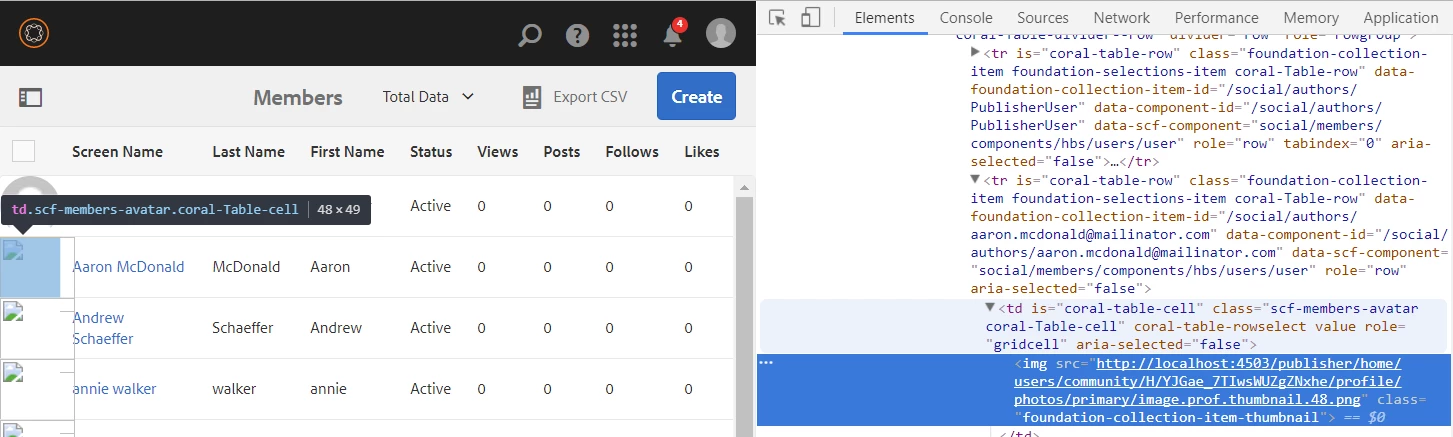
Using 6.3. After setting up AEM Communities and enabling tunneling we are able to see community users on the author side under Navigation > Communities > Members.  However, the URL to retrieve the users avatar profile picture is being generated incorrectly.  It is pointing to the default http://localhost:4503/... path, which is incorrect in our environment.  It needs to be https://www.ourdomain.com/aemauthor/.....    Where can this be configured?
This post is no longer active and is closed to new replies. Need help? Start a new post to ask your question.
Best answer by neerav

Okay, its not just the URL you'd like to change but the context path too. I can not comment unless I see the configuration or try replicating the issue myself. Can you please work with Adobe Support and open a Support ticket?

6 replies

Adobe Employee
November 7, 2017

Can you check if the Externalizer service [1] is configured properly?

[1] Externalizing URLs

DouglasPeAuthor
Level 2
November 7, 2017

I have given this a try, but it did not resolve the problem.  What I have noticed is the communities features just don't seem to always leverage the configuration/settings appropriately.  We also architected our solution with a tomcat application server in order to add a contextpath or directory to the end of each URL to separate author and publish.  e.g., https://www.ourdomain.com/author/ and https://www.ourdomain.com/publisher/.   A good amount of the communities features don't handle the context path at the end.  The links that AEM generates on the author site seem to drop the /author/ and wind up being invalid links.  For example if you select a communities site and try to edit it or go to the site information page it navigates you to an invalid URL.   It drops the /author/ and winds up pointing to https://www.ourdomain.com/editor.html/.....  This only happens under communities (about half the links/features), all other links throughout the site seem to work fine.

I was hoping this was some sort of configuration, otherwise it seems like a bug.

neeravAdobe EmployeeAccepted solution
Adobe Employee
November 8, 2017

Okay, its not just the URL you'd like to change but the context path too. I can not comment unless I see the configuration or try replicating the issue myself. Can you please work with Adobe Support and open a Support ticket?

DouglasPeAuthor
Level 2
December 18, 2017

This was submitted as a ticket and ultimately discovered to be a bug.  Adobe provided a patch that will be included in a future release

June 27, 2018

Hey, I'd like to follow up on the solution by asking to share the solution. You've worked with Adobe Support on it, but It is not clear which patch solved your problem. Unfortunately, we experienced the same issue on AEM 6.4. The URL to the communities user avatar contains the default http://localhost:4503 path. We checked also externalizer configs but it doesn't solve the problem. Could you share more details, please?

DouglasPeAuthor
Level 2
June 27, 2018

I did confirm it is now working in our environment. I tried to track down the daycare ticket but I cant for some reason.  If memory serves I think it might have been in SP2 for 6.3?  I do believe this is affected by the 'Publish' line in the Day CQ Link Externalizer configuration at .../system/console/configMgr of your author.