com.google.gson.internal -- Cannot be resolved | Community
Skip to main content
Level 2
June 11, 2020
Solved

com.google.gson.internal -- Cannot be resolved

  • June 11, 2020
  • 4 replies
  • 12020 views

Hi Team,


How to add embed-dependency in bnd-maven-plugin. wanna add com.google.gson


com.google.gson.internal -- Cannot be resolved


This post is no longer active and is closed to new replies. Need help? Start a new post to ask your question.
Best answer by VeenaVikraman

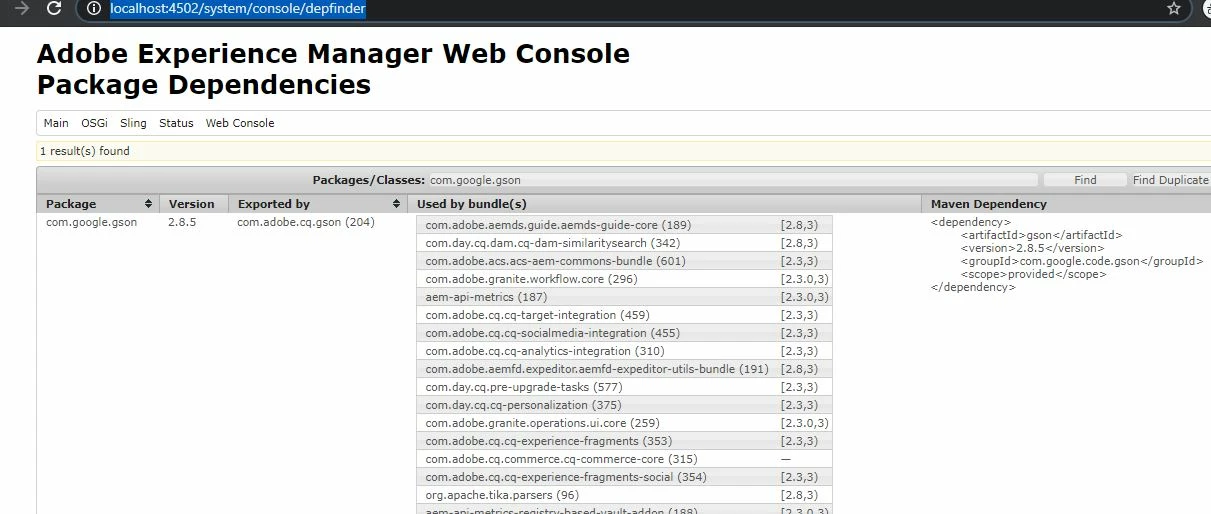
Which version of AEM are you using @sathyaprakasha2 . In most of the latest version of AEM , google gson  bundle should be available in the felix console already. Can you check /system/console/depfinder and search for the archetype you want to install ? 

I have 6.5 version and I already have gson in my felix console. PFB the screenshot.  You can copy the dependency from here and add it in the pom.xml files under <dependencyManagement><dependencies> section.


 1) Add below dependency on your main pom.xml

<dependency> <artifactId>gson</artifactId> <version>2.8.5</version> <groupId>com.google.code.gson</groupId> <scope>provided</scope> </dependency>

2) Add the below in your core/pom.xml

<dependency> <artifactId>gson</artifactId> <groupId>com.google.code.gson</groupId> </dependency>


If it is not available in your Felix console , then you can treat it as a third party bundle and follow the article mentioned by @ankur_khare 


Hope this helps 🙂

4 replies

Ankur_Khare
Community Advisor
Community Advisor
June 11, 2020

Refer this link where  @13541247 vikaram explained it nicely-

https://www.linkedin.com/pulse/how-add-third-party-bundle-you-aem-package-veena-vikraman/


VeenaVikraman
Community Advisor
VeenaVikramanCommunity AdvisorAccepted solution
Community Advisor
June 11, 2020

Which version of AEM are you using @sathyaprakasha2 . In most of the latest version of AEM , google gson  bundle should be available in the felix console already. Can you check /system/console/depfinder and search for the archetype you want to install ? 

I have 6.5 version and I already have gson in my felix console. PFB the screenshot.  You can copy the dependency from here and add it in the pom.xml files under <dependencyManagement><dependencies> section.


 1) Add below dependency on your main pom.xml

<dependency> <artifactId>gson</artifactId> <version>2.8.5</version> <groupId>com.google.code.gson</groupId> <scope>provided</scope> </dependency>

2) Add the below in your core/pom.xml

<dependency> <artifactId>gson</artifactId> <groupId>com.google.code.gson</groupId> </dependency>


If it is not available in your Felix console , then you can treat it as a third party bundle and follow the article mentioned by @ankur_khare 


Hope this helps 🙂

Level 2
June 11, 2020
Hi Veena , Thanks for your reply ! .. I have verified gson in flexi console but they excluded the particular package (com.google.gson.internal ) so we have added Export-Package: com.google.gson.*;version='2.8.6' ..its resolved our issue..
Surabhi_Katiyar
Adobe Employee
Adobe Employee
June 11, 2020

In maven-bundle-plugin, <wrapImportPackage>;</wrapImportPackage>  would add all your dependencies as resources in the generated jar file and configure the bundle classpath for you.
bnd-maven-plugin does not use instructions in the POM. You have to do that in bnd file. in the link provided below will show you an example of -includeresource instruction and how to set your bundle classpath.


Please check the document for more information:


1. https://help.liferay.com/hc/en-us/articles/360018162491-Resolving-Third-Party-Library-Package-Dependencies-

Adobe Employee
February 17, 2021

You're supposed to be directly referencing anything in the com.google.gson.internal package... that's why it's called "internal". 

See the big warning on the GSON JavaDocs site for these internal packages [1] that reads: Do NOT use any class in this package as they are meant for internal use in Gson. Infact, this package is no longer exported at all in later versions of GSON.


The fix is to update your code to depend on Gson's public API space.


[1] https://javadoc.io/doc/com.google.code.gson/gson/1.7.2/com/google/gson/internal/package-summary.html