com.adobe.granite.workflow.WorkflowException: Process resource is null | Community
Skip to main content
Level 3
June 18, 2021
Solved

com.adobe.granite.workflow.WorkflowException: Process resource is null

  • June 18, 2021
  • 2 replies
  • 3626 views

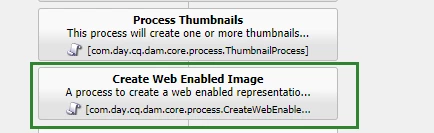
The workflow "DAM Update Asset"  is working by default.  But if I add a new step "Create Web Enabled Image", I will get the the error message "Process resource is null". If I remove the step "Create Web Enabled Image" , I am still get the error and "DAM Update Asset" can' work anymore.


Through testing, it is found that as long as I modify "DAM Update Asset" no matter what I change, this workflow does not work anymore.


Does anyone know how to fix it?


18.06.2021 11:18:44.923 *ERROR* [JobHandler: /etc/workflow/instances/server0/2021-06-17/model_2171630674877000:/content/dam/test.jpeg/jcr:content/renditions/original] com.adobe.granite.workflow.core.job.JobHandler Process resource is null
com.adobe.granite.workflow.WorkflowException: Process resource is null
at com.adobe.granite.workflow.core.job.HandlerBase.executeProcess(HandlerBase.java:124)
at com.adobe.granite.workflow.core.job.JobHandler.process(JobHandler.java:232)
at org.apache.sling.event.impl.jobs.JobConsumerManager$JobConsumerWrapper.process(JobConsumerManager.java:512)
at org.apache.sling.event.impl.jobs.queues.JobRunner.run(JobRunner.java:205)
at java.util.concurrent.ThreadPoolExecutor.runWorker(ThreadPoolExecutor.java:1142)
at java.util.concurrent.ThreadPoolExecutor$Worker.run(ThreadPoolExecutor.java:617)
at java.lang.Thread.run(Thread.java:745)


AEM Version : 6.1.0.20150507


Thanks,

Forrest
This post is no longer active and is closed to new replies. Need help? Start a new post to ask your question.
Best answer by ForrestLi

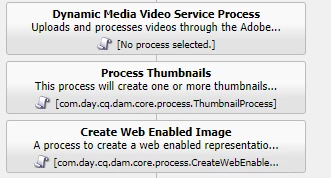
Final I found the another step "Dynamic Media Video Service Process" was blocking my new step. Really strange, if don't change anything, "DAM Update Asset" is work well, if I add a new setp to "DAM Update Asset",  the step "Dynamic Media Video Service Process" will not work.  I don't know why this happened.


2 replies

Bhuwan_B
Community Advisor
Community Advisor
June 18, 2021
ForrestLiAuthor
Level 3
June 18, 2021

@bhuwan_b 

I checked that comment, but it is not working for me. Thanks.
ForrestLiAuthorAccepted solution
Level 3
June 18, 2021

Final I found the another step "Dynamic Media Video Service Process" was blocking my new step. Really strange, if don't change anything, "DAM Update Asset" is work well, if I add a new setp to "DAM Update Asset",  the step "Dynamic Media Video Service Process" will not work.  I don't know why this happened.


Dipti_Chauhan
Community Advisor
Community Advisor
June 18, 2021

HI

Not sure if this is related to your issue but  In your "Dynamic Media Video Service Process" step "no process selected" message is coming. as part of some service pack there are some changes in the Dynamic Media Video Service Process. I think new property type with value as "EXTERNAL_PROCESS" is added. Please refer the attachment for the property changes happened in the process step node.


and if this does not work than specify process at metaData node