com.adobe.granite.crxde-lite reinstall in publisher | Community
Skip to main content
msina
Level 3
November 6, 2018
Solved

com.adobe.granite.crxde-lite reinstall in publisher

  • November 6, 2018
  • 5 replies
  • 2633 views

Hi,

Recently we observed com.adobe.granite.crxde-lite bundle is not present/got deleted in publisher node.Due to this reason we are not able to login to http://localhost:4503/crx/de

Do you know how to reinstall the bundle in publisher nodes.

The same bundle present in author node.

Thanks

Sina
This post is no longer active and is closed to new replies. Need help? Start a new post to ask your question.
Best answer by leoberliant

Try the following actions:

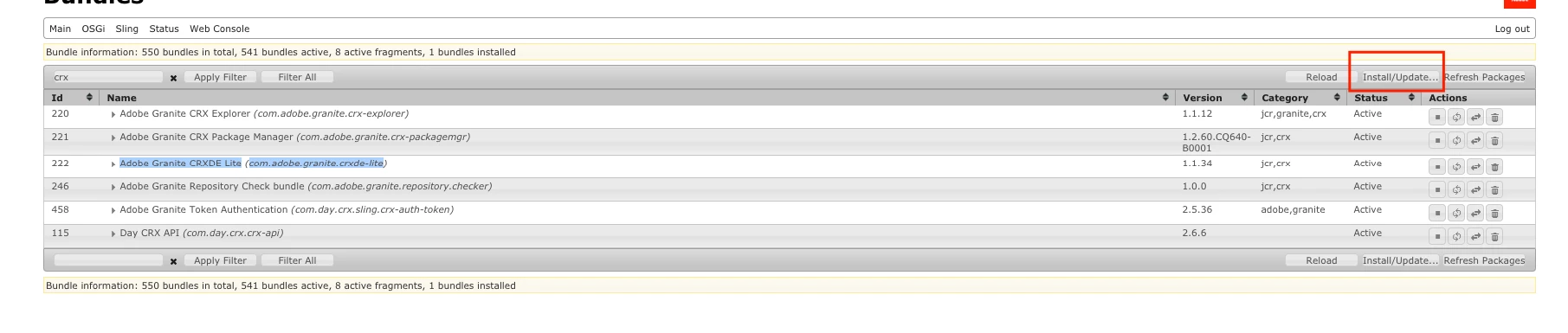
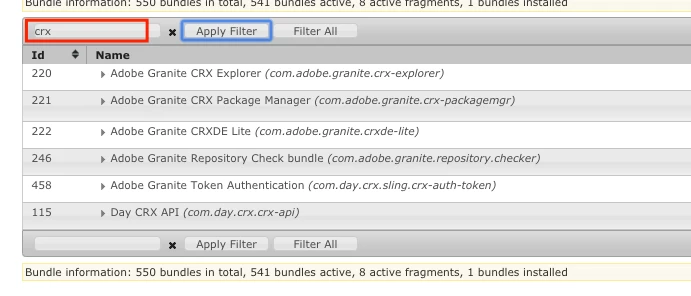
1. On author log into OSGi /system/console/bundles.

2. Type CRX in the search field and click Apply filter

3. Most likely Adobe Granite CRXDE Lite com.adobe.granite.crxde-lite bundle is missing, however, you can do the same search on Publish and compare the result to indetify the difference.

4. Note Adobe Granite CRXDE bundle ID, in my sample, it is 222.

5. On your AEM author navigate to /crx-quickstart/launchpad/felix/bundle222 /AEM64/author/crx-quickstart/launchpad/felix/bundle222/version0.0

6. Deploy bundle.jar to AEM publish via /system/console/bundles -> Install/Update...

5 replies

smacdonald2008
Level 10
November 7, 2018

I am checking internally on this. I will post back when i hear.

Adobe Employee
November 7, 2018

Hi Sina,

If you have access to /system/console/bundles on the publisher, the solution would be to retrieve the bundle from the author instance and to manually install it on the publisher.

To retrieve the bundle, you can search for "com.adobe.granite.crxde-lite" using crx/de on the author, and create a package with its path (usually something like /libs/system/<version of aem>/install/com.adobe.granite.crxde-lite<version of bundle> )

Building and downloading the package, you will have the bundle in the archive file generated.
Uncompress it and manually install it through /system/console/bundles on the publisher.
The access to crx-de should be good.

leoberliantAdobe EmployeeAccepted solution
Adobe Employee
November 7, 2018

Try the following actions:

1. On author log into OSGi /system/console/bundles.

2. Type CRX in the search field and click Apply filter

3. Most likely Adobe Granite CRXDE Lite com.adobe.granite.crxde-lite bundle is missing, however, you can do the same search on Publish and compare the result to indetify the difference.

4. Note Adobe Granite CRXDE bundle ID, in my sample, it is 222.

5. On your AEM author navigate to /crx-quickstart/launchpad/felix/bundle222 /AEM64/author/crx-quickstart/launchpad/felix/bundle222/version0.0

6. Deploy bundle.jar to AEM publish via /system/console/bundles -> Install/Update...

msina
msinaAuthor
Level 3
November 7, 2018

Thanks All.

Applied the berliant​ solution ,it worked fine, Thanks.

smacdonald2008
Level 10
November 7, 2018

I am glad it worked!