Client Libraries JavaScript Page Head Not Loading into Publisher | Community
Skip to main content
FrancescaBueti
Level 2
May 2, 2019
Solved

Client Libraries JavaScript Page Head Not Loading into Publisher

  • May 2, 2019
  • 7 replies
  • 5061 views

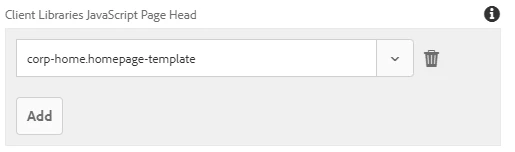
I have configured a Client Library JavaScript Page Head like so:

In author is appears as expected:

In publisher, however, it does not appear. All pages and packages are active/published.

Is there anything that could be preventing this from appearing in the publisher instance?

Thanks,

Francesca

This post is no longer active and is closed to new replies. Need help? Start a new post to ask your question.
Best answer by Ravi_Pampana

If your clientlibs files are under /apps (which is recommended by adobe from AEM 6.4 onwards) you need to add "allowProxy" property so that clientlibs will be loaded via etc.clientlibs

jcr:primaryType="cq:ClientLibraryFolder"

allowProxy="{Boolean}true"

Also, make sure in publisher /etc is having read access for everyone user

From Adobe Documentation:

In order for the client libraries under /apps to be accessible, a proxy servelt is used. The ACLs are still enforced on the client library folder, but the servlet allows for the content to be read via /etc.clientlibs/ if the allowProxy property is set to true.

A static resource can only be accessed via the proxy, if it resides below a resource below the client library folder.

As an example:

  • You have a clientlib in /apps/myproject/clientlibs/foo
  • You have a static image in /apps/myprojects/clientlibs/foo/resources/icon.png

Then you set the allowProxy property on foo to true.

  • You can then request /etc.clientlibs/myprojects/clientlibs/foo.js
  • You can then reference the image via /etc.clientlibs/myprojects/clientlibs/foo/resources/icon.png

7 replies

Adobe Employee
May 2, 2019

francesca​ You might have to reference using /etc.clientlibs but before that you need to configure "Client Library Folder and Using the Proxy Client Libraries Servlet" - Please check Using Client-Side Libraries - read section "Locating Client Library Folder and Using the Proxy Client Libraries Servlet"

Ravi_Pampana
Community Advisor
Ravi_PampanaCommunity AdvisorAccepted solution
Community Advisor
May 3, 2019

If your clientlibs files are under /apps (which is recommended by adobe from AEM 6.4 onwards) you need to add "allowProxy" property so that clientlibs will be loaded via etc.clientlibs

jcr:primaryType="cq:ClientLibraryFolder"

allowProxy="{Boolean}true"

Also, make sure in publisher /etc is having read access for everyone user

From Adobe Documentation:

In order for the client libraries under /apps to be accessible, a proxy servelt is used. The ACLs are still enforced on the client library folder, but the servlet allows for the content to be read via /etc.clientlibs/ if the allowProxy property is set to true.

A static resource can only be accessed via the proxy, if it resides below a resource below the client library folder.

As an example:

  • You have a clientlib in /apps/myproject/clientlibs/foo
  • You have a static image in /apps/myprojects/clientlibs/foo/resources/icon.png

Then you set the allowProxy property on foo to true.

  • You can then request /etc.clientlibs/myprojects/clientlibs/foo.js
  • You can then reference the image via /etc.clientlibs/myprojects/clientlibs/foo/resources/icon.png

smacdonald2008
Level 10
May 3, 2019

As Ravi points out - you should include Clientlibs the correct way - using a script tag does not address best practice.

FrancescaBueti
Level 2
May 3, 2019

Hi Ravi,

Thank you for your response! I have updated the allowProxy property and the path has been updated accordingly:

However, it is still missing on publish. Though it seems to be able to pull in other clientlibs without issue:

Can you elaborate on how to "make sure in publisher /etc is having read access for everyone user"?

Thanks,

Francesca

FrancescaBueti
Level 2
May 3, 2019

Hi,

The script tag is generated by referencing the library via the template policy:

Is including libraries at the template-level like so not best practice?

Best,

Francesca

Ravi_Pampana
Community Advisor
Community Advisor
May 3, 2019

You can add read permission to everyone and anonymous user in publish instance (/etc/designs, /etc/clientlibs) by going to useradmin console and search for below users

Everyone

Anonymous

VuongNguyen
Level 2
January 14, 2024

In practice, when configuring webpack.dev.js, webpack.prod.js, or webpack.common.js, you will encounter a configuration similar to the one below:

devServer: { inline: false, proxy: [{ context: ['/content', '/etc.clientlibs'], target: 'http://localhost:4502', }], writeToDisk, liveReload: !writeToDisk }

If you examine the index.html file in the ui.front-end module, you will find a sample declaration as follows:

<!DOCTYPE HTML> <html lang="en"> <head> <meta charset="UTF-8"/> <title>Flagtick Frontend file</title> <meta name="template" content="page-content"/> <meta name="viewport" content="width=device-width, initial-scale=1"/> <link rel="stylesheet" href="/etc.clientlibs/flagtick/clientlibs/clientlib-base/css/site.css" type="text/css"> <link rel="stylesheet" href="/etc.clientlibs/flagtick/clientlibs/clientlib-site/site.css" type="text/css"> ... </head>

We utilize the ui.front-end code, which depends on resources served by the AEM instance. The primary method involves leveraging /etc.clientlibs. Alternatively, the second approach is to load resources directly from the front-end dist folder, referencing the stats.json file.

Way 1: <link rel="stylesheet" href="/etc.clientlibs/flagtick/clientlibs/clientlib-site/site.css" type="text/css"> Way 2: stats.json { "type": "asset", "name": "clientlib-site/site.css", "size": 8501, "emitted": false, "comparedForEmit": false, "cached": true, "info": { "size": 8501 }, "chunkNames": [ "site" ], "chunkIdHints": [], "auxiliaryChunkNames": [], "auxiliaryChunkIdHints": [], "related": {}, "chunks": [ "site" ], "auxiliaryChunks": [], "isOverSizeLimit": false }, Then we have: <link rel="stylesheet" href="/clientlib-site/site.css" type="text/css">

You can see picture as below to understand why we need allowProxy="true".