CF version content display | Community
Skip to main content
Adobe Employee
May 24, 2022
Solved

CF version content display

  • May 24, 2022
  • 1 reply
  • 594 views

Hi could some one help me how to to pull a specific versioned content from a CF  and display in page.

Content fragment  - sample

  • 1.1
    • Title – Title1
    • Description – D1
    • Disclaimer – Dis1
  • 1.2
    • Title – Title2
    • Description – D2
    • Disclaimer – Dis3
  • 1.3
    • Title – Title3
    • Description – D3
    • Disclaimer – Dis3
  • Current
    • Title – Title Current
    • Description – Current
    • Disclaimer – Current

      . In this case, if user selects 1.2 as version then it should display the version 1.2 content.
This post is no longer active and is closed to new replies. Need help? Start a new post to ask your question.
Best answer by shabarish

Hi @sachin_gowdap ,

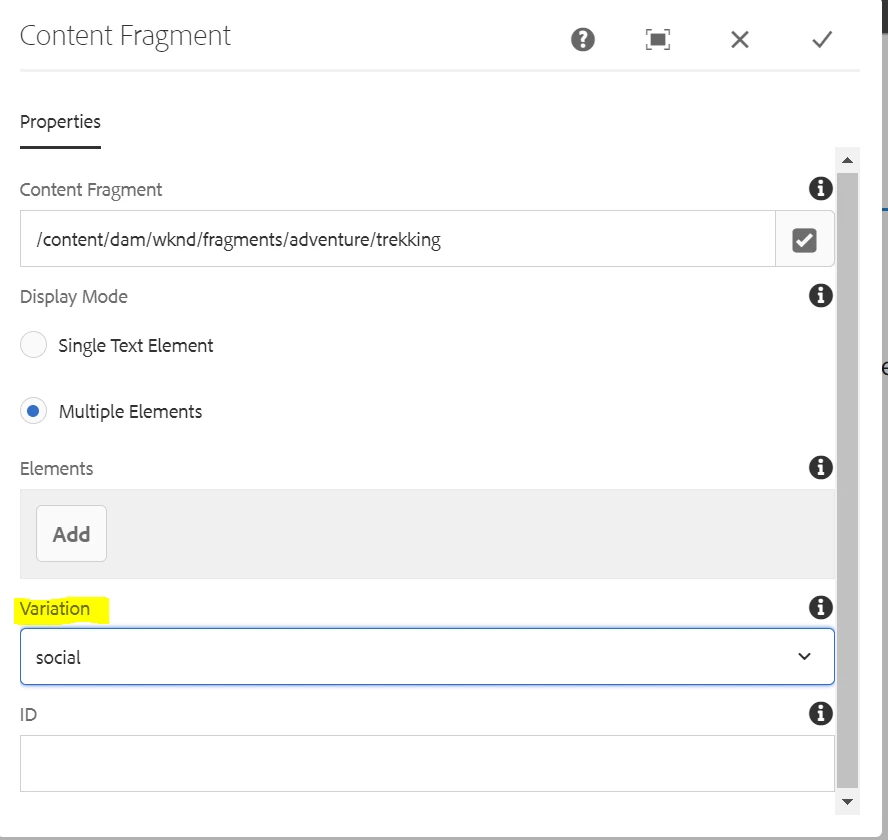
You can use core component Content Fragment, in that component you will get a option to select different variation and based on variation content will be changed.


Please follow this Adobe document for more on CF authoring Page Authoring with Content Fragments | Adobe Experience Manager

1 reply

shabarish
shabarishAccepted solution
Level 2
May 24, 2022

Hi @sachin_gowdap ,

You can use core component Content Fragment, in that component you will get a option to select different variation and based on variation content will be changed.


Please follow this Adobe document for more on CF authoring Page Authoring with Content Fragments | Adobe Experience Manager