cant install bundle | Community
Skip to main content
This post is no longer active and is closed to new replies. Need help? Start a new post to ask your question.
Best answer by joerghoh

My local AEM 6.3 has the bundle "com.adobe.cq.sightly.cq-wcm-sightly-extension" in the version 1.4.28; it exports the package "com.adobe.cq.sightly" in version 3.1.0.

If your built bundle demands a version range  [2.5,3), it's built against a wrong version of the uber.jar; I also just checked the uber.jar and it has the very same version number 3.1.0 listed for this package.

Jörg

11 replies

Level 3
September 25, 2017

Execution m2e-tycho:default-bundle:manifest of goal org.apache.felix:maven-bundle-plugin:2.5.3:manifest

failed: Unable to load the mojo 'manifest' (or one of its required components) from the plugin

'org.apache.felix:maven-bundle-plugin:2.5.3' (org.apache.felix:maven-bundle-plugin:2.5.3:bundle:default-

bundle:package) org.apache.maven.plugin.PluginExecutionException: Execution m2e-tycho:default-

bundle:manifest of goal org.apache.felix:maven-bundle-plugin:2.5.3:manifest failed: Unable to load the

mojo 'manifest' (or one of its required components) from the plugin 'org.apache.felix:maven-bundle-

plugin:2.5.3' at

org.apache.maven.plugin.DefaultBuildPluginManager.executeMojo(DefaultBuildPluginManager.java:153)

at org.eclipse.m2e.core.internal.embedder.MavenImpl.execute(MavenImpl.java:331) at

org.eclipse.m2e.core.internal.embedder.MavenImpl$11.call(MavenImpl.java:1362) at

org.eclipse.m2e.core.internal.embedder.MavenImpl$11.call(MavenImpl.java:1) at

org.eclipse.m2e.core.internal.embedder.MavenExecutionContext.executeBare(MavenExecutionContext.java:

177) at

org.eclipse.m2e.core.internal.embedder.MavenExecutionContext.execute(MavenExecutionContext.java:112)

at org.eclipse.m2e.core.internal.embedder.MavenImpl.execute(MavenImpl.java:1360) at

org.eclipse.m2e.core.project.configurator.MojoExecutionBuildParticipant.build(MojoExecutionBuildParticipant.java:

52) at

org.sonatype.tycho.m2e.internal.AbstractMavenBundlePluginProjectConfigurator$1.build(AbstractMavenBundlePluginProjectConfigurator.java:

132) at org.eclipse.m2e.core.internal.builder.MavenBuilderImpl.build(MavenBuilderImpl.java:137) at

org.eclipse.m2e.core.internal.builder.MavenBuilder$1.method(MavenBuilder.java:172) at

org.eclipse.m2e.core.internal.builder.MavenBuilder$1.method(MavenBuilder.java:1) at

org.eclipse.m2e.core.internal.builder.MavenBuilder$BuildMethod$1$1.call(MavenBuilder.java:115) at

org.eclipse.m2e.core.internal.embedder.MavenExecutionContext.executeBare(MavenExecutionContext.java:

177) at

org.eclipse.m2e.core.internal.embedder.MavenExecutionContext.execute(MavenExecutionContext.java:112)

at org.eclipse.m2e.core.internal.builder.MavenBuilder$BuildMethod$1.call(MavenBuilder.java:105) at

org.eclipse.m2e.core.internal.embedder.MavenExecutionContext.executeBare(MavenExecutionContext.java:

177) at

org.eclipse.m2e.core.internal.embedder.MavenExecutionContext.execute(MavenExecutionContext.java:151)

joerghoh
Adobe Employee
Adobe Employee
September 25, 2017

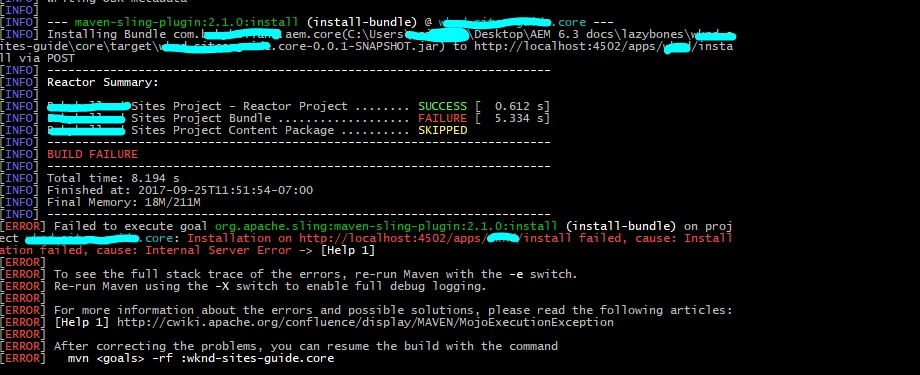
The Maven build fails in the step "install", when "localhost:4502" reports an internal server error. You should check what's the reason for this and fix it. And then try again.

This is not a problem of the maven build itself.

Jörg

kautuk_sahni
Community Manager
Community Manager
September 25, 2017

1. [ERROR] Failed to execute goal org.apache.sling:maven-sling-plugin:2.1.0:install (install-bundle) on project testsite-services: Installation on http://localhost:4502/apps/XYZ/install failed, cause: Installation failed, cause: Conflict -> [Help 1]

Root cause: This error occurred because build script is trying to deploying the packet under /apps/XYZ/install directory which actually does not exists.

Create folder named "XYZ" & "XYZ/install" under "apps". Use CRXDE Light to create folders.

2. Remove the <usePut> tag

Source:- Abobe CQ5 – Deployment error of code – MojoExecutionException – Need is the mother of invention …

~kautuk

Kautuk Sahni
Level 3
September 25, 2017

im actually done, i have installed the package... the one that causing it was the path to the /apps/wknd/install folder.

my problem right now is this one

smacdonald2008
Level 10
September 25, 2017

YOu are not building the correct version of AEM UBER. If you are using AEM 6.3 - use UBER 6.3. What version are you using?

Level 3
September 25, 2017

im using 6.3

smacdonald2008
Level 10
September 25, 2017

Your project is not picking up the 6.3 UBER. If it was - you would see:

See if you can build this project and get it deployed to AEM 6.3 - it will resolve all of the HTL dependencies for 6.3:

Creating an Adobe Experience Manager 6.3 HTL component that uses the WCMUsePojo API

Level 3
September 25, 2017

im pretty sure im using 6.3

im going to create another project and see if it works...

Prince_Shivhare
Community Advisor
Community Advisor
September 25, 2017

is your jar downloaded ?

joerghoh
Adobe Employee
joerghohAdobe EmployeeAccepted solution
Adobe Employee
September 25, 2017

My local AEM 6.3 has the bundle "com.adobe.cq.sightly.cq-wcm-sightly-extension" in the version 1.4.28; it exports the package "com.adobe.cq.sightly" in version 3.1.0.

If your built bundle demands a version range  [2.5,3), it's built against a wrong version of the uber.jar; I also just checked the uber.jar and it has the very same version number 3.1.0 listed for this package.

Jörg