[Campaign <-> AEM 6.2 Integration] Failed to fetch content from AEM during delivery creation. | Community
Skip to main content
manovinayaka757
Level 3
November 6, 2017

[Campaign <-> AEM 6.2 Integration] Failed to fetch content from AEM during delivery creation.

  • November 6, 2017
  • 1 reply
  • 6180 views

We are unable to fetch content from AEM from campaign. Please find the below case information. I raised a ticket with Neolane, but there is no response.

If someone who has encountered, please provide some information on how to resolve this.

Environment Information:

AEM version : 6.2

Adobe Campaign version : 6.1

Adobe campaign Hybrid Model

Adobe campaign Mid sourcing deployment model

Adobe campaign on premise marketing wfserver build number: 8861

Adobe campaign client console build number: 8861

CASE:

I created a campaign in AEM 6.2 and then tried to fetch the content created for the campaign in Campaign client console, but this ended in error:

I followd the steps mentioned in the following documentation.

Integrating with Adobe Campaign 6.1

During delivery creation, upon clicking the "Synchronise" button, I get the following error as shown in the screen shot.

Server LOG:

14:41:45 >>> INT-150012 The HTTP query returned a 'Service Unavailable' type error (503) (iRc=-53)

14:41:45 >>> JST-310000 Error while compiling script 'nms:amcIntegration.js' line 1665: JSON.parse.

SCREEN SHOT:
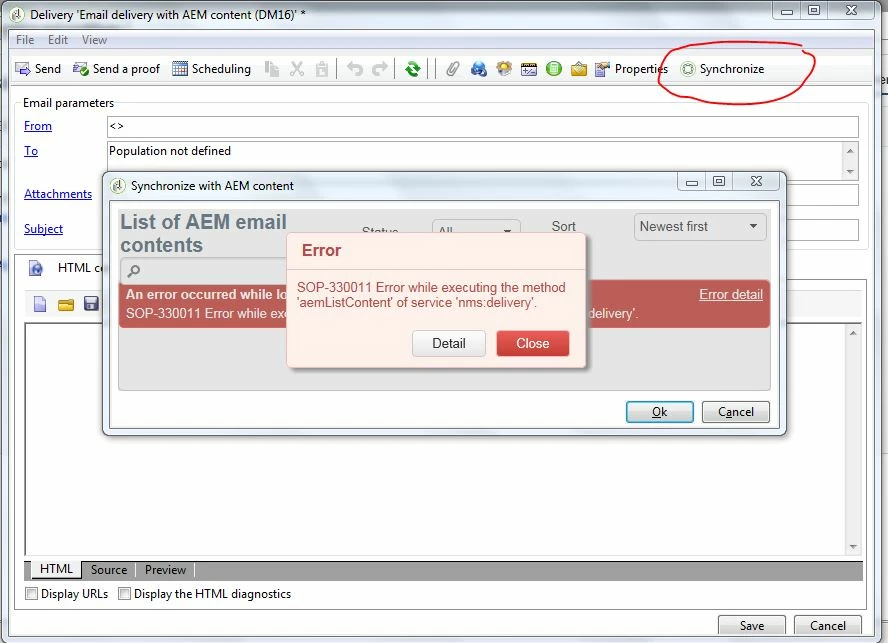
This post is no longer active and is closed to new replies. Need help? Start a new post to ask your question.

1 reply

kautuk_sahni
Community Manager
Community Manager
November 6, 2017

/content/campaignsTry Following:

1. Check the AEM "campaign-remote" user permissions

2. Make sure the AEM connection-url configured in the External Accounts is reachable from the machine.

    A switch from localhost to an IP-address solved this issue.

     Source:- Troubleshooting your Adobe Campaign Integration

3. Check the existence of path /content/campaigns

4. Make sure No firewall blocking access between AEM and ACS.

~kautuk

Kautuk Sahni
manovinayaka757
Level 3
November 7, 2017

Please see my reply in bold

1. Check the AEM "campaign-remote" user permissions

- I have reset the password for campaign-remote, and this user has all permissions to the campaigns folder

But in campaign I am using "campaign-api" with the same password as "campaign-remote"

[Please refer to image]

2. Make sure the AEM connection-url configured in the External Accounts is reachable from the machine.

   A switch from localhost to an IP-address solved this issue.

     Source:- Troubleshooting your Adobe Campaign Integration

     - I am using http://<IP_ADDRESS>:4502

     [Please refer to image]

3. Check the existence of path /content/campaigns

- By deafult with a fresh AEM author, when I hit /content/campaigns return a HTTP 500

but other campaign URLs are accesible eg. /content/campaigns/geometrixx.html

From my understanding, the path does exists.

Please let me know how to test this out from Campaign, if campaign tries to access just "/content/campaigns" then this will for

sure end in error, but on the other hand "/mcmadmin#/content/campaigns" this path is accesssible

4. Make sure No firewall blocking access between AEM and ACS.

- There is no firewall blocking, as I can ping and receive response from AEM author and publisher from Campaign server

aem_external_account.JPG