Level 4
Oct 7, 2015 3:44 PM UTC
Solved

Calling on Custom Fonts?

What is meant by using friendly font name in the Cards font field?

Here what I have tried but not working:

Helvetica Neue LT Std bold condensed

also tried: HelveticaNeueLTStdBd
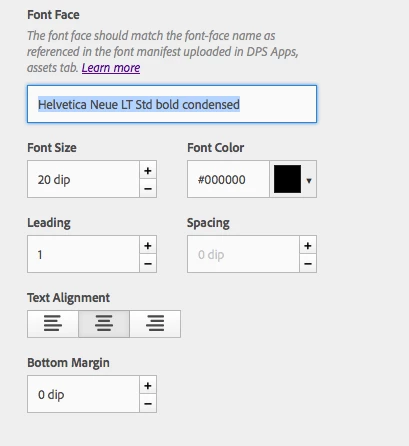
Here is my manifest:

{

"version": "1.0",

"description": "Technology Inovation 17.2",

"fonts": {

"HelveticaLTStdRoman": {

"fileName": "HelveticaLTStd-Roman.otf",

"postScriptName": "HelveticaLTStd-Roman"

},

"AHelveticaLTStdUltraComp": {

"fileName": "HelveticaLTStd-UltraComp.otf",

"postScriptName": "HelveticaLTStd-UltraComp"

},

"HelveticaNeueLTStdBd": {

"fileName": "HelveticaNeueLTStd-Bd.otf",

"postScriptName": "HelveticaNeueLTStd-Bd"

},

"HelveticaNeueLTStdBdCn": {

"fileName": "HelveticaNeueLTStd-BdCn.otf",

"postScriptName": "HelveticaNeueLTStd-BdCn"

},

"HelveticaNeueLTStdRoman": {

"fileName": "HelveticaNeueLTStd-Roman.otf",

"postScriptName": "HelveticaNeueLTStd-Roman"

}

}

}

This post is no longer active and is closed to new replies. Need help? Start a new post to ask your question.
AndreiPAccepted solution
Adobe Employee
Oct 7, 2015 9:17 PM UTC

Hi,

Please change the name in the Metadata Style ( Content&Layouts/Cards) field to HelveticaLTStdRoman.

Publish the new change and test it on your device.


Friendly font name is the name that you will use when editing the cards and that name must be mentioned in the Metadata Style.

"fonts": {

"myFriendly_font_here": {


Thanks,

Andrei

3 replies

AndreiPAdobe EmployeeAccepted solution
Adobe Employee
Oct 7, 2015 9:17 PM UTC

Hi,

Please change the name in the Metadata Style ( Content&Layouts/Cards) field to HelveticaLTStdRoman.

Publish the new change and test it on your device.


Friendly font name is the name that you will use when editing the cards and that name must be mentioned in the Metadata Style.

"fonts": {

"myFriendly_font_here": {


Thanks,

Andrei

Translate
SFS-DPSAuthor
Level 4
Oct 8, 2015 12:39 PM UTC

Ok Resolved. I was using "HelveticaNeueLTStdBd" However a coworker of mine discovered that the first letter "H" must be lowercase.

So this is what worked "helveticaNeueLTStdBd". I first made this change in the manifest and then uses the same in the cards.

Adobe should consider confirming this and adding it to the how to page for others.

Translate
Adobe Employee
Oct 8, 2015 2:59 PM UTC

We're hoping to make the custom font workflow much easier in the near future.

Translate