Solved
Button in component dialog
I have to create a button inside a component dialog. Kindly advise on how to do it
I have to create a button inside a component dialog. Kindly advise on how to do it
Hi @sanjana12,
You can use one of below:
Here is simple code example of Button usage.
<cq:dialog jcr:primaryType="nt:unstructured" jcr:title="Properties" sling:resourceType="cq/gui/components/authoring/dialog">
    <content jcr:primaryType="nt:unstructured" sling:resourceType="granite/ui/components/coral/foundation/fixedcolumns">
        <items jcr:primaryType="nt:unstructured">
            <column jcr:primaryType="nt:unstructured" sling:resourceType="granite/ui/components/coral/foundation/container">
                <items jcr:primaryType="nt:unstructured">
                    <text jcr:primaryType="nt:unstructured" fieldLabel="Text" name="./text" sling:resourceType="granite/ui/components/coral/foundation/form/textfield"/>
                    <path jcr:primaryType="nt:unstructured" fieldLabel="Path" filter="nosystem" name="./path" rootPath="/content/dam" sling:resourceType="granite/ui/components/coral/foundation/form/pathfield"/>
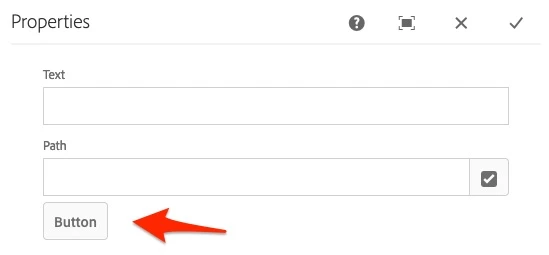
                    <button jcr:primaryType="nt:unstructured" sling:resourceType="granite/ui/components/coral/foundation/button" text="Button" type="button" />
                </items>
            </column>
        </items>
    </content>
</cq:dialog>
And the result:
Enter your E-mail address. We'll send you an e-mail with instructions to reset your password.