Browser URL in Sightly | Community
Skip to main content
Level 5
September 2, 2020
Solved

Browser URL in Sightly

  • September 2, 2020
  • 3 replies
  • 3490 views

Dear Team,


Is there any way we can print exact browser URL in Sightly HTML?


e.g.

1) if Page url is http://localhost:4502/editor.html/content/home.html


It should print exact same i.e.  http://localhost:4502/editor.html/content/home.html


2) If Page url is http://localhost:4502/content/home.html


It should print exactly same i,e http://localhost:4502/content/home.html.


Note: I tried with  ${request.requestURL.toString} but in both the cases it prints only 


http://localhost:4502/content/home.html. . It ignores editor.html.


Thank you in advance.
This post is no longer active and is closed to new replies. Need help? Start a new post to ask your question.
Best answer by Theo_Pendle

Hi @arvind-1,

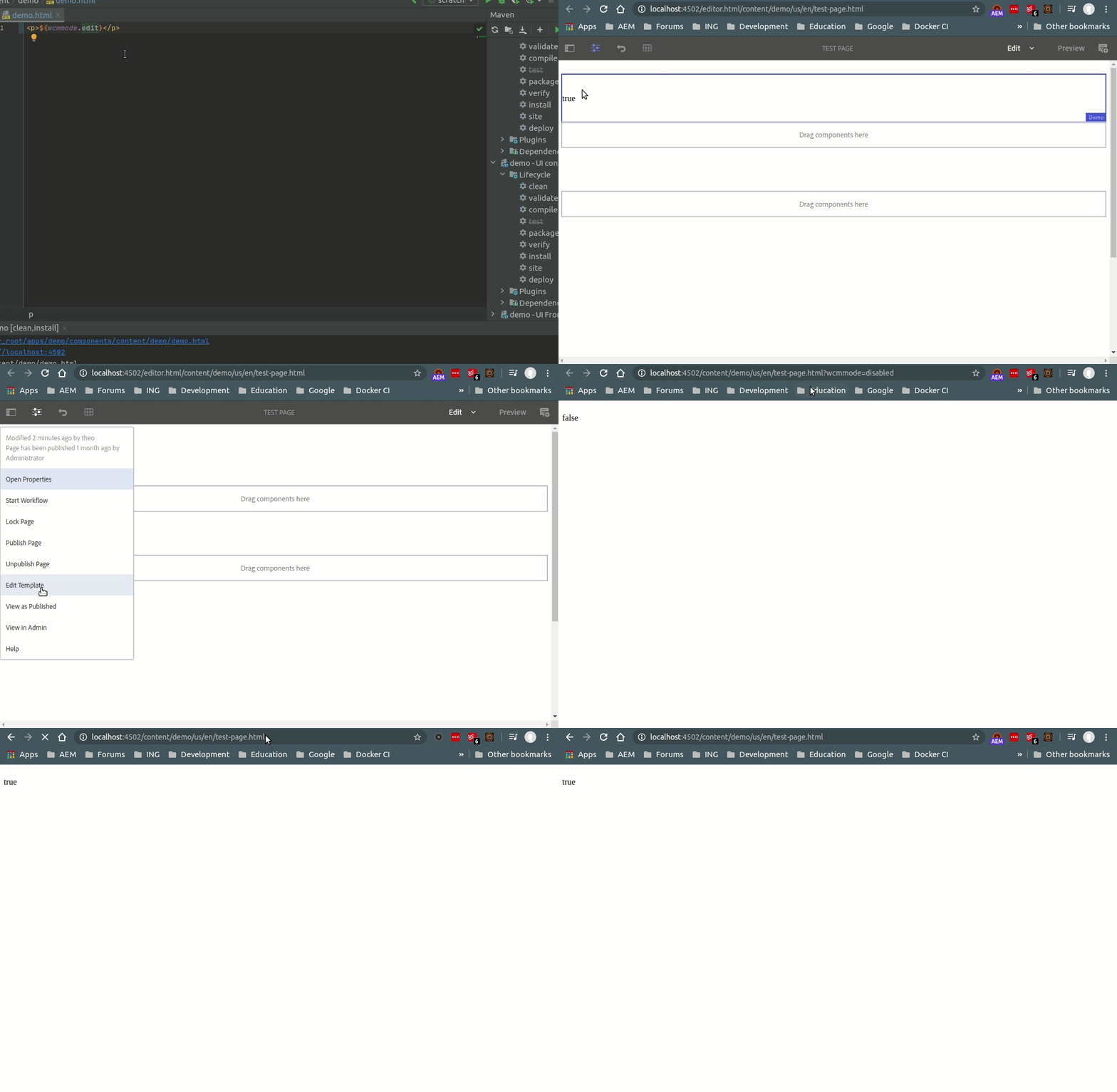
This is normal for a typical AEM Author instance installation. The reason is that the WCMMODE is EDIT by default on Author instances, which is mentioned in the documentation here: https://helpx.adobe.com/experience-manager/6-3/sites/developing/using/reference-materials/javadoc/com/day/cq/wcm/api/WCMMode.html#EDIT

In order to simulate a Publisher instance, you must add ?wcmmode=disabled to the URL, regardless of whether /editor.html is present in the URL or not (this is what the View as Published option does).

I demonstrate this in the GIF below:


3 replies

Varun_Shakya
Community Advisor
Community Advisor
September 2, 2020

If it is not utmost important to use sightly particularly, you can leverage JS(

window.location.href 

) and jquery to get the URL and then append it html tag where you want it.

If you want to use sightly only then I guess you are able to get the full URL except "editor.html".

In this case you can form your URL add "editor.html" in URL if the user is in Edit mode [wcmmode.edit].

arvind-1Author
Level 5
September 2, 2020

@varun_shakya , Thank you for your reply.


Actually my req is to add some class in a div only when we are in edit mode i.e. when url contains editor.html.


I already tried wcmmode.edit but unfortunately it always gives me true whether I hit  http://localhost:4502/editor.html/content/home.html  or  http://localhost:4502/content/home.html.


Regards,

AP

Varun_Shakya
Community Advisor
Community Advisor
September 2, 2020

refer this

https://experienceleaguecommunities.adobe.com/t5/adobe-experience-manager/how-to-add-the-author-edit-mode-condition-in-sightly-htl-for/qaq-p/330826


Check for Arun's comment


<sly data-sly-test.editor="${wcmmode.edit || wcmmode.design}"></sly>

<div id="mydivid" class="${editor?'abcd xyz myclass':'abcd xyz'}">

     ........

</div>

Theo_Pendle
Theo_PendleAccepted solution
Level 8
September 3, 2020

Hi @arvind-1,

This is normal for a typical AEM Author instance installation. The reason is that the WCMMODE is EDIT by default on Author instances, which is mentioned in the documentation here: https://helpx.adobe.com/experience-manager/6-3/sites/developing/using/reference-materials/javadoc/com/day/cq/wcm/api/WCMMode.html#EDIT

In order to simulate a Publisher instance, you must add ?wcmmode=disabled to the URL, regardless of whether /editor.html is present in the URL or not (this is what the View as Published option does).

I demonstrate this in the GIF below: