Browser console error while adding components to the page using plus icon | Community
Skip to main content
sivaramr5911311
October 7, 2020
Solved

Browser console error while adding components to the page using plus icon

  • October 7, 2020
  • 3 replies
  • 2380 views

Hi All,


I get a browser console error when I try to add components to the page. This happens when I use the plus icon. When I double click on the parsys area to add components, it works fine. But when I use the plus icon, it doesn't work and shows this error.
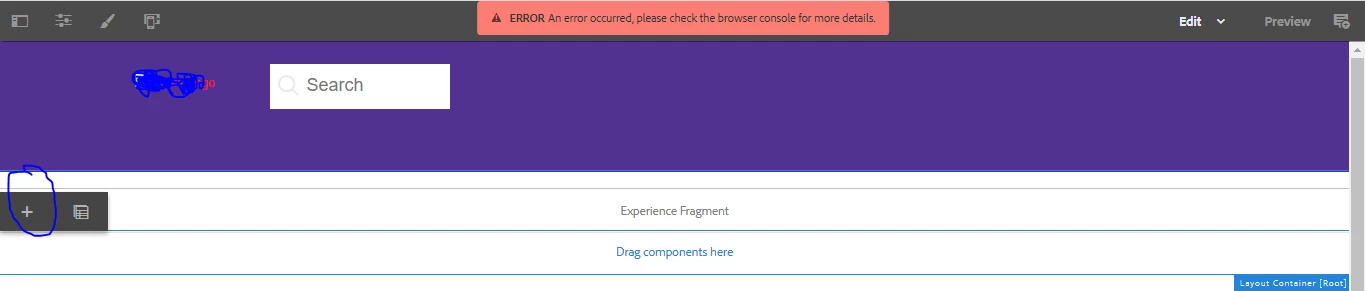



Also, this error happens only when I have an experience fragment in the page.

When I delete the experience fragments, im able to add the components using plus icon. Does anyone have any idea on this and how it can be resolved?


Thanks,
Siva

This post is no longer active and is closed to new replies. Need help? Start a new post to ask your question.
Best answer by Jineet_Vora

Hello @sivaramr5911311,

Difficult to say what can be the issue but looks like some JS conflict.

Jineet

3 replies

Jineet_Vora
Community Advisor and Adobe Champion
Jineet_VoraCommunity Advisor and Adobe ChampionAccepted solution
Community Advisor and Adobe Champion
October 7, 2020

Hello @sivaramr5911311,

Difficult to say what can be the issue but looks like some JS conflict.

Jineet

santhosh_kumark
Level 6
October 7, 2020

Hi @sivaramr5911311 ,


There are two possibilities.

1. Try checking there are required js library for that function which is throwing error in console.

2. indexOf is a method that you find on strings not numbers. Try converting it to Strings.

Please follow this link https://stackoverflow.com/questions/36483151/uncaught-typeerror-indexof-is-not-a-function

hope this will resolve the issue.


Regards,

Santosh

Umesh_Thakur
Community Advisor
Community Advisor
October 7, 2020

Normally what happens that we need to use xfpage structure component for experience fragments and we add only those clientlibs, those are required for experience fragments, to populates its look and feel or to perform a task.

So may be one or some of the clientlibs will have a conflict or dependency resolution issue so that can be validated once.

As I can see you are using dispatcher url to author the page so it can be checked once with the IP or host name with port.

OR you can invalidate and rebuild the clientlibs on http://localhost:4502/libs/granite/ui/content/dumplibs.rebuild.html

 I think this will help.

Regards

Umesh Thakur
