Solved
Brightcove custom fields(with html content) are breaking in AEM.
Hi,
Versions:- AEM : 6.3, Brightcove connector : 5.5.1.
we have a custom field added for videos in the Brightcove which will be used to add some HTML content like below
<div><p class="testClass"><a href="https://www.abc.com" target="_blank">Some Label</a> </p></div>
when this video is pulled to AEM, it is breaking like below
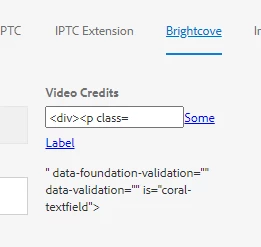
we understood that double inverted commas(" ") in the HTML content are causing the issue and if we replace with single inverted commas(' ') it is working fine.
so the workaround is to tweak the OOTB Brightcove dialog to replace double inverted commas to single inverted commas.
Question: Did anyone face this issue? is there any alternate solution without tweaking the Brightcove dialog?
Thanks in advance.
Sandeep.