Level 2
Jan 28, 2025 10:24 AM UTC
Solved

[Beginner] Curl command for editing a content fragment

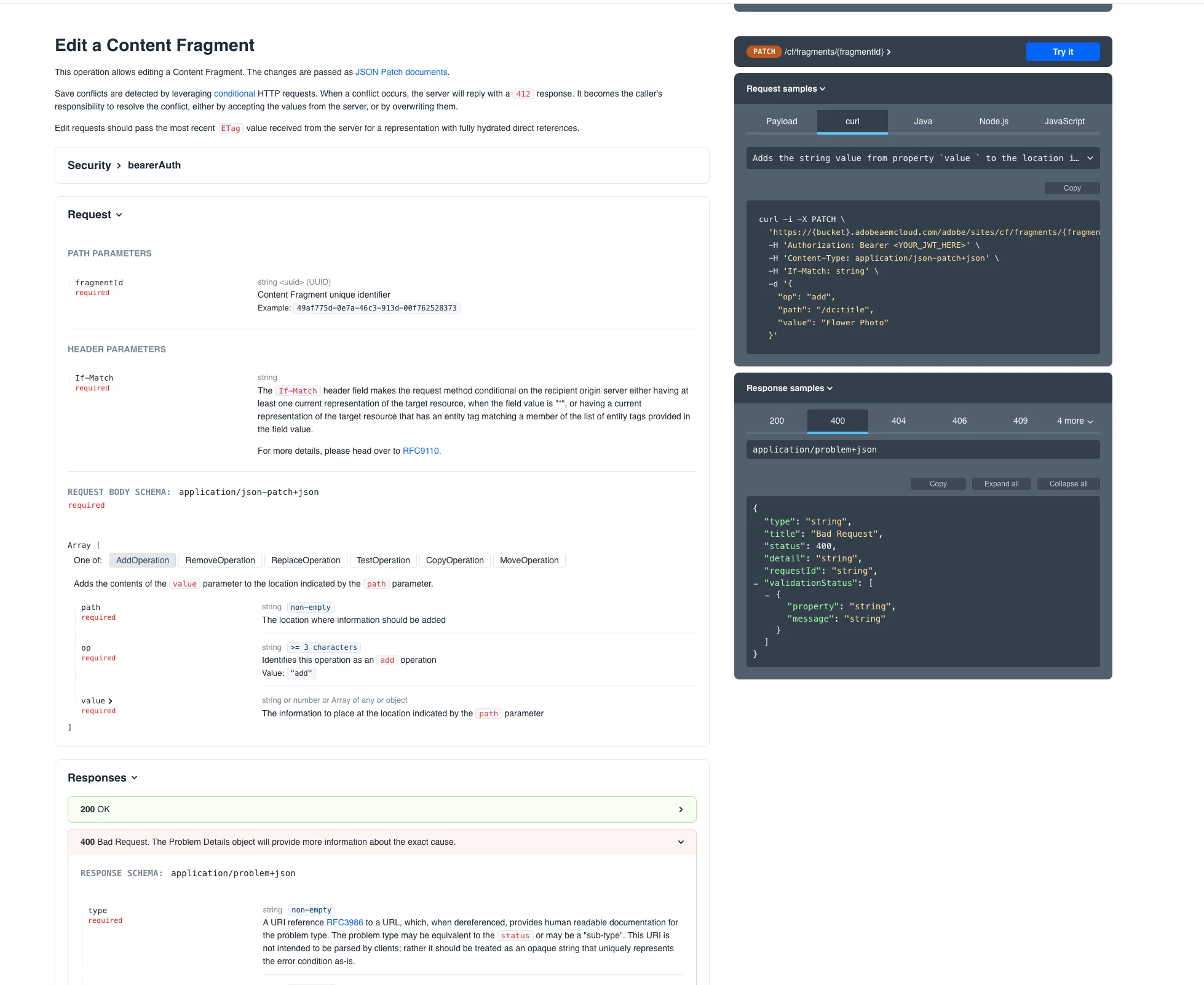
I'm using the following curl command to make changes into the content fragment through curl.


curl -i -X PATCH \
  'https://{bucket}.adobeaemcloud.com/adobe/sites/cf/fragments/{fragmentId}' \
  -H 'Authorization: Bearer <YOUR_JWT_HERE>' \
  -H 'Content-Type: application/json-patch+json' \
  -H 'If-Match: string' \
  -d '{
    "op": "add",
    "path": "  ",
    "value": "Doe"
  }' "

according to the Sites API. 
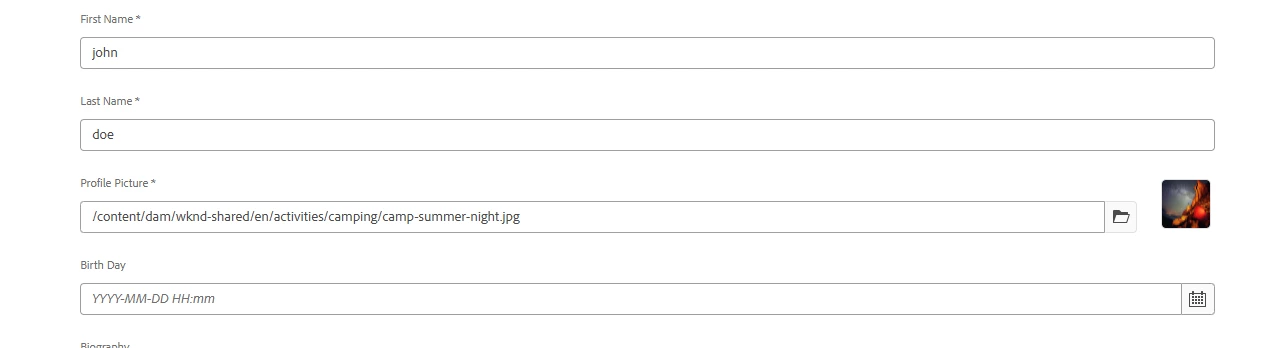
However I'm confused regarding the command as I do not know what value do I put in path if my content fragment is at location /content/dam/wknd-shared/en/
where name of the content fragment is custom-author and I want to add "doe" in the property Last Name (lastName in content fragment model) assuming it is blank before. the final output should be as follows.
 

Please guide me on how to do the same.



arunpatidar
arunpatidarAccepted solution
Community Advisor
Jan 29, 2025 11:26 AM UTC

Hi,

Can you try postman or any other tools to test this?


check here the documentation - https://developer.adobe.com/experience-cloud/experience-manager-apis/api/stable/sites/ 


Arun Patidar

7 replies

arunpatidar
Community Advisor
Community Advisor
Jan 28, 2025 11:03 AM UTC

Hi @vashishth47 


Please check the sample command


I think first you need to get the fragmentId using list API

curl -i -X GET \ 'https://{bucket}.adobeaemcloud.com/adobe/sites/cf/fragments?cursor=string&limit=1&path=/content/dam/adaptto/presentations/aem-cloud-service-from-a-developer-perspective&references=direct' \ -H 'Authorization: Bearer <YOUR_JWT_HERE>'


This will return the fragmentId


and I assume lastName is the name property for Last Name field, then you can execute the follwoing


curl -i -X PATCH \ 'https://{bucket}.adobeaemcloud.com/adobe/sites/cf/fragments/{fragmentId}' \ -H 'Authorization: Bearer <YOUR_JWT_HERE>' \ -H 'Content-Type: application/json-patch+json' \ -H 'If-Match: string' \ -d '{ "op": "add", "path": "/lastName", "value": "Doe" }'


Translate
Arun Patidar
Level 2
Jan 29, 2025 10:20 AM UTC

I have used the following command:

curl -i -X PATCH "http://localhost:4502/adobe/sites/cf/fragments/1a9f0dcc-e5f6-462b-9f1b-3d0a631feb0b" -H "Authorization: Basic YWRtaW46YWRtaW4=" -H "Content-Type: application/json-patch+json" -H 'If-Match: string' -d '{"op": "replace" , "path": "/lastName","value": "donny"}'

It is throwing the following error

HTTP/1.1 400 Bad Request X-Request-Id: 49a56dff-6a29-4aaf-9730-efc9c5681ddc Content-Type: application/problem+json;charset=utf-8 Content-Length: 187 {"type":"https://api.adobeaemcloud.com/adobe/meta/errors/bad_request", "title":"Bad Request", "status":400, "detail":"Invalid JSON patch.", "requestId":"49a56dff-6a29-4aaf-9730-efc9c5681ddc"}

can you tell me what am I doing wrong and where I can refer to in future for further clarity.

Translate
arunpatidar
Community Advisor
arunpatidarCommunity AdvisorAccepted solution
Community Advisor
Jan 29, 2025 11:26 AM UTC

Hi,

Can you try postman or any other tools to test this?


check here the documentation - https://developer.adobe.com/experience-cloud/experience-manager-apis/api/stable/sites/ 


Translate
Arun Patidar
kautuk_sahni
Level 9
Jan 29, 2025 1:08 PM UTC

@vashishth47 Did you find the suggestions helpful? Please let us know if you require more information. Otherwise, please mark the answer as correct for posterity. If you've discovered a solution yourself, we would appreciate it if you could share it with the community. Thank you!

Translate
Kautuk Sahni
AmitVishwakarma
Community Advisor
Community Advisor
Feb 2, 2025 7:22 AM UTC

To update the "Last Name" field in a content fragment using a PATCH request, follow these steps:

1. Get the fragmentId using a GET request if you don't already have it. Example command:

curl -i -X GET \ 'https://{bucket}.adobeaemcloud.com/adobe/sites/cf/fragments?path=/content/dam/your-path&limit=1' \ -H 'Authorization: Bearer <YOUR_JWT_HERE>'

2. Make the PATCH request to update the lastName field: Example:

curl -i -X PATCH \ 'https://{bucket}.adobeaemcloud.com/adobe/sites/cf/fragments/{fragmentId}' \ -H 'Authorization: Bearer <YOUR_JWT_HERE>' \ -H 'Content-Type: application/json-patch+json' \ -H 'If-Match: <ETag from GET response>' \ -d '{ "op": "replace", "path": "/jcr:content/lastName", "value": "Doe" }'

 Make sure to adjust the path to match the correct path for your content fragment model's lastName field (/jcr:content/lastName is just an example).

If you still face issues: Error "Invalid JSON patch": Check that the path and value are correct and follow the proper structure for your content fragment's model. Test using tools like Postman for debugging.

Translate
Amit Vishwakarma - Adobe Commerce Champion 2025 | 17x Adobe certified | 6x Adobe SME